Searching and Reviewing when Recording a
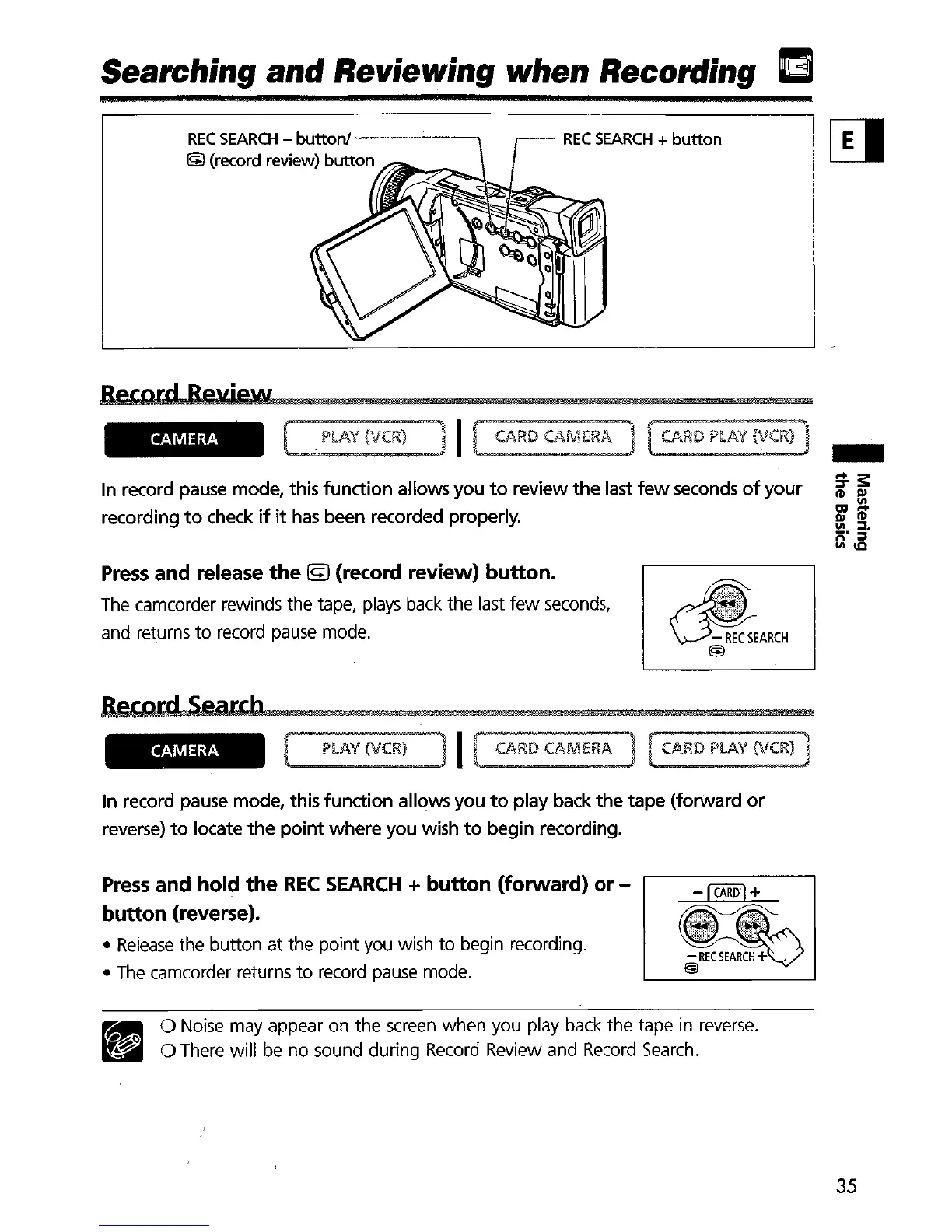
REC
SEARCH
-
buttonl------,
&J
(record review)
button
REC
SEARCH
+
button
Record
Review
CAMERA
In record pause mode, this
function
allows
you
to
review
the
last
few
seconds
of
your
recording
to
check
if
it
has
been recorded properly.
Press
and release
the
19
(record review)
button.
The
camcorder rewinds the tape,
plays
back
the last
few
seconds,
and returns
to
record
pause
mode.
RecOrd
Search
CAMERA
PLAY
H¥
CARD
CAMERA
CARD
PLAY
(VCR)
In record pause mode, this
function
allows you
to
play
back
the
tape
(forward
or
reverse)
to
locate
the
point
where
you wish
to
begin recording.
Press
and hold
the
REC
SEARCH
+
button
(forward)
or
-
button
(reverse).
•
Release
the button at the point you wish
to
begin recording.
•
The
camcorder returns
to
record
pause
mode.
•
o Noise may appear on the
screen
when you play back the tape
in
reverse
.
o There will
be
no sound during
Record
Review and
Record
Search.
35


 To Next Page