Using the VL·3 Video Light (Optional)
This
video light
enables
you
to
record
brightly
in
color
even
in
dark
places.
This
VL-3
Video
Light
attaches
to the
camcorder's
,,$"
advanced
accessory
shoe
for cable-free
operation
and
is
powered
by
the
camcorder's
power
supply.
Refer
also
to the
VL-3
Video
Light
instruction
manual.
a Always turn
off
the camcorder before attaching/removing the video light.
a
Do
not
touch or place flammable material or plastic close
to
the lamp or
th.e
surrounding parts during or immediately after
use;
they become very hot.
a
Do
not
look directly at the lamp while the video light
is
on.
a
Do
not
carry the camcorder
by
the video light.
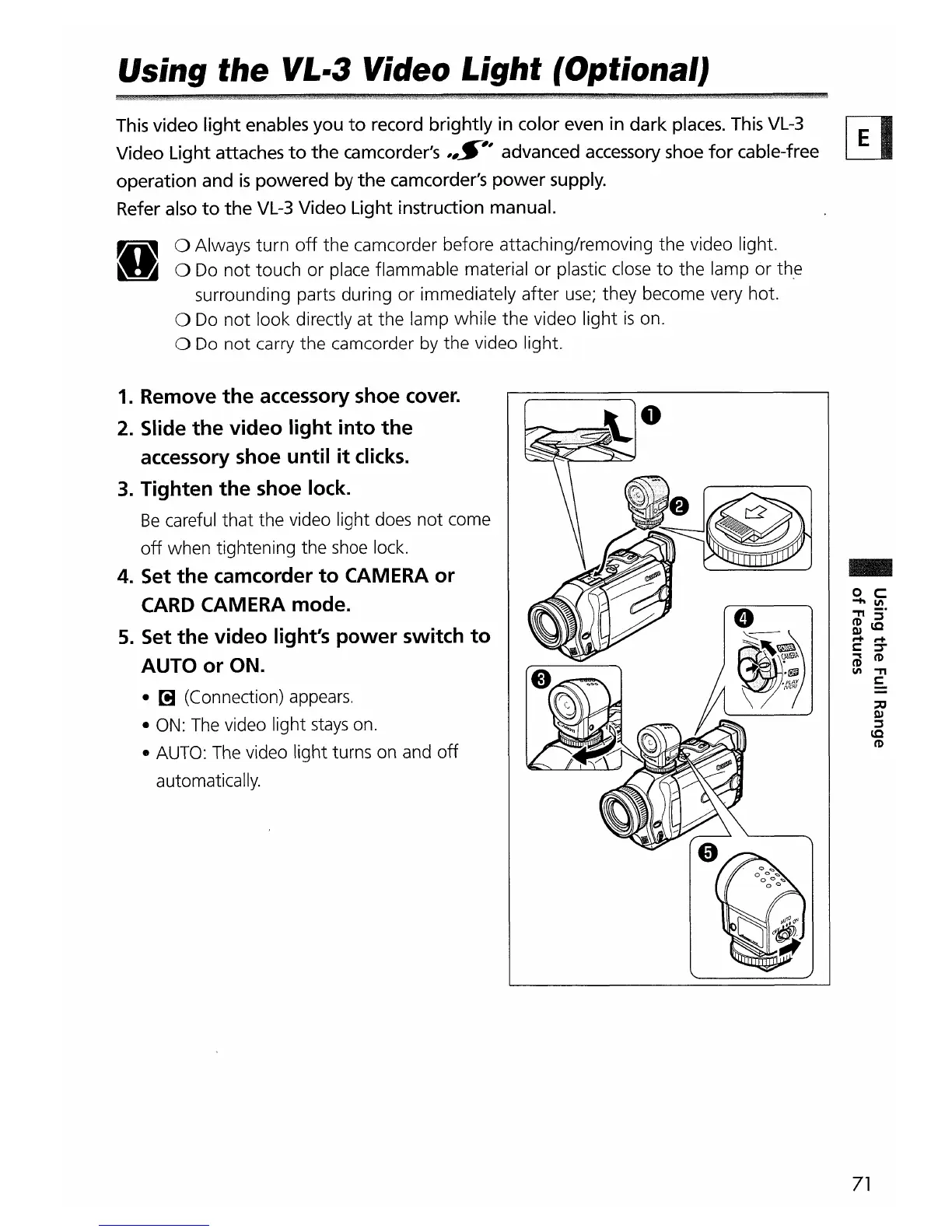
1. Remove
the
accessory shoe cover.
2. Slide
the
video
light
into
the
accessory shoe until
it
clicks.
3. Tighten
the
shoe lock.
Be
careful that the video light does not come
off
when tightening the shoe lock.
4. Set
the
camcorder
to
CAMERA
or
CARD CAMERA mode.
5. Set
the
video
light's
power
switch
to
AUTO
or
ON.
•
[!J
(Connection) appears.
•
ON:
The
video light
stays
on.
•
AUTO:
The
video light turns on and
off
automatically.
-
71


 To Next Page