Using
the VFI.·1 Video Flash I.ight (Optional}
The
VFL-1
Video
Flash
Light
allows
you
to
record still images and movies even
at
night
or
in
dark
places. This
video
flash
light
attaches
to
the
camcorder's
,,$"
advanced
accessory shoe
for
cable-free
operation
and
is
powered
by
the
camcorder's
power
supply.
Using
it
as
video
light,
you
can set
it
to
turn
on
and
off
automatically according
to
the
surrounding brightness. Using
it
as
flash,
you
can set
it
to
fire
automatically accor.ding
to
the
brightness
of
the
subject and
the
settings
of
the
camcorder,
or
to
fire
a pre-
flash
to
reduce
the
red-eye effect.
Refer also
to
the
VFL-1
Video
Flash
Light
instruction manual.
III 0 Always turn
off
the camcorder before attaching/removing the video flash light.
~
0
Do
not
carry the camcorder by
the
video flash light.
A;tt&mj
.M0.iJ.%iJiWnWWilf0iYil%:'ETyarf&%f!lii;Wf.JlmNe1&%tifXV'dillWill&MiiilJiWNWfElWWifilWJiruMi0lm
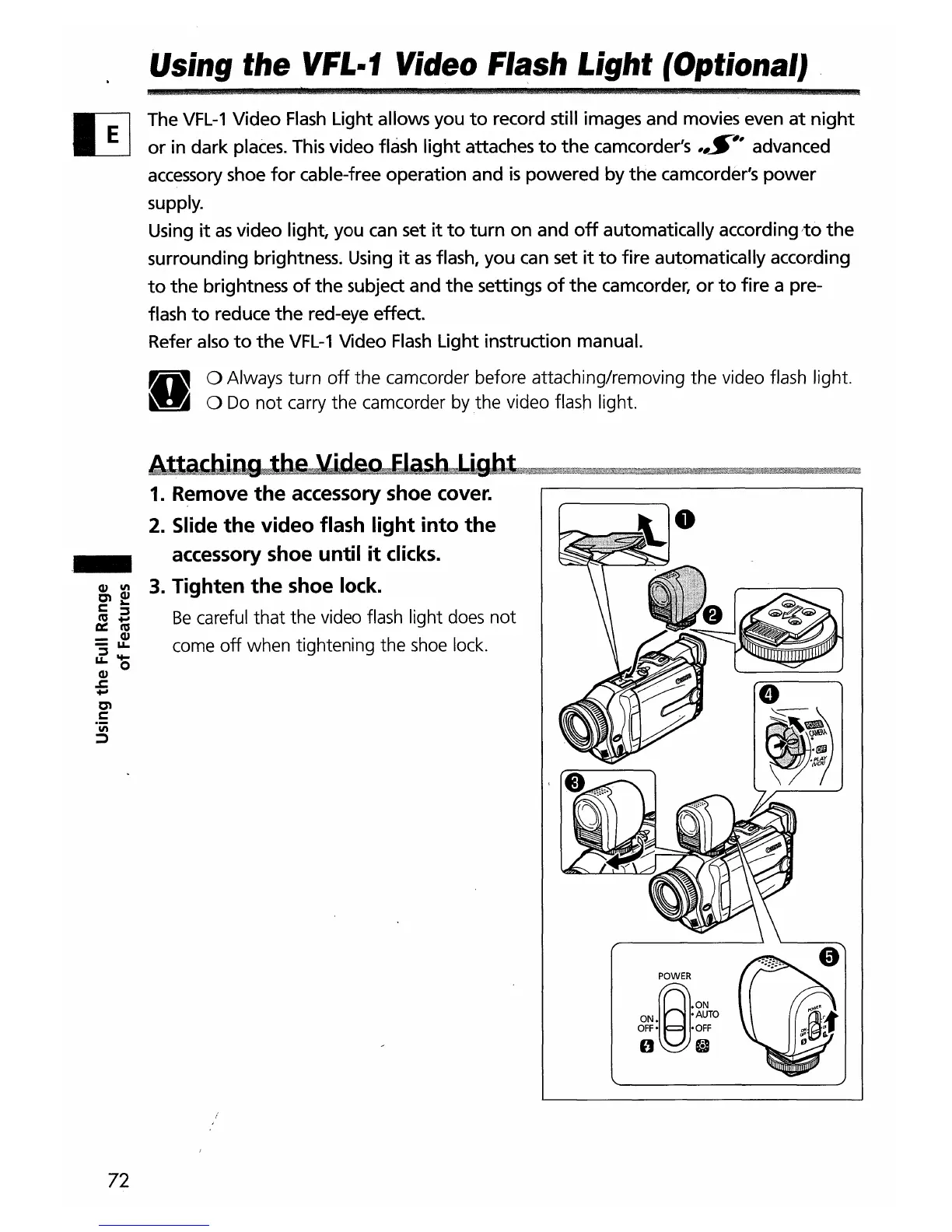
1.
Remove
the
accessory shoe cover.
2.
Slide
the
video
flash
light
into
the
._
accessory shoe
until
it
clicks.
~
~
3.
Tighten
the
shoe lock.
l:
a..
~
~
Be
careful that the video flash light does
not
=
~
come
off
when tightening the shoe lock.
~o
Q)
.J:
.....
~
l:
.iii
~
POWER
~
.ON
ON •
AUTO
OFF: ·OFF
o e
72


 To Next Page