-
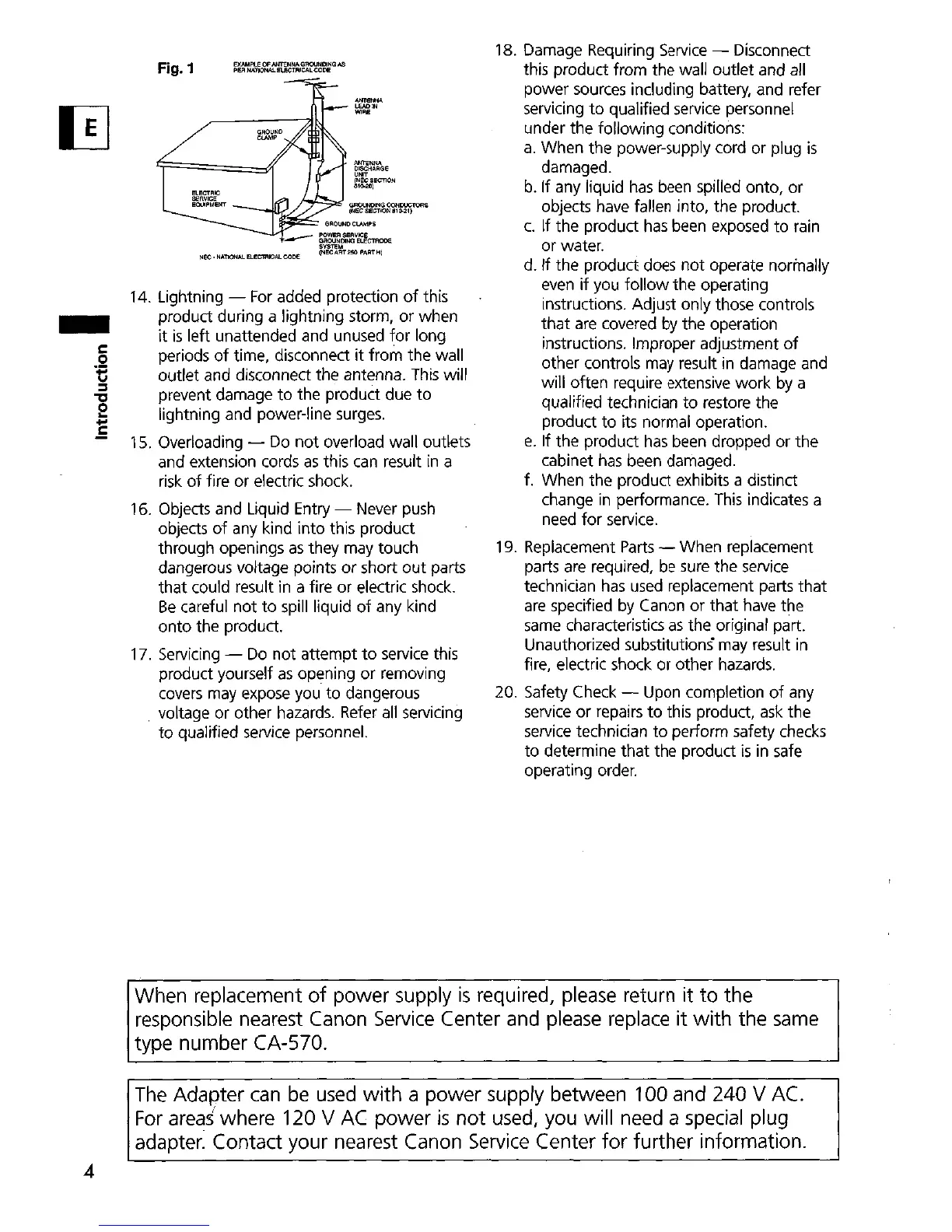
14. Lightning -
For
added protection
of
this
product during a lightning storm, or when
it
is
left unattended and unused
for
long
periods
of
time, disconnect
it
from the wall
outlet and disconnect
the
antenna.
This
will
prevent damage
to
the
product due
to
lightning and power-line surges.
15. Overloading - Do
not
overload wall outlets
and extension cords
as
this
can
result
in
a
risk
of
fire
or
electric shock.
16. Objects and Liquid Entry - Never push
objects
of
any kind
into
this product
through openings
as
they may touch
dangerous voltage points
or
short
out
parts
that
could result in a fire or electric shock.
Be
careful
not
to
spill liquid
of
any kind
onto
the product.
17. Servicing - Do
not
attempt
to
service this
product yourself
as
opening
or
removing
covers may expose you
to
dangerous
voltage or other hazards. Refer
all
servicing
to
qualified service personnel.
18. Damage Requiring Service - Disconnect
this product from the wall outlet and all
power sources including battery, and refer
servicing
to
qualified service personnel
under the following conditions:
a.
When
the
power-supply cord or plug
is
damaged.
b. If any liquid
has
been spilled onto,
or
objects have fallen into, the product.
c.
If
the
product has been exposed
to
rain
or water.
d. If
the
product does
not
operate normally
even
if
you
follow
the operating
instructions. Adjust only those controls
that
are
covered by
the
operation
instructions. Improper adjustment
of
other controls may result in damage and
will often require extensive
work
by a
qualified technician
to
restore the
product
to
its normal operation.
e.
If
the
product
has
been dropped
or
the
cabinet
has
been damaged.
f. When the product exhibits a distinct
change in performance. This indicates a
need
for
service.
19. Replacement
Parts
- When replacement
parts are required, be sure the service
technician
has
used replacement parts
that
are specified by Canon
or
that
have the
same characteristics
as
the original part.
Unauthorized substitutions" may result in
fire, electric shock
or
other hazards.
20. Safety Check - Upon completion
of
any
service
or
repairs
to
this product, ask the
service technician
to
perform safety checks
to
determine
that
the product
is
in safe
operating order.
4
When replacement
of
power supply
is
required, please return it
to
the
responsible nearest Canon
Service
Center and please replace
it
with
the
same
type number CA-570.
The
Adapter
can
be
used
with
a power supply between 100 and 240 V AC.
For
areas
where 120 V
AC
power
is
not
used, you will need a special plug
adapter. Contact your nearest Canon Service Center
for
further information.


 To Next Page