3. Connect
the
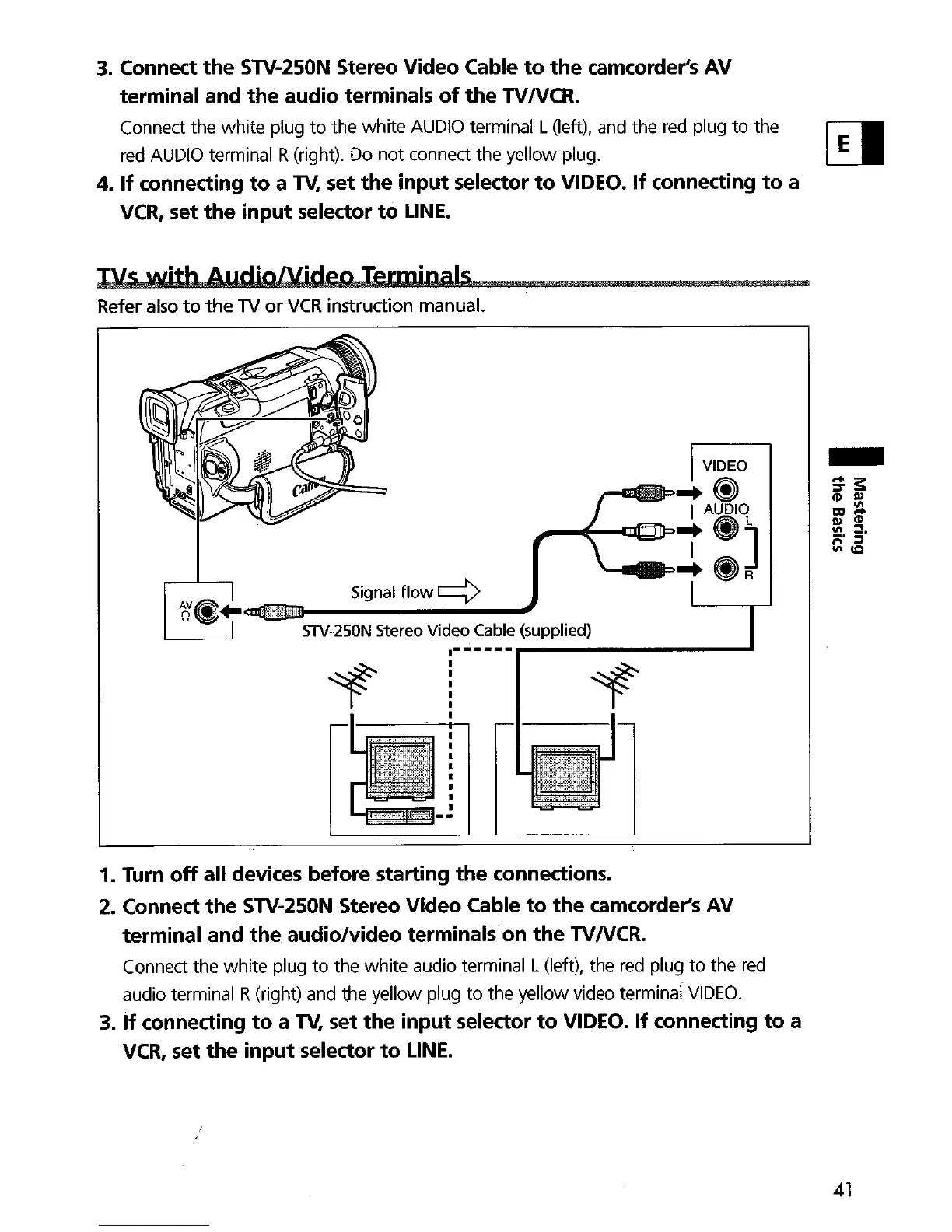
STV-250N Stereo Video Cable
to
the
camcorder's AV
terminal and
the
audio terminals
of
the
TVNCR.
Connect the white plug
to
the white
AUDIO
terminal L(left), and the
red
plug
to
the
red
AUDIO
terminal R(right). Do not connect the yellow plug.
4.
If
connecting
to
a
TV,
set
the
input selector
to
VIDEO.
If
connecting
to
a
VCR,
set
the
input selector
to
LINE.
NS
with
AlldioNiden
TermipalS
Refer also
to
the
TV
or
VCR
instruction manual.
VIDEO
E
~~
-~-....
f:O~
::'~"a<liDDJ
Signal
flow q J
SlV-250N Stereo Video Cable (supplied)
-
1. Turn
off
all devices before starting
the
connections.
2. Connect
the
STV-250N Stereo Video Cable
to
the
camcorder's AV
terminal and
the
audio/video terminals on
the
TVNCR.
Connect the white plug
to
the white audio terminal L(left), the
red
plug
to
the
red
audio terminal R(right) and the yellow plug
to
the yellow video terminal
VIDEO.
3.
If
connecting
to
a T\I, set
the
input selector
to
VIDEO. If connecting
to
a
VCR,
set
the
input selector
to
LINE.
41


 To Next Page