Troubleshooting
51
3
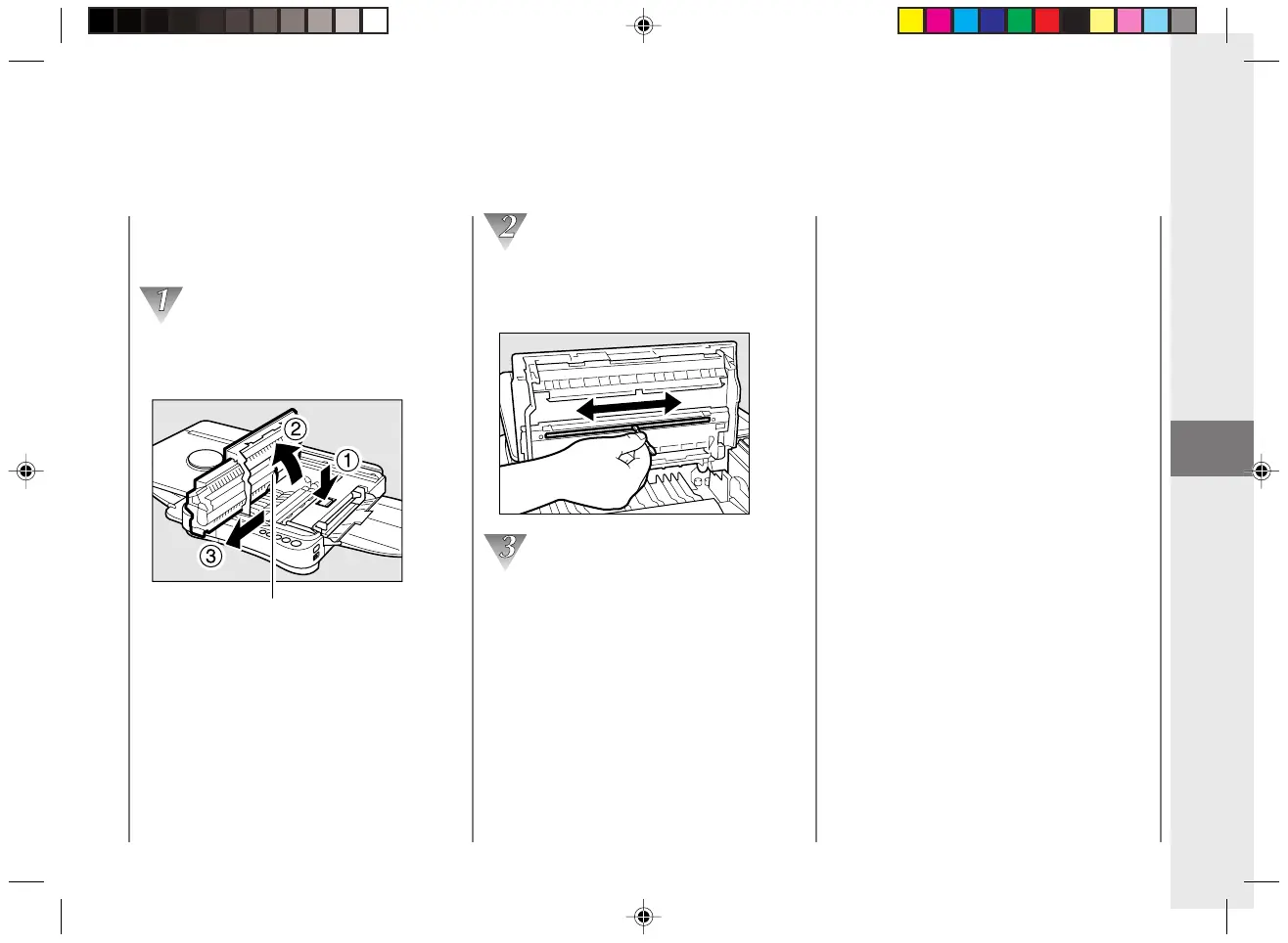
Cleaning the fiber lens
(reverse side)
Open the top cover and remove the
cartridge.
(See “Replacing Cartridges”, on p.21.)
Fiber lens (reverse side)
Clean the reverse side of the fiber lens. To
clean, run a cotton swab lightly over the
entire length of the lens several times.
Once the cleaning is complete replace the
cartridge, close the top cover and slide
the plate back into the center position.
Copy Image Problems
MEMO:
• When cleaning the fiber lens be sure to use the
flat type of cotton swab that is normally used for
cleaning audio equipment. A round cotton swab
will not fit into the groove properly.
• Do not soak the cotton swabs in any type of
cleaning solution or alcohol before using them to
clean the fiber lens. Only use dry cotton swabs.
• If the above procedure fails to remedy the copy
image problems, contact your dealer or service
representative.
03/ PC140-USA 10/10/03, 7:42 AM51



 To Next Page