3-9
Basic Settings
Setting Camera Control, Image Size and Quality (Camera and Video)
Note
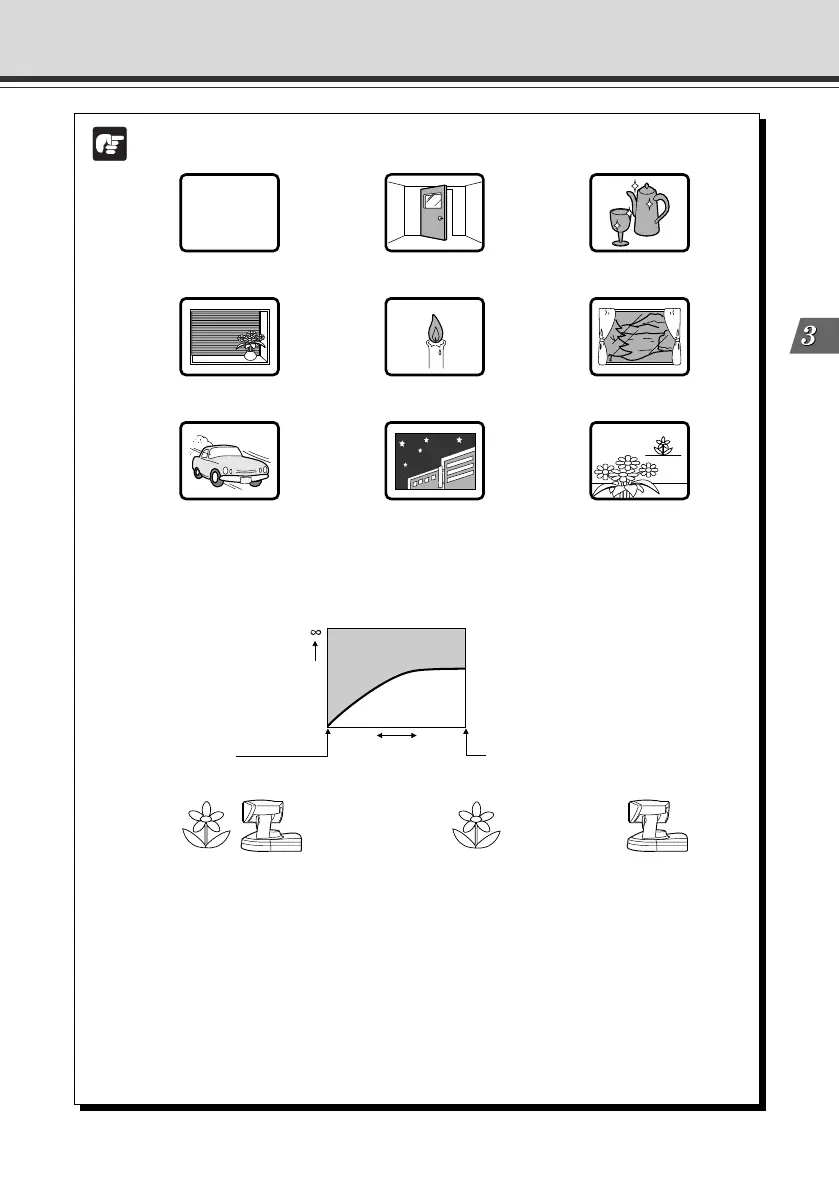
● The camera may have difficulty focusing automatically on subjects of the type
shown below.
● The figure below shows the effective focusing range. At some zoom settings, the
camera may not be able to focus on the subject.
Changes in the distance from the camera to the subject
Subjects with little or no contrast
(a white wall, for example)
Angled subjects
Highly reflective subjects
Subjects that consist entirely of
oblique or horizontal lines or stripes
Insubstantial subjects
such as flames or smoke
Subjects seen through glass
Tele end of zoom
Up to approx. 1.6 m (63.0 in.)
In night mode, up to approx. 2.3 m (90.55 in.)
Distance
Effective focusing range
1.6 m (63.0 in.)
1 cm
(0.39 in.)
Zoom position
Wide end of zoom
Down to approx. 1 cm (0.39 in.)
In night mode, down to approx. 2 cm (0.79 in.)
Quickly moving subjects Night views or dark places Far and near subjects in a frame
● Note on shooting images continuously
When taking images of location where the light source gradually changes like
shooting outdoor images continuously during day and night, and there is little
change in the pictures you are taking, the color of pictures shown may be
different from the actual color.
To reflect the actual color, control the camera such as panning, tilting or
zooming because it causes a change in the captured images.
● Under the conditions where a single-colored object is focused on or sodium
lamp, mercury lamp, or a specific type of fluorescent bulb is used, color
adjustment may not be made automatically.
003-VBC50i-E-US 06.7.6, 11:34 AM9



 To Next Page