EasyManua.ls Logo

Canon VM-E70 - ANGLE FINDER; Attaching the Angle Finder; Using the Angle Finder

Canon VM-E70
52 pages
Print Icon
To Next Page IconTo Next Page
To Previous Page IconTo Previous Page
Loading...
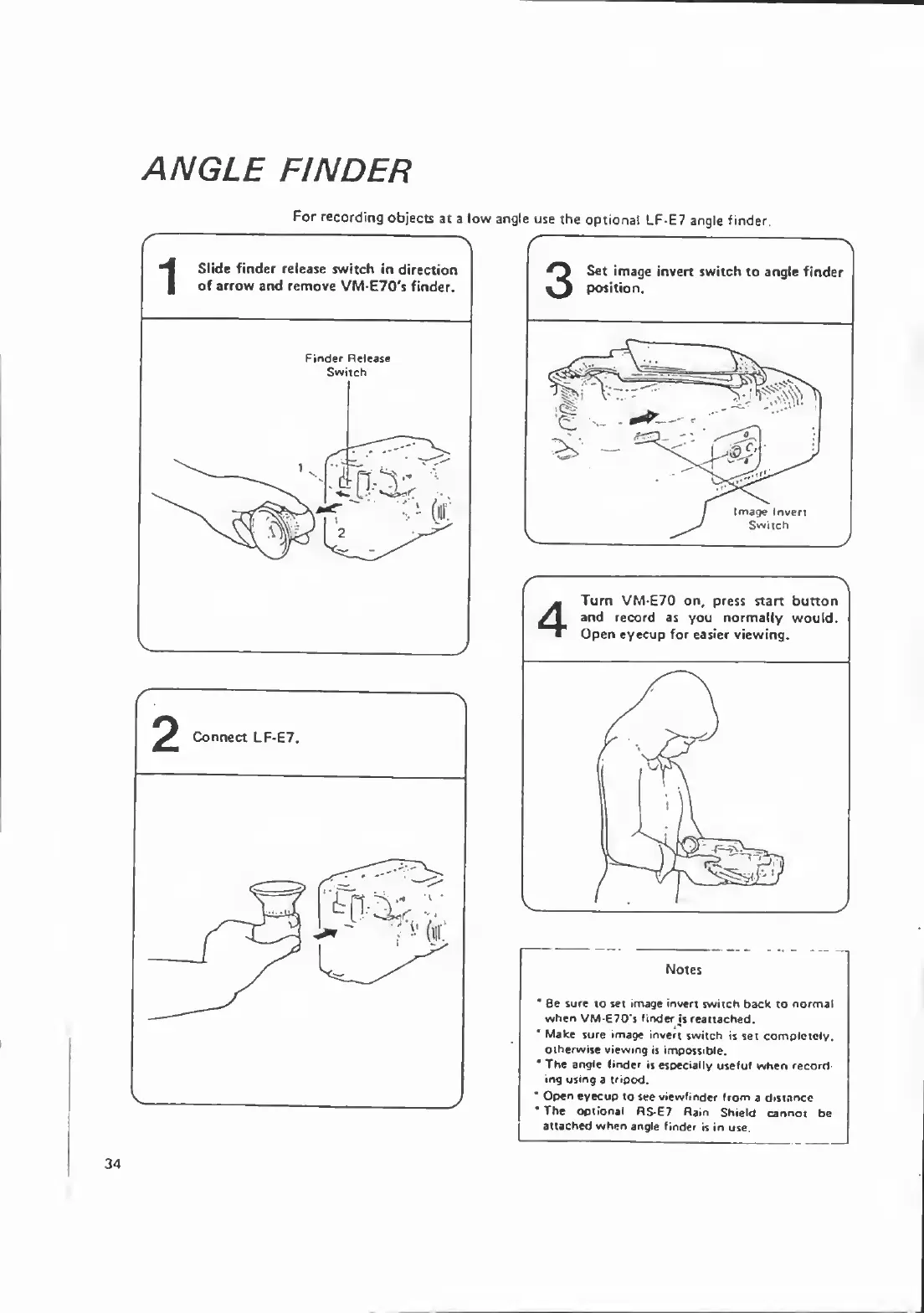
ANGLE
FINDER
For
recording
objects
at
a
low
angle
use
the
optional
LF-E7
angle
finder.
1
Slide
finder
release
switch
in
direction
of
arrow
and
remove
VM-E70's
finder.
Finder
Release
Switch
Set
image
invert
switch
to
angle
finder
position.
Image
Invert
Switch
Notes
*
8e
sure
to
set
image
invert
switch
back
to
normal
when
VM-E70's
finder
js
reattached.
*
Make
sure
image
invert
switch
is
set
completely,
otherwise
viewing
is
impossible.
"
The
angle
linder
is
especially
useful
when
record¬
ing
using
a
tripod.
*
Open
eyecup
to
see
viewfinder
from
a
distance
*
The
optional
RS-E7
Rain
Shield
cannot
be
attached
when
angle
finder
is
in
use.

Related product manuals