EasyManua.ls Logo

Canon VM-E70 - VIEWFINDER DISPLAY; Viewfinder Display Meanings

Canon VM-E70
52 pages
Print Icon
To Next Page IconTo Next Page
To Previous Page IconTo Previous Page
Loading...
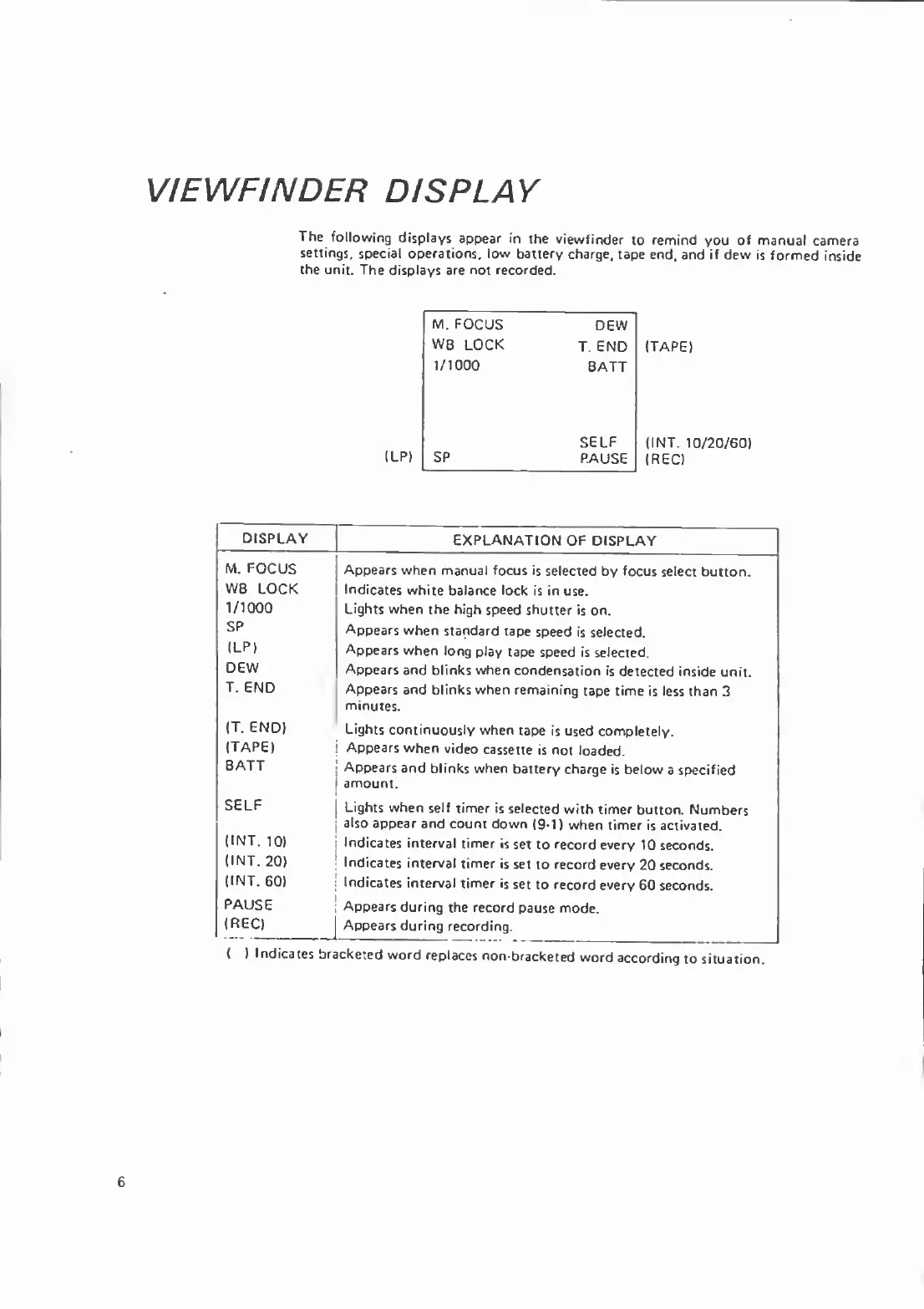
VIEWFINDER
DISPLAY
The
following
displays
appear
in
the
viewfinder
to
remind
you
of
manual
camera
settings,
special
operations,
low
battery
charge,
tape
end,
and
if
dew
is
formed
inside
the
unit.
The
displays
are
not
recorded.
(LP)
M.FOCUS
DEW
WB
LOCK
T.
END
1/1000
BATT
SELF
SP
PAUSE
(TAPE)
(I
NT.
10/20/60)
(REC)
DISPLAY
EXPLANATION
OF
DISPLAY
M.
FOCUS
Appears
when
manual
focus
is
selected
by
focus
select
button.
WB
LOCK
Indicates
white
balance
lock
is
in
use.
1/1000
Lights
when
the
high
speed
shutter
is
on.
SP
Appears
when
standard
tape
speed
is
selected.
(LP)
Appears
when
long
play
tape
speed
is
selected.
DEW
Appears
and
blinks
when
condensation
is
detected
inside
unit.
T.
END
Appears
and
blinks
when
remaining
tape
time
is
less
than
3
minutes.
(T.
END)
Lights
continuously
when
tape
is
used
completely.
(TAPE)
Appears
when
video
cassette
is
not
loaded.
BATT
Appears
and
blinks
when
battery
charge
is
below
a
specified
amount.
SELF
Lights
when
self
timer
is
selected
with
timer
button.
Numbers
also
appear
and
count
down
(9-1)
when
timer
is
activated.
(INT.
10)
Indicates
interval
timer
is
set
to
record
every
10
seconds.
(INT.
20)
Indicates
interval
timer
is
set
to
record
every
20
seconds.
(INT.
60)
Indicates
interval
timer
is
set
to
record
every
60
seconds.
PAUSE
Appears
during
the
record
pause
mode.
(REC)
Appears
during
recording.
(
)
Indicates
bracketed
word
replaces
non-bracketed
word
according
to
situation.
6

Related product manuals