EasyManua.ls Logo

Canon VM-E70 - CHARACTER GENERATOR; Connecting the CG-E1; Using the Character Generator

Canon VM-E70
52 pages
Print Icon
To Next Page IconTo Next Page
To Previous Page IconTo Previous Page
Loading...
CHARACTER
GENERATOR
The
optional
CG-E1
Character
Generator
connects
easily
to
VM-E70's
accessory
shoe
and
lets
you
record
titles,
as
well
as
the
date,
time,
stopwatch
reading
and
lap-time
along
with
your
video
recordings.
1
Make
sure
VM-E70
is
off.
2
S
lide
base
of
character
generator
into
accessory
shoe
of
VM-E70.
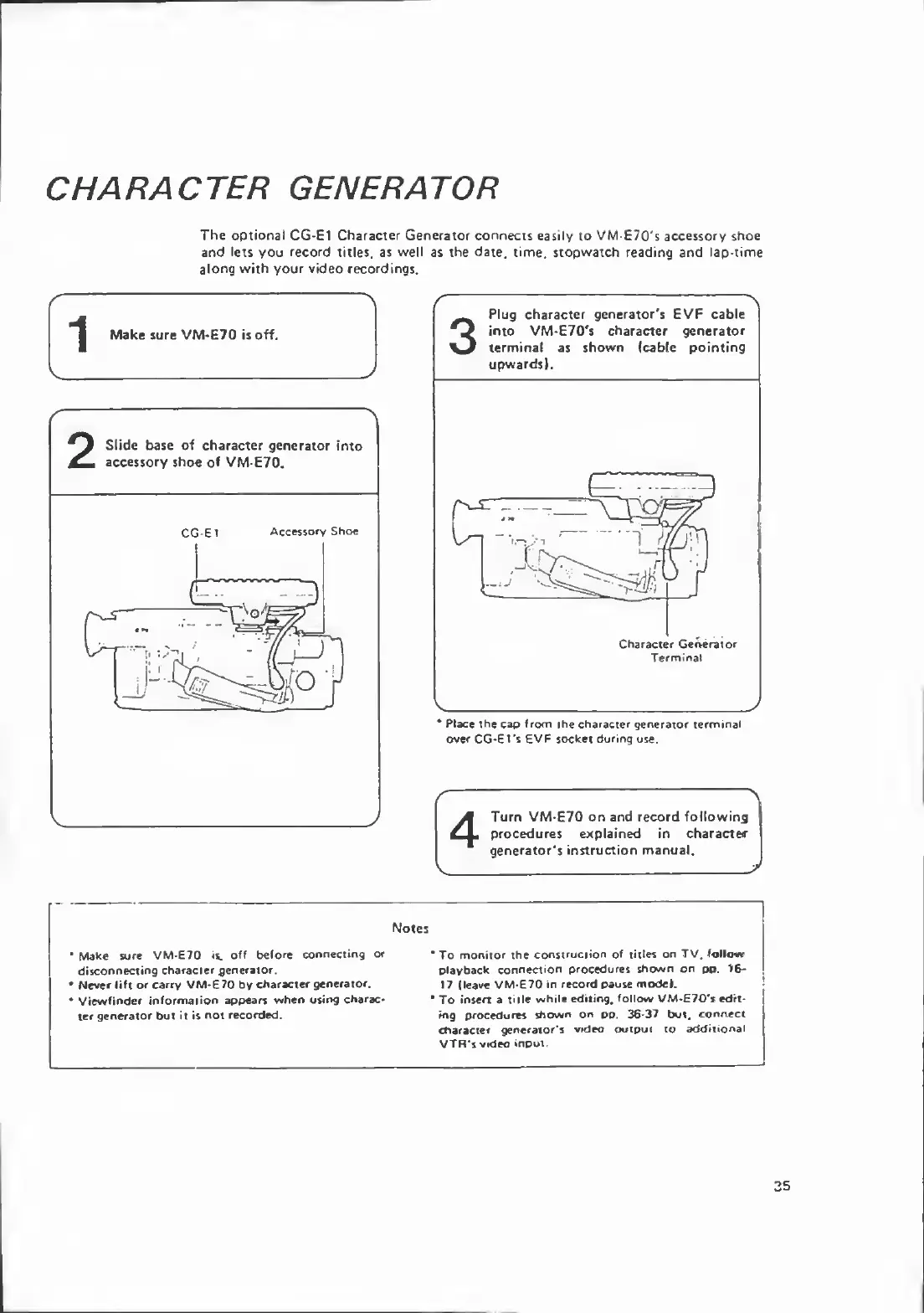
CG-Et
Accessory
Shoe
3
P
lug
character
generator's
EVF
cable
into
VM-E70's
character
generator
terminal
as
shown
(cable
pointing
upwards).
Character
Generator
Terminal
V
*
Place
the
cap
from
the
character
generator
terminal
over
CG-Et's
EVF
socket
during
use.
4
T
urn
VM-E70
on
and
record
following
procedures
explained
in
character
generator's
instruction
manual.
Notes
Make
sure
VM-E70
is.
off
before
connecting
or
disconnecting
character
generator.
Never
lift
or
carry
VM-E70
by
character
generator.
Viewfinder
information
appears
when
using
charac¬
ter
generator
but
it
is
not
recorded.
*To
monitor
the
construction
of
titles
on
TV,
follow
playback
connection
procedures
shown
on
pp.
1f>-
17
(leave
VM-E70
in
record
pause
model.
*
To
insert
a
title
while
editing,
follow
VM-E70*s
edit¬
ing
procedures
shown
on
oo.
36-37
but,
connect
character
generator's
video
output
to
additional
VTR's
video
input

Related product manuals