EasyManua.ls Logo

Canon VM-E70 - SELF TIMER; Setting the Self Timer; Self Timer Countdown; Cancelling Self Timer

Canon VM-E70
52 pages
Print Icon
To Next Page IconTo Next Page
To Previous Page IconTo Previous Page
Loading...
Automatic
and
interval
timer
recording
frees
you
for
greater
recording
creativity.
Just
set
the
timer
and
VM-E70
records
by
itself
for
a
maximum
of
6
hours.
SELF
TIMER
Set
the
self
timer
and
VM-E70
starts
recording
automatically
after
a
brief
standby
period
letting
you
get
in
on
the
action.
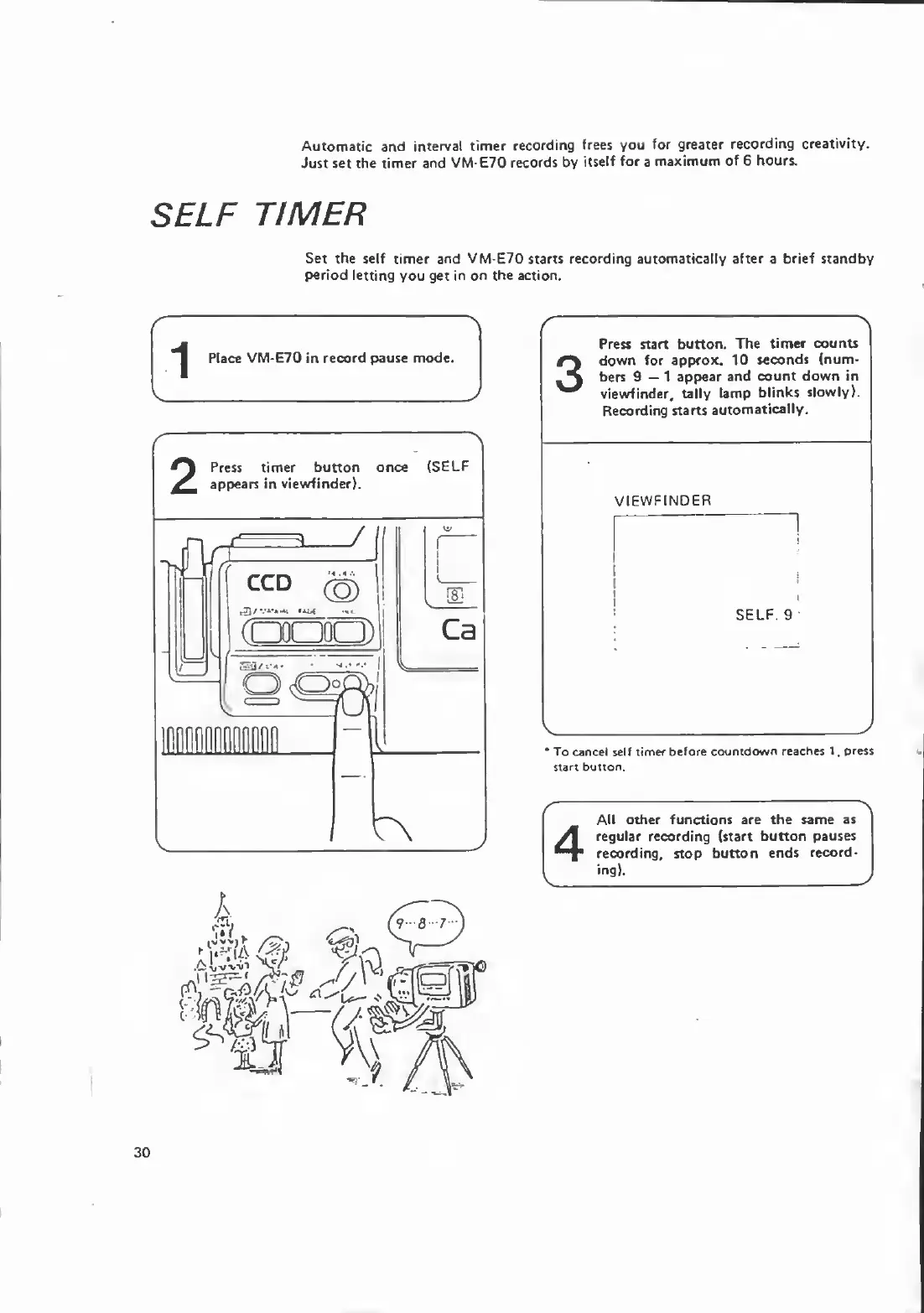
1
Place
VM-E70
in
record
pause
mode.
r
Press
start
button.
The
timer
counts
down
for
approx.
10
seconds
(num¬
bers
9—1
appear
and
count
down
in
viewfinder,
tally
lamp
blinks
slowly).
Recording
starts
automatically.
VIEWFINDER
SELF.
9
V_
J
*
To
cancel
self
timer
before
countdown
reaches
1,
press
start
button.
4
All
other
functions
are
the
same
as
regular
recording
(start
button
pauses
recording,
stop
button
ends
record¬
ing).
30

Related product manuals