EasyManua.ls Logo

Canon VM-E70 - INTERVAL TIMER; Setting the Interval Timer; Starting Interval Recording; Cancelling Interval Timer

Canon VM-E70
52 pages
Print Icon
To Next Page IconTo Next Page
To Previous Page IconTo Previous Page
Loading...
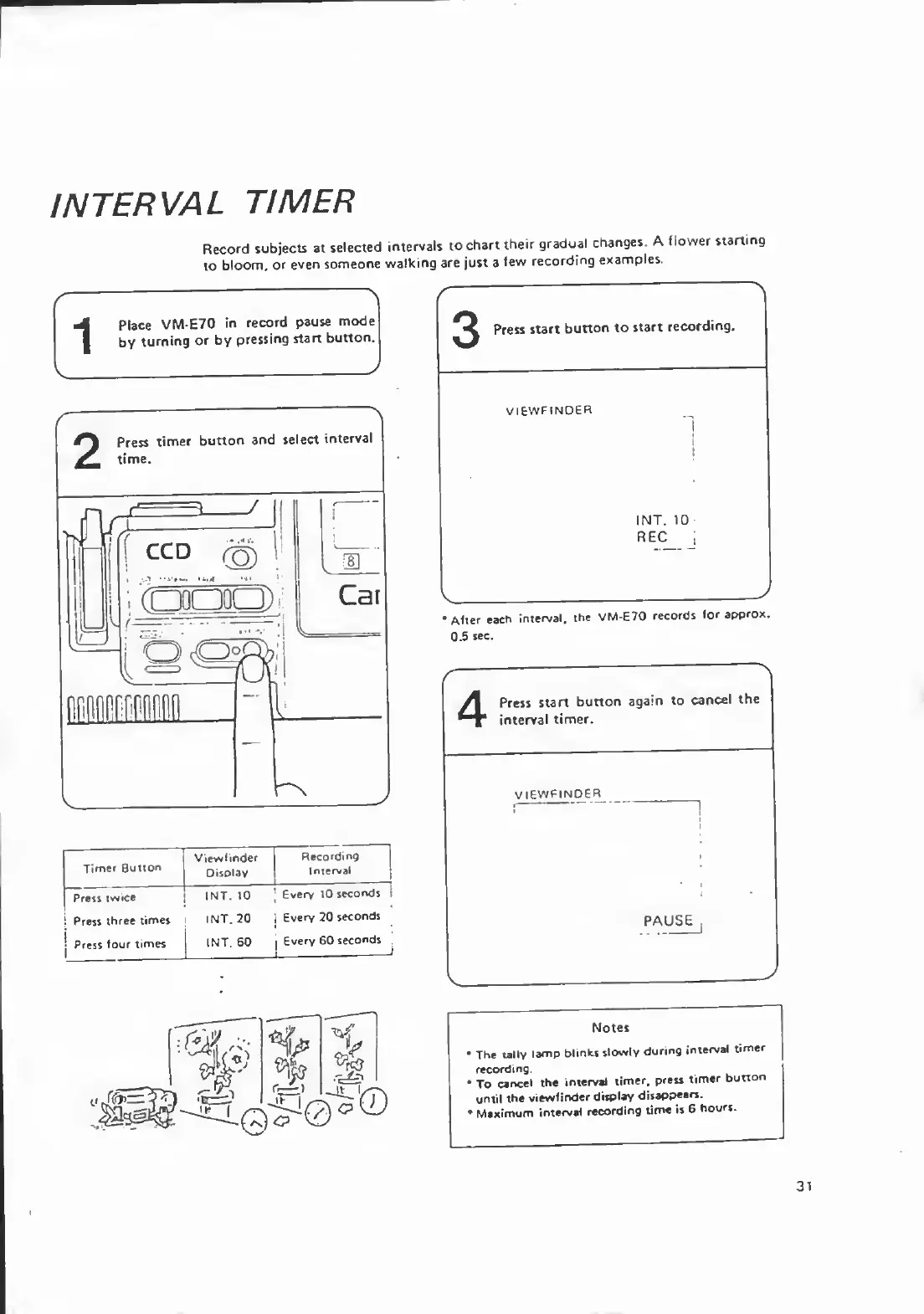
INTERVAL
TIMER
Record
subjects
at
selected
intervals
to
chart
their
gradual
changes.
A
flower
starting
to
bloom,
or
even
someone
walking
are
just
a
few
recording
examples.
Place
VM-E70
in
record
pause
mode
by
turning
or
by
pressing
start
button.
Press
start
button
to
start
recording.
VIEWFINOER
INT.
10
REC
After
each
interval,
the
VM-E70
records
for
approx.
0.5
sec.
Press
start
button
again
to
cancel
the
interval
timer.
VIEWFINDER
PAUSE
Notes
The
tally
lamp
blinks
slowly
during
interval
timer
recording.
To
cancel
the
interval
timer,
press
timer
button
until
the
viewfinder
display
disappears.
Maximum
interval
recording
lime
is
6
hours.
31

Related product manuals