EasyManua.ls Logo

Canon VM-E70 - IF USING A BATTERY PACK; Inserting the Battery Pack; Removing the Battery Pack; Battery Pack Usage Notes

Canon VM-E70
52 pages
Print Icon
To Next Page IconTo Next Page
To Previous Page IconTo Previous Page
Loading...
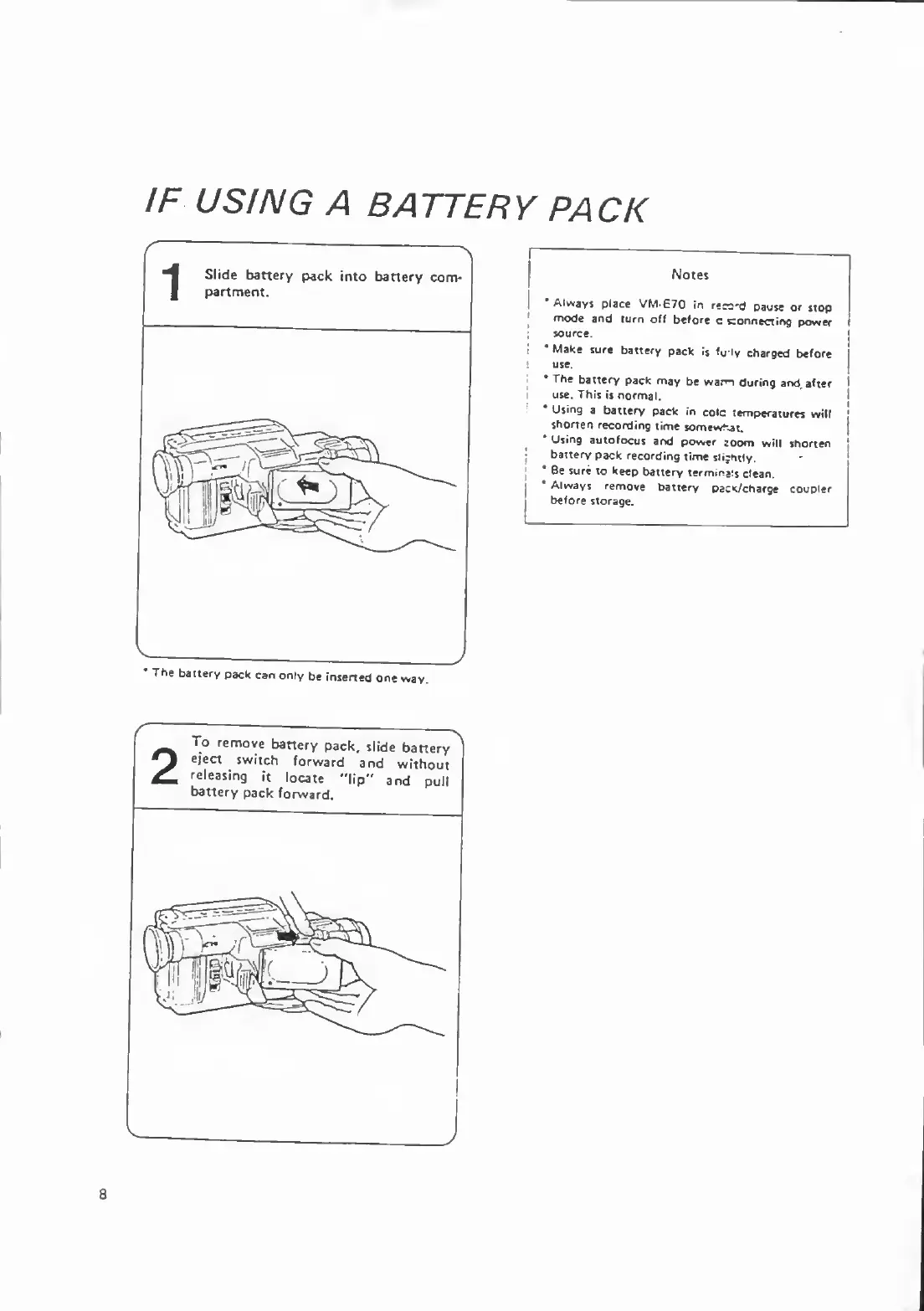
IF
USING
A
BATTERY
PACK
'
The
baitery
pack
can
only
be
inserted
one
way.
Always
place
VM-E70
in
recc'd
pause
or
stop
mode
and
turn
off
before
c
connecting
power
source.
*
Make
sure
battery
pack
is
fu
ly
charged
before
use.
The
battery
pack
may
be
warm
during
and
after
use.
This
is
normal.
Using
a
battery
pack
in
cole
temperatures
will
shorTen
recording
time
somewhat.
*
Using
autofocus
and
power
zoom
will
shorten
baitery
pack
recording
time
slightly.
*
Be
sure
to
keep
battery
term,na:$
clean.
*
Always
remove
battery
pacK/charge
coupler
before
storage.
8

Related product manuals