46
Transferring Images Individually
You can select which images to transfer when recording images of
different sizes to a CF card and CFast card simultaneously, or when
shooting in RAW+JPEG image quality.
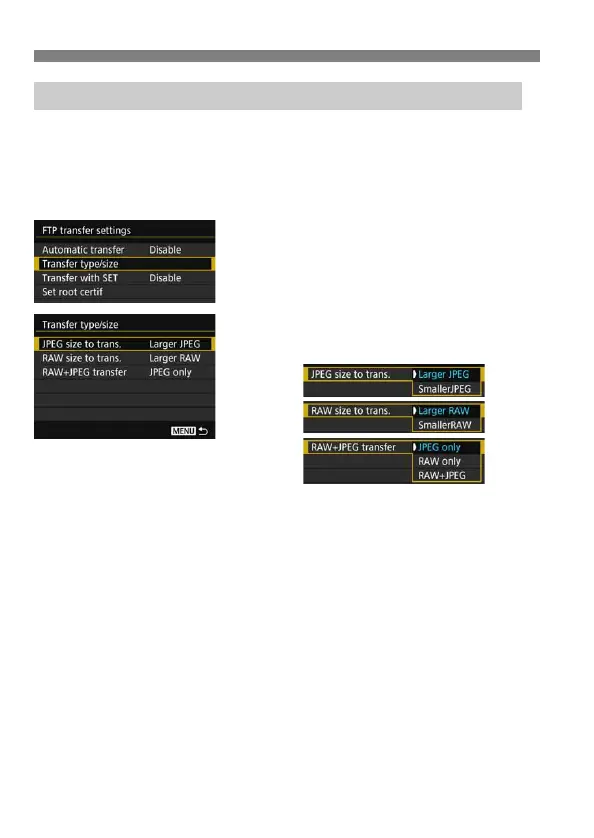
Select [Transfer type/size] in step 5 on page 44 to select the size or
type of images to transfer.
1
Select [Transfer type/size].
2
Select the size and type of images
to transfer.
To transfer smaller JPEGs when the camera is set up to record
larger JPEGs to either a CF card or CFast card and smaller JPEGs
to the other, set [JPEG size to trans.] to [SmallerJPEG].
When the camera is set up to record RAW images to either a CF
card or CFast card and JPEGs to the other, specify which images to
transfer in the [RAW+JPEG transfer] setting. Similarly, complete the
same setting when RAW+JPEG images are recorded
simultaneously to a single card.
When images of the same size are recorded to both a CF card and
CFast card simultaneously, images recorded to the card selected for
[Record/play] or [Playback] in [Record func+card/folder sel.]
under the [51] tab are transferred.
Selecting Particular Sizes or Types of Images to Transfer



 To Next Page