67
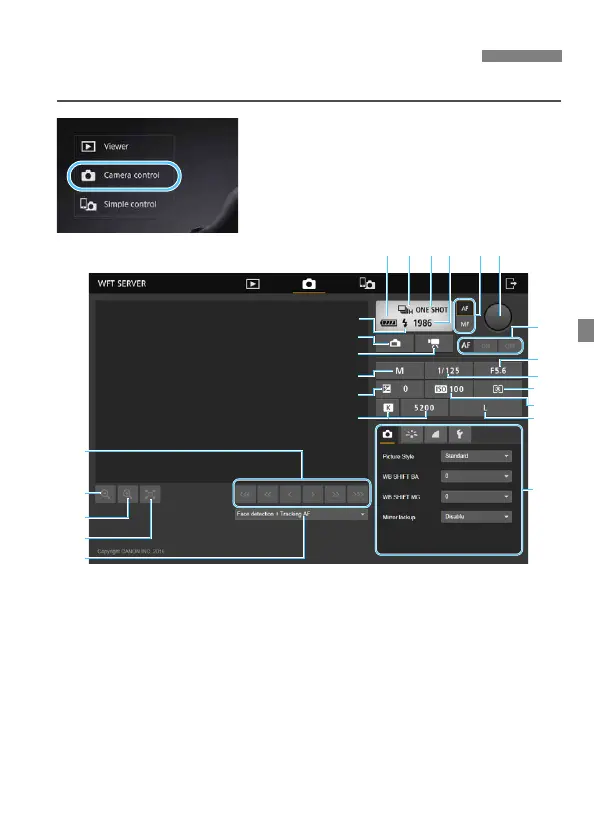
You can use WFT Server to shoot remotely.
1
Press [z Camera control].
The advanced capture screen is
displayed.
Shooting Remotely [Camera control]
(1) Battery check (
13
) Menu
(2) Drive mode (
14
) Flash-ready
(3) AF mode (
15
) Still photo Live View shooting button
(4) Possible shots (
16
) Movie shooting button
(5) AF/MF switching button (
17
) Shooting mode
(6) Shutter button (
18
) Exposure compensation
(7) AF button (
19
) White balance
(8) Aperture (
20
) Manual focus button
(9) Shutter speed (
21
) Reduce button
(
10
) Metering mode (
22
) Magnify button
(
11
)ISO speed (
23
) Live View image size switching button
(
12
) Image-recording quality (
24
)AF method
(
20
)
(2) (3)(1)
(
11
)
(4) (5) (6)
(7)
(8)
(9)
(
10
)
(
12
)
(
13
)
(
21
)
(
22
)
(
23
)
(
24
)



 To Next Page