3
35
English
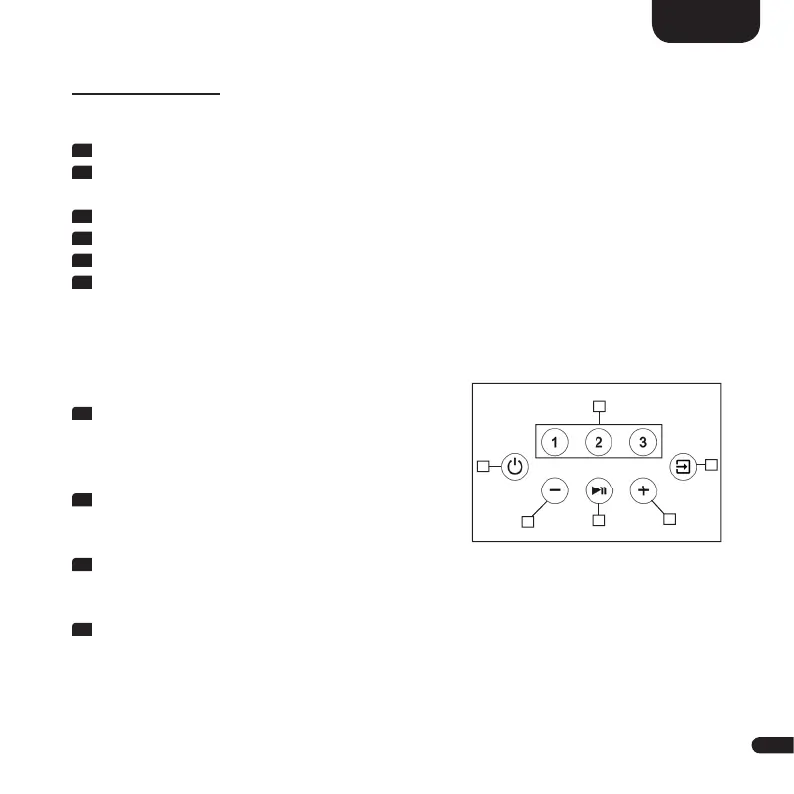
TOUCH KEYS
Device control:
1
Power Switches the device On/Off (On/Standby)
2
Preset 1–3 Preset keys to store resp. recall Spotify playlists and/or
(sound)settings
3
Input Toggles input forward
4
Plus [+] Increases main volume
5
Minus [-] Decreases main volume
6
Play/Pause • Play/Pause function during audio playback using
Chromecast built-in, Spotify Connect, AirPlay and
Bluetooth
®
wireless technology
• Toggles Play Mode forward
(press and hold for 4 seconds)
Menu control:
3
Input
• Enter the menu (press and hold for 3 seconds)
• One level back in the menu
• Exit the menu (press and hold for 3 seconds)
4
Plus
• Menu selection upwards
• Increase menu value
5
Minus
• Menu selection downwards
• Decrease menu value
6
Play/Pause
• Enter the next menu level
• Confi rm selection
2
6
4
3
5
1


 To Next Page
 Loading...