
EasyManua.ls Logo

CAO Group Precise LTM - User Manual

CAO Group Precise LTM
20 pages
Print Icon
To Next Page IconTo Next Page
Loading...
1
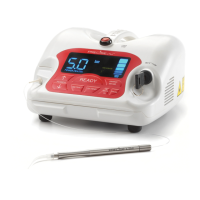
5 WATT SOFT TISSUE DIODE LASER.
OPERATOR’S MANUAL.

Table of Contents

Questions and Answers

  • R
    Robert PenaAug 1, 2025
    What to do if CAO Group Precise LTM Measuring Instruments laser has no response, but fan is on?
    • H
      hansondavidAug 1, 2025
      If the fan is running but the laser is unresponsive, ensure the laser stop switch is in the down position; depress the button if it isn't. Also, check the fiber cartridge to confirm it's properly engaged.
  • A
    ashleykimAug 4, 2025
    What to do if CAO Group Precise LTM wireless foot pedal does not activate laser?
    • B
      Brandon CampbellAug 5, 2025
      If the wireless foot pedal isn't activating the laser, try the following: * Replace the 9-Volt battery. * Ensure there are no metal obstructions between the pedal and the laser. * Reposition the pedal or rotate it slightly.
  • T
    Tracy NicholsAug 9, 2025
    What to do if CAO Group Measuring Instruments laser has no response, fan is off?
    • K
      kelsey15Aug 9, 2025
      If the laser isn't responding and the fan is off, check that the power cord is securely plugged into the back of the laser unit and that the power switch on the back panel is in the on (I) position. Also, ensure the key is inserted and turned on.
  • M
    Matthew BakerAug 13, 2025
    Why measured power output on power meter is different from the LED display on CAO Group Precise LTM Measuring Instruments?
    • J
      James StewartAug 13, 2025
      The power meter might show a different power output than the LED display if it isn't calibrated for use with 810 nm wavelength devices. Ensure that your power meter is properly calibrated.
  • M
    Manuel SmithAug 17, 2025
    What to do if CAO Group Measuring Instruments laser has power but no LED display?
    • T
      turnerjulieAug 18, 2025
      If the laser has power but the LED display is not working, check that the fiber cartridge is securely engaged. Also, check if the laser stop switch or the remote interlock are engaged.
  • J
    John RodriguezAug 21, 2025
    What to do if an audible beep on CAO Group Measuring Instruments laser will not stop when foot pedal is depressed?
    • L
      Lisa LopezAug 21, 2025
      To stop a continuous audible beep on the laser when the foot pedal is depressed, turn the laser off for 5 minutes, then turn it back on. If the beep stops, the unit has made operational adjustments. If it continues, the laser requires professional adjustment.
  • J
    Jamie BellAug 27, 2025
    Why fiber does not move from the cartridge in CAO Group Precise LTM Measuring Instruments?
    • O
      Olivia CordovaAug 27, 2025
      If the fiber isn't moving from the cartridge, make sure the fiber cartridge is seated properly and that it is not out of fiber.

Summary

Introduction to the Precise LTM Laser

Before Operating Your Laser

Removing the Laser from Packaging

Instructions for safely unpacking the laser unit and its components.

Assembling the Laser Unit

Details on inspecting and inserting components into the laser unit.

LED Display and Control Panel Overview

Explains the indicators and controls on the laser's front panel.

Adjustable Aiming Beam Functionality

Describes the function and levels of the aiming beam.

Fiber Extend and Retract Function

Explains how to extend and retract the laser fiber.

Power Cord Installation

Guide on connecting the power cord and adapter for the laser unit.

Power, Fan, and Key Switch Operation

Instructions for operating the main power switch and key switch.

Remote Interlock Feature

Explains the function and installation of the remote interlock jack.

Wireless Foot Pedal Battery Installation

Steps for installing the battery in the wireless foot pedal.

Disposable Fiber Cartridge Installation

Guidance on installing a new disposable fiber cartridge.

Laser Stop Switch Function

Details on the laser stop button's function and importance.

Facility Requirements for Laser Use

Power Requirements

Specifies electrical power needs for the laser system.

Heating, Ventilation, and Humidity Requirements

Outlines optimal environmental conditions for laser operation.

Lighting Requirements

Recommends adequate lighting for operator visibility.

Combustible Chemicals and Gases Precautions

Warns about combustible materials in the operatory.

High Speed Vacuum System for Plume Evacuation

Emphasizes the need for vacuum systems for plume evacuation.

Access and Visual Safety Measures

Covers restricted access and safety signage for the treatment area.

Operating Your Precise LTM Laser

Safety Considerations Before Operation

Outlines crucial safety protocols and responsibilities before using the laser.

In-Office Safety Issues

Discusses lighting, ventilation, and safety eyewear requirements.

Laser Safety Program and Continuing Education

Recommendations for establishing a laser safety program and training.

FDA Regulations and Laser Compliance

Explains FDA regulations for medical laser devices.

OSHA and Worker Safety Provisions

Covers OSHA's role and recommendations for laser safety.

Statutory Licensure Requirements

Discusses state licensure requirements for laser use.

Wireless Technology and FCC Compliance

Details FCC regulations and technical standards for wireless devices.

Precise LTM Wireless Frequency and Interlock

Explains the 2.4GHz frequency and unique serial number interlock.

ANSI Laser Safety Standards

References ANSI standards for laser safety in healthcare.

Before Beginning Procedures

Pre-procedure checks including fiber tip and aiming beam.

During Procedures

Guidance on test firing, standby/ready status, and tissue contact.

After Each Procedure

Steps for cleaning, retracting fiber, and recording data post-procedure.

Startup and System Check

Selecting the Treatment Center

Guidelines for choosing a suitable location for laser operation.

Foot Pedal Installation Check

Verifying the correct installation of the wireless foot pedal.

Key Activation and Control Panel Check

Verifying the laser's activation and control panel display.

Laser Stop Button Check

Ensuring the laser stop button is functional and not engaged.

Disposable Fiber Cartridge Check

Verifying the proper seating and function of the fiber cartridge.

Setting Laser Modes (Continuous;Pulse)

How to select between Continuous and Pulse laser modes.

Setting Laser Power Output

Adjusting the laser's power output from 0.5 to 5.0 Watts.

Setting the Aiming Beam Intensity

Adjusting the intensity of the aiming beam.

Programming Laser Settings

Creating and saving custom laser settings combinations.

Preparations, Care, and Maintenance

Disposable Fiber Cartridge Overview

Information about the disposable fiber cartridge.

Replacing the Fiber Cartridge

Detailed steps for removing and replacing the fiber cartridge.

Fiber Preparation for Lasing

Guide on extending, stripping, and preparing the fiber tip.

Fiber Jacket Description

Describes the protective outer cover of the fiber.

Fiber Cladding Function

Explains the cladding's role in blocking laser energy escape.

Quartz;Silica Fiber Properties

Discusses the flexibility and handling of quartz/silica fiber.

Stripping the Fiber

Steps to remove the fiber's jacket using a stripper tool.

Cleaving the Fiber Tip

Instructions for scoring and breaking the fiber for a clean tip.

Initiating the Fiber Tip

Method to prepare the fiber tip for heat retention using ink.

Fiber Disinfection

Explains how the fiber tip is disinfected by laser energy.

Laser Maintenance Procedures

Laser Chassis Disinfection

How to clean the exterior of the laser unit.

Laser Calibration and Checks

Explains power output monitoring and recalibration needs.

Handpiece Preparation and Sterilization

Steps for assembling and sterilizing the laser handpiece.

Preparation for Lasing

Final steps to prepare the fiber tip before operating the laser.

Disposable Tips

Information on the available disposable tips.

Labels, Signs, Warnings, and Information

Federal Compliance and Standards

Details compliance with US and Canadian safety standards.

Danger Laser In Use Signage

Requirement for posting "Laser In Use" warning signs.

Laser Classifications

Specifies the laser class and power ratings.

General Cautions and Warnings

Lists essential cautions for safe operation and maintenance.

NOHD and Safety Eyewear Guidance

Provides NOHD data and requirements for safety eyewear.

Servicing and Warranty Information

Limited Warranty Details

Outlines the warranty period and conditions for the laser.

Repairs and Returns Process

Procedure for obtaining repair services and RMA numbers.

Troubleshooting Common Issues

Laser No Response (Fan Off)

Steps to resolve issues when the laser has no response and fan is off.

Laser No Response (Fan On)

Steps to resolve issues when the laser has no response but fan is on.

Laser Power, No LED Display

Steps to address issues with power but no LED display.

Laser Power Output Issues

Steps to resolve problems with laser power output.

Power Meter vs. LED Display Discrepancy

Guidance for discrepancies between power meter and LED display.

Fiber Movement Issues

Steps to resolve problems with fiber movement from the cartridge.

Error Message (Er) and Beep Alerts

How to handle error messages and system alert beeps.

Persistent Audible Beep

Steps to resolve a continuous audible beep when depressing pedal.

Wireless Foot Pedal Activation Issues

Troubleshooting steps for when the wireless foot pedal fails.

Electromagnetic Compatibility (EMC)

Electromagnetic Emissions Guidance

Information on RF emissions and compliance levels.

EMC Immunity Test Levels

Details on immunity test levels for ESD, transients, surge, dips, and magnetic fields.

Electromagnetic Emissions Declaration

Declaration for conducted and radiated RF emissions.

RF Separation Distance Guidance

Recommended separation distances for RF equipment to avoid interference.

Laser Specifications and Ordering Information

Ordering Information for Accessories

Lists part numbers for accessories and replacement parts.

Indications for Use

Approved uses of the Precise LTM laser in dentistry.

Delivery System Specifications

Details on fiber, handpiece, and laser aperture specifications.

Warranty Details

Provides warranty information for the laser and fiber.

Glossary of Laser Terminology

References on Laser Dentistry

CAO Group Precise LTM Specifications

General IconGeneral
BrandCAO Group
ModelPrecise LTM
CategoryMeasuring Instruments
LanguageEnglish