Instruction manual C816C
15
Please keep this instruction manual for future reference
USING YOUR CERAMIC HOB
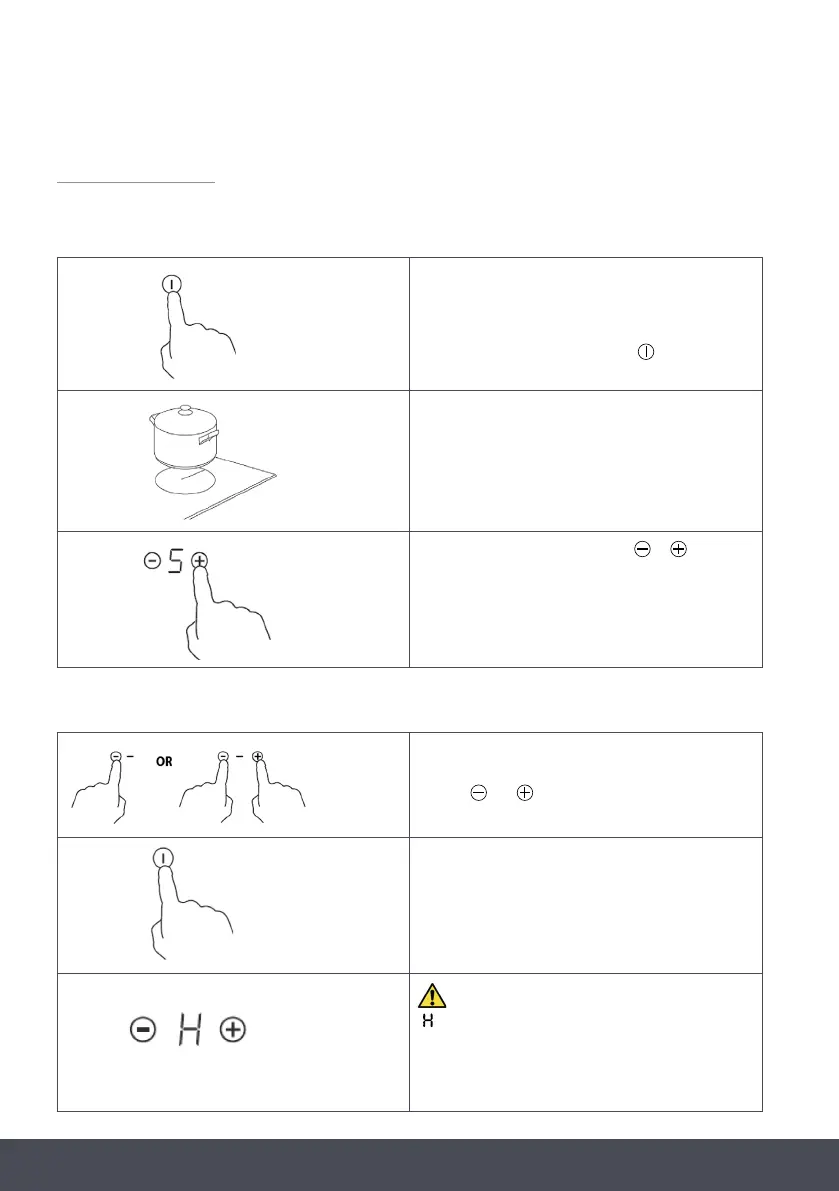
TO START COOKING
WHEN YOU HAVE FINISHED COOKING
When power to the hob is turned on the buzzer sounds
once, all the indicators light up for 1 second then go
out, indicating that the ceramic hob has entered standby
mode.
To turn on, touch the ON/OFF control . All the
indicators then show “-“.
Place a suitable pan on the cooking zone that you wish
to use.
Make sure both the bottom of the pan and the surface of
the cooking zone are clean and dry.
Select a heat setting by touching the or controls.
- If you do not choose a heat setting within 1 minute, the
ceramic hob will automatically switch off. You will need
to start again at step 1.
- You can modify the heat setting at any time during
cooking.
Turn the cooking zone off by scrolling down to “- “or
touching and together.
You can turn the whole hob off by touching the
ON/OFF control.
Under any circumstances, the brackets cannot touch with the inner surfaces of the worktop after installation (see picture). This will
ensure the hob is properly secured to the underside of the work surface.
BEWARE OF HOT SURFACES
“ ” will show which cooking zone is hot to touch. It will
disappear when the surface has cooled down to a safe
temperature. It can also be used as an energy saving
function. If you want to heat further pans, use the zone
that is still hot.


 To Next Page