30 docs.carbide3d.com support@carbide3d.com 31
Install the X‑Rail Belt
1. Select one of the three identical belts.
2. Attach a belt clip to one end of the belt. (Refer
back to Figure5‑4
3. Set the belt clip on top of the X-rail next to
down, and extend along the X-rail towards the
Z-Plus. Ensure the teeth of the bottom 2 inches
of belt interlock with the top. See Figure5‑5.
4. ×10mm
socket head cap screw to secure the belt clip
to the Y1-carriage. Insert the screw from the
OUTSIDE and tighten. See Figure5‑5.
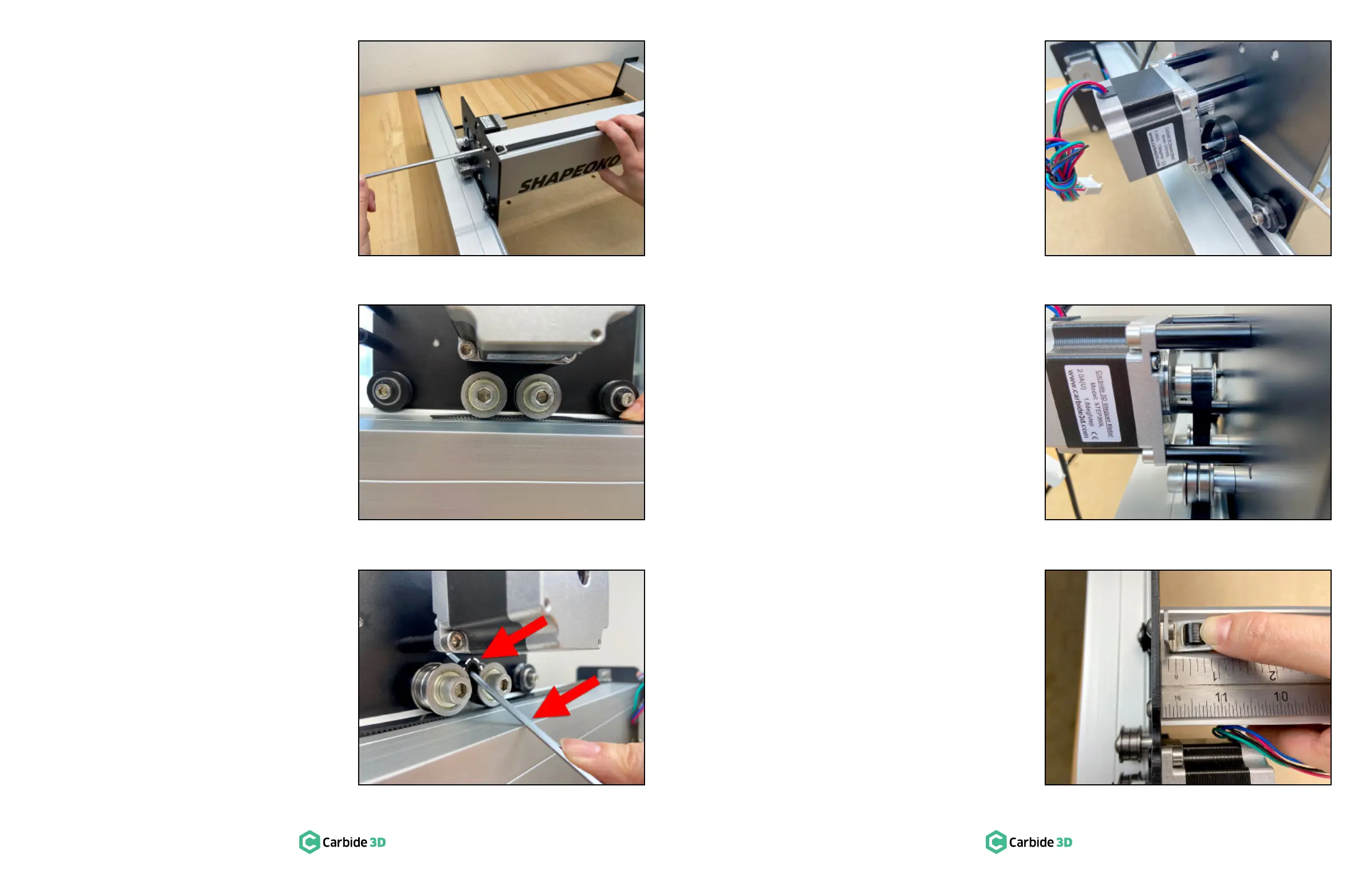
5. Feed the belt under the two idlers on the back
of the Z-Plus. Make sure the belt does not twist
and the teeth remain facing down all the way
to the Y2-carriage. See Figure5‑6.
Slide the 3mm hex key under the belt,
between the two idlers. Use the hex key as
belt up between the two idlers as shown in
Figure5‑7.
7. Use the 3mm hex key to reach in between the
X-motor and carriage plate, hook the loop, and
pull it up and out towards you. See Figure5‑8.
8. Make sure the belt has not twisted and the
teeth are still facing down, then place the belt
Figure5‑9.
Very gently take the slack out of the belt
by slowly pulling the free end toward the
Y2-carriage.
10. Attach another belt clip to the free end of the
belt. (Refer back to Figure5‑4
11. Adjust the amount of belt you feed through
/-inch gap exists
between the belt clip and the Y2-carriage.
Ensure the teeth of the bottom few inches of
belt interlock with the top. See Figure5‑10.
Figure5-5
Figure5-6
Figure5-7
Figure5-8
Figure5-9
Figure5-10


 To Next Page