EasyManua.ls Logo

Carel EVD4 - User Manual

Carel EVD4
48 pages
Print Icon
To Next Page IconTo Next Page
Loading...
EVD
4
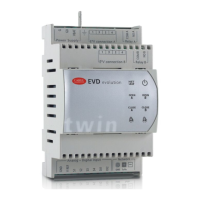
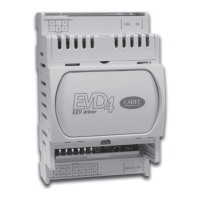
Driver for electronic expansion valve
User manual

Questions and Answers

  • B
    brandonwrightSep 4, 2025
    What to check if Carel showcase doesn't reach set temperature with valve fully open?
    • D
      Daniel ColemanSep 4, 2025
      If a Carel Controller-controlled showcase doesn't reach the set temperature even when the valve is fully open, several issues could be the cause. A blocked solenoid might be preventing proper refrigerant flow, so check that the solenoid opens correctly, inspect the electrical connections, and verify the relay operation. Insufficient refrigerant could also be the problem, so check for air bubbles in the liquid indicator upstream of the expansion valve and ensure the subcooling is suitable (greater than 5 °C); if needed, charge the circuit. Lastly, the valve might be blocked closed, even when commanded open, so use manual control to fully close and open the valve; if the superheat remains high, check the electrical connections and/or replace the valve.
  • M
    Mary HarrisSep 7, 2025
    Why liquid returns to the compressor only when starting Carel EVD4?
    • W
      williamsbrendaSep 7, 2025
      If liquid refrigerant is returning to the compressor only when starting the Carel Controller after it has been off, the “Circuit/EEV ratio” parameter might be too high. Try lowering the value of the “Circuit/EEV ratio” parameter.
  • J
    jenniferreyesSep 12, 2025
    What to do if Carel showcase doesn't reach set temperature and valve position is always 0?
    • P
      Paige MunozSep 12, 2025
      If your Carel Controller-controlled showcase isn't reaching the set temperature and the valve position is always at 0, there are a couple of things to check. First, ensure the driver is correctly set in STAND ALONE mode by verifying that the stand alone parameter is activated. Also, check the connection of the driver's digital input to make sure it's correctly connected.
  • D
    douglas62Nov 14, 2025
    Why liquid returns to compressor during operation of Carel EVD4 Controller?
    • C
      Carla RushNov 14, 2025
      If liquid refrigerant is returning to the compressor during operation of the Carel Controller, several factors could be at play. First, the probes might be measuring an incorrect superheat value; ensure the pressure and temperature readings are accurate, the probe positions are correct, the pressure probe range is correct, and the electrical connections of the probes are secure. The refrigerant type setting might be incorrect, so verify and correct the refrigerant parameter. The valve type setting may also be incorrect, so check and correct the valve type parameter. The valves may be incorrectly connected or reversed, and are open, so check the valve movement by using manual control to fully close and open it, and if reversed, check the connections. The superheat set point might be too low...
  • M
    Melissa WellsNov 17, 2025
    Why evaporation pressure is high during start-up with high evaporator temperature in Carel Controller?
    • S
      Stephanie RussellNov 17, 2025
      If you're experiencing high evaporation pressure during start-up with a high evaporator temperature on your Carel Controller, it could be due to a few reasons. First, check if the MOP (Maximum Operating Pressure) protection is disabled. If so, activate it and set the threshold to the required saturated evaporation temperature and the MOP integral time to a value greater than 0 (recommended 4 seconds). If the MOP protection is already active but ineffective, make sure the MOP threshold is set to the correct saturated evaporation temperature and decrease the value of the MOP integral time. For showcases only, if there's an excessive refrigerant charge for the system, try applying a “soft start” technique by activating the utilities one at a time or in small groups. If this isn't possible, de...
  • A
    Amy TurnerNov 20, 2025
    Why does the Carel Controller system swings?
    • A
      annrobertsNov 20, 2025
      If your Carel Controller system is experiencing swings, several factors could be contributing. The condensing pressure might be unstable, fluctuating more than +/- 0.5 bar from the set point; try to stabilize it, for example, by disabling the condensing pressure control and operating the fans at maximum speed, depending on the installation's operating conditions. If the superheat set point is too low, increase it, ensuring the unit's temperature remains low and reaches the control set point. If the superheat swings even in manual control, observe the valve's average operating position, enable manual positioning, and set the valve opening to that average value; if the swing continues, re-enable automatic operation and set more reactive parameters by increasing the proportional factor, integ...
  • F
    fstanleyNov 24, 2025
    What to do if Carel EVD4 switches off due to low pressure during start-up?
    • C
      Christine WalkerNov 24, 2025
      If your Carel Controller unit is switching off due to low pressure during start-up, especially in units with an on-board compressor, there are several potential causes. The “Circuit/EEV ratio” parameter might be too low, so increase its value. Ensure the driver is correctly set in STAND ALONE mode by verifying that the stand alone parameter is activated. Also, check the connection of the driver's digital input to ensure it is correctly connected. The LOP (Low Oil Pressure) protection might be disabled, so activate it by setting the threshold to the required saturated evaporation temperature and the LOP integral time to a value greater than 0 (recommended 4 seconds). If the LOP protection is already active but ineffective, ensure the LOP threshold is set to the correct saturated evaporation...
  • L
    Lisa DudleyNov 27, 2025
    What causes Carel EVD4 Controller unit to switch off due to low pressure during control?
    • W
      Wanda WatsonNov 27, 2025
      If your Carel Controller unit switches off due to low pressure during normal control, especially in units with an on-board compressor, several factors could be responsible. First, check if the LOP (Low Oil Pressure) protection is disabled; if so, activate it by setting the threshold to the required saturated evaporation temperature and the LOP integral time to a value greater than 0 (recommended 4 seconds). If the LOP protection is already enabled but ineffective, make sure the LOP threshold is set to the correct saturated evaporation temperature and decrease the value of the LOP integral time. A blocked solenoid could be the problem, so verify that the solenoid opens correctly, and inspect its electrical connections and the relay operation. Insufficient refrigerant could also cause this i...
  • A
    Alexandra PatelDec 1, 2025
    Why liquid returns to compressor only after defrosting in Carel showcase?
    • C
      cantunancyDec 1, 2025
      If liquid refrigerant returns to the compressor only after defrosting in your Carel Controller (specifically in showcases), there are a few potential causes to investigate. If the superheat value is very low for a few minutes before stabilizing, increase the low superheat threshold to at least 2 °C higher than the (low) superheat value and/or decrease the low superheat integral time, ensuring it remains greater than zero. If the superheat never reaches very low values, set more reactive parameters by increasing the proportional factor, integral time, and differential time to bring forward the closing of the valve even when the superheat is greater than the set point. If multiple showcases defrost simultaneously, stagger the start defrost times. If staggering isn't possible and the previous...

Summary

IMPORTANT WARNINGS

1. INTRODUCTION

1.2 Connecting to the main serial port

Details the diagrams and methods for connecting the EVD4 to controllers via tLAN, pLAN, or RS485 networks.

1.3 Operation of the service serial port

Explains how to access EVD4 parameters using the service serial port with the EVD4-UI software and a converter.

2. INPUTS AND OUTPUTS

2.1 Power supply, sensors, digital I;O

Describes the main 14-pin MINIFIT connector for power supply, sensors, digital inputs, and transistor output.

2.2 Main serial port for connection to tLAN;PLAN;RS485 (supervisor; Modbus)

Details the removable terminal for connecting the EVD4 to master units like µChiller, pCO, or supervisors.

3. EVD4 APPLICATIONS: CONNECTIONS, LIST OF PARAMETERS AND OPERATING MODES

5. TROUBLESHOOTING

APPENDIX I. INSTALLING AND USING THE EVD4-UI PROGRAM

I.I Installation

Provides instructions for downloading and installing the EVD4-UI configuration and monitoring software.

Carel EVD4 Specifications

General IconGeneral
ModelEVD4
TypeElectronic Expansion Valve Controller
Power Consumption5 VA max
Protection RatingIP20
Input Voltage24 Vac/dc
Serial PortsRS485
ProtocolModbus RTU
Analog Outputs0-10Vdc / 4-20mA (configurable)
Humidity10..90% RH non-condensing

Related product manuals