Need help?
Do you have a question about the Carel thTx and is the answer not in the manual?
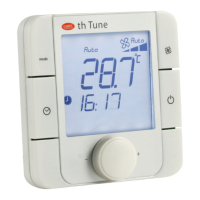
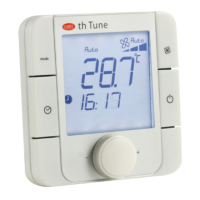
The CAREL thTx is an electronic controller designed for air conditioning in residential and commercial environments, offering a user-friendly interface for temperature control. Its compact and elegant design makes it suitable for various settings. The thTx can function as a standalone room thermostat or as a zone controller when connected to programmable controllers in radiant heating systems. Depending on the model, it can be equipped with a temperature sensor or a combined temperature and humidity sensor, and supports power supply options of 230 Vac or 24 Vac/Vdc. The thTx also provides the ability to manage a three-speed fan.
The thTx controller allows for easy and intuitive temperature adjustment using capacitive touch buttons. It is ideal for use as a Human-Machine Interface (HMI) for heat pumps, rooftop units, air handling units (AHUs), fan coils, and as a display for zone control in centralized systems. The RS485 serial connection, using the Modbus protocol, enables multiple thTx controllers to be connected to a central controller for synergistic operation with programmable controllers.
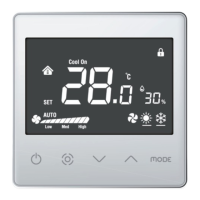
The device features a display with capacitive keys for interaction. The main functions include:
The thTx terminal allows for parameter and output configuration in two ways: directly via the terminal (using buttons and parameters) or via Modbus (using Modbus parameters).
Parameter Configuration: To access the parameter menu, switch off the thermostat using the ON/OFF button, then press and hold "MODE" + "Up Arrow" for 5 seconds. Enter the password (0022). The password can be changed using parameter E23.
Mode Selection: Pressing the Mode button cycles the lower-left icon through Heating (sun), Cooling (snowflake), and Ventilation (fan). The current mode can also be viewed via Modbus parameter HR140.
SET/FAN Button: This button allows changing the fan speed and, consequently, the three-speed fan output (EL/EM/EH). It also serves as the confirmation button for settings (setpoint and within the configuration menu). Pressing the button allows selecting the desired speed (low, medium, high) or automatic (Auto) and sending this information via Modbus (register 141).
Thermostat ON/OFF: The thermostat's ON/OFF state is managed either by the thermostat itself or via Modbus. To turn on, press "Up Arrow"; to turn off, press "Up Arrow" again to deactivate the relay. The ON/OFF state is controlled via Modbus register HR143 (0 = OFF; 1 = ON).
Buzzer Activation: Access menu E4 (Buzzer activation) and confirm: 0 = Disabled; 1 = Enabled.
Keypad Lock: In normal operation, pressing both Up and Down arrows simultaneously for 3 seconds locks the display, showing a padlock icon. This can also be configured via Modbus using variable HR165.
Relay Control: Relay control is available in both cooling and heating modes and is user-managed. The differential parameter (dF) in the parameter menu defines the differential for heating or cooling modes. The user must define the setpoint. In addition to cooling and heating management, the relay can be controlled for humidity via configuration menu E28.
Setpoint: Turn on the thermostat, use the Up arrow to increase the setpoint, or the Down arrow to decrease it by 0.5 degrees at a time. It can also be modified via Modbus HR144. The maximum and minimum setpoint values can be linked via HR145 and HR146, and their corresponding menus E6 and E7. The same applies when the relay is configured for humidity management, where the setpoint value adjusts by 1 RH% and is set via Modbus/HR134.
Differential: To adjust the temperature differential, access menu E19; for humidity, access menu E21. The temperature differential (HR58) increases by 0.1 from 0.0 to 5.0. The humidity differential (HR50) increases by 1 from 0 to 20.
Humidity Control: In models with a humidity sensor, the data is displayed next to the temperature value. The relative humidity value can also be read via Modbus register HR134.
Antifreeze Mode: This can be enabled via menu E10. Antifreeze is only valid in heating mode. When the temperature drops to 5.0°C, antifreeze activates; when it rises above 8.0°C, antifreeze protection stops by acting on the relay.
Alarm: When an alarm occurs, the corresponding error code is displayed on the LCD. Modbus Coil 32 takes the value 1. "E1" indicates a temperature sensor error, and "E3" indicates a humidity sensor error.
Temperature Sensor Calibration: To adjust temperature calibration, access menu E8 (temperature calibration) within a range of -9 to +9°C, with increments of ±0.1°C. This can also be configured via Modbus using variable HR10.
Humidity Sensor Calibration: Available only on models with a humidity sensor. To adjust humidity calibration, access menu E9 (humidity calibration) within a range of -20 to +20 RH%, with increments of ±0.1 RH%. This can also be configured via Modbus using variable HR57.
Manual Mode: In addition to the autonomous mode where thTx automatically regulates outputs based on setpoint values and configuration, the display can be used to manually override and manage icons and outputs via Modbus. This involves configuring Modbus parameters:
Display Icon Management: In default configuration, thTx can switch between Heating/Cooling/Ventilation. Via configuration menu E12 or Modbus register HR350, specific icons can be forced to display.
Relay Management: By changing Coil 51 (Modbus RS485 "Relay management configuration"), icon 2 appears at the top left of the screen. Depending on the configuration via Coil 70 (or menu E28) "Relay output management" (0: Temperature = temperature control; 1: Humidity = humidity control) and the active MODE (HR140), the relay state can be controlled via Coil 52.
Disassembly: Insert a screwdriver into the slot at the bottom and press outwards to extract the display.
Material Warranty: 2 years (from production date, excluding wear parts).
Type Approval: The quality and safety of CAREL INDUSTRIES Hq products are guaranteed by the ISO 9001 certification for design and production.
 General
| Brand | Carel |
|---|---|
| Model | thTx |
| Category | Controller |
| Language | English |

 To Next Page