LB.05080.00 Pag.20 16/04/2014
DOSES PROGRAMMING
PLEASE NOTE :TO ACCESS TO THE DOSES PROGRAMMING THE MACHINE MUST BE AT THE SET-UP TEMPERATURE.
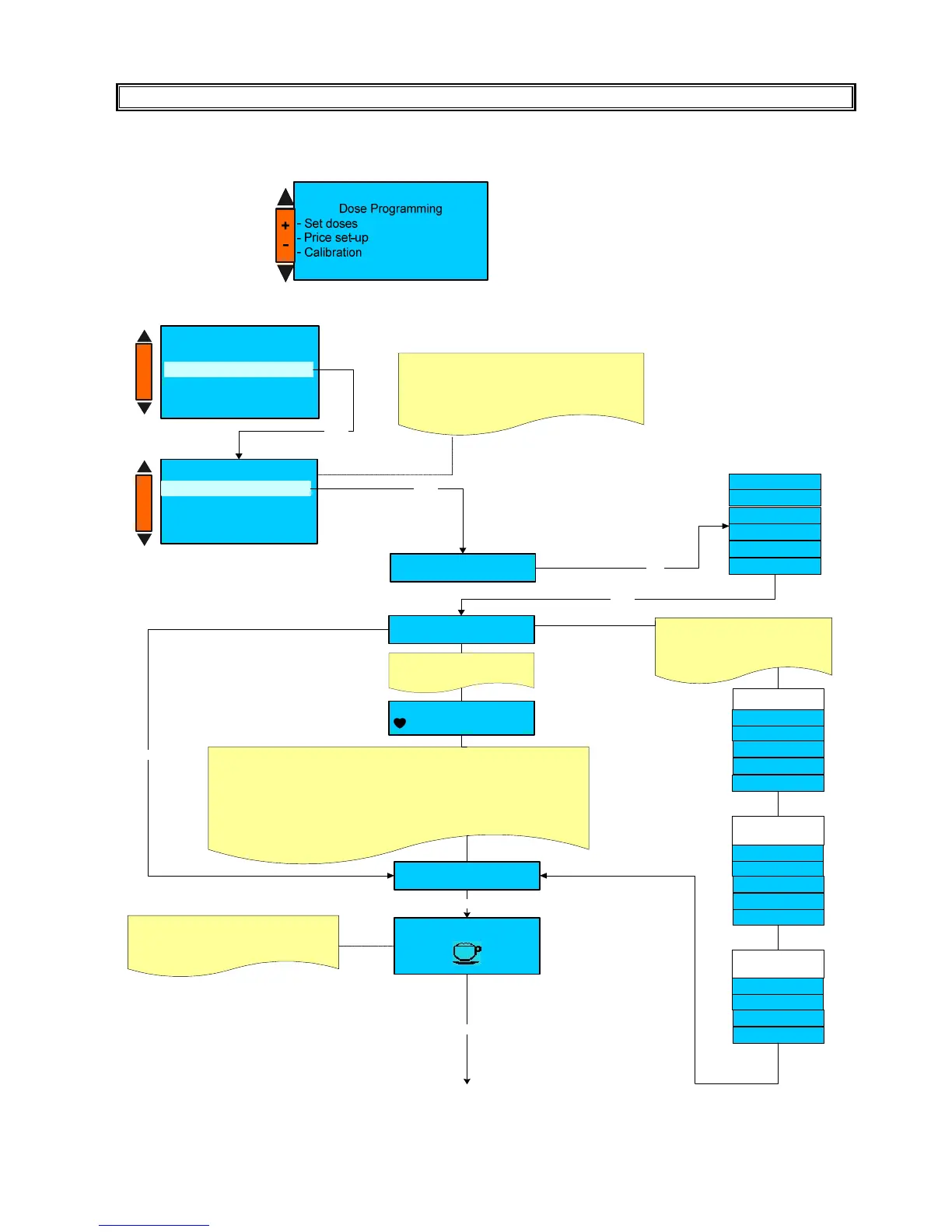
Press the key N° 5 (-) and N° 6 (+) to select the parameter and then press the key 7(Enter) to confirm the selection.
A) SET DOSES
Coffee
M ilk
Hot W ater
Disable
BX Drink type
+ / -
BX Drink name
XX XXX
Enter
To m odify the drink nam e
press the key B 1.
the display show
XXXXX
-B -C -D-F-G -H-I-L-M-
The heart sym bol (cursor) m ust be located on the character you want to select .
To scroll the character use the keys (+ / - ).
Press E nter key to confirm the selection .
Use key B1 to skip at the end of the nam e .
Use key B2 to delete a letter.
Use key B3 to insert a space .
After you selected the required nam e , press Enter key, the display shows :
TX Drink name
XX XXX
Enter
Coffee + M ilk
Enter
Black coffee
Kaffee
Am ericano
Coffee
Espresso
Based on the selected drink type ,
the relevant drink nam e will be
show n.
Press +/- to select the drink nam e
from the default nam es list.
CO FFEE BA SED
DR IN K N AME
Latte m acchiato
M ilchkaffee
Caffè latte
Cappuccino
Esp. macchiato
COF F E E + M ILK
BA SED D RIN K
NA ME
Enter
TX Select icon
Press +/- to select the icon which w ill be
displayed during dispensing .
Do se Program m ing
- P rice set-up
- C alibration
Set doses
Enter
Set doses
BX XXX XXXXXX
BX XXX XXXXXX
BX XXX XXXXXX
BX XXX XXXXXX
BX X XXXXXXXX
Enter
+
-
+
-
BX
= Selected n° key of the first dose keys m enù
XX XXX X
= key nam e.
BX
²
= Selected n°key of the second dose keys m enù
BX
³
= Selected n°key of the thir d dose keys m enù
M ilch
Leche
M ilk
Latte
M IL K B AS E D
DR IN K N AM E
Steam












 To Next Page