EN-15Halfords Carrera Impel
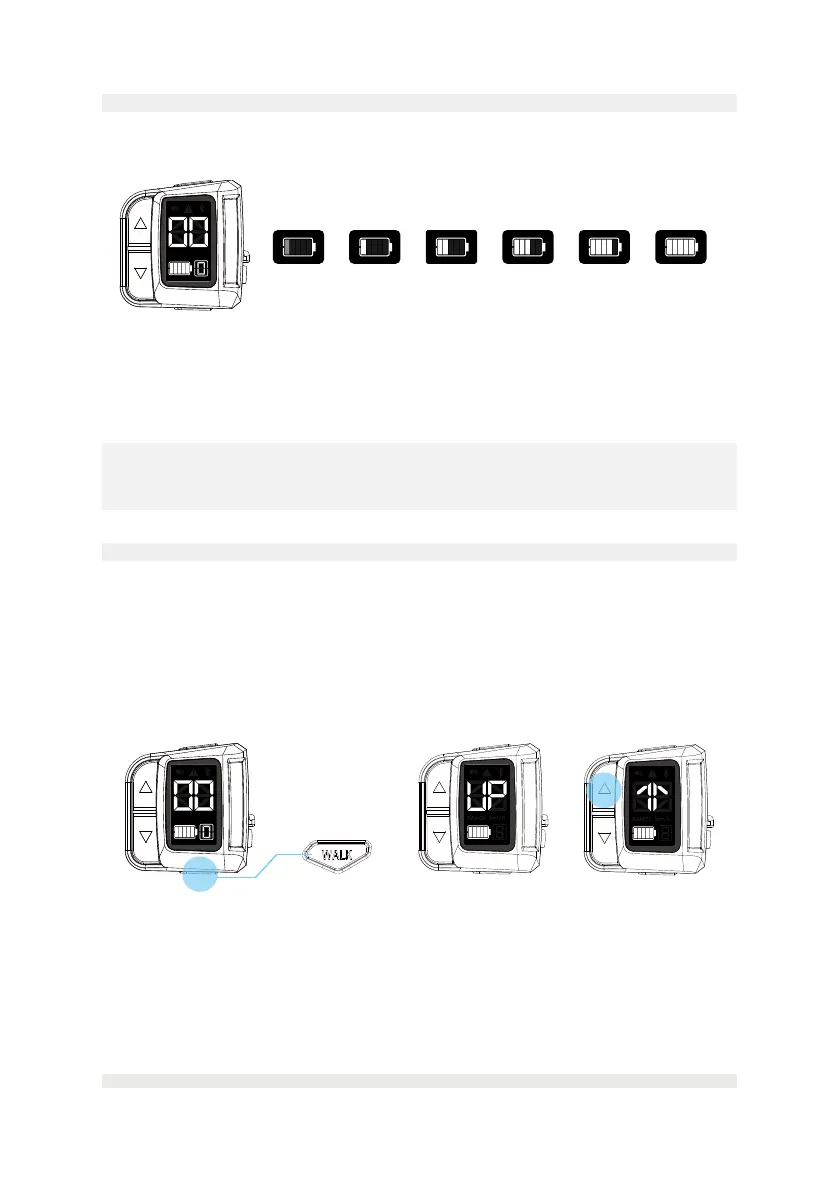
6.6. Charge level indicator
Thebatterystatuslightkeepsashingwhilecharging.Oncethebatteryisfullycharged,
thebatterystatuslightwillstopashing.
• Whenthebatteryisempty,theconsolewillturnoautomatically;pleasechargethe
battery as soon as possible.
• Whenthebatteryisunder9%,thebatterystatuslightwillkeepashing,pleasecharge
the battery immediately.
NOTE
At 4% charged, the riding support will stop. The remaining charge capacity is reserved
to power the lights for up to two hours.
<9%
Flashes
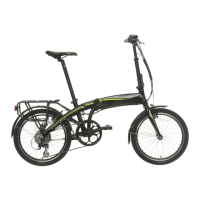
Longpress(>2secs)
Walk assistance activated Press and hold
10-20% 21-40% 41-60% 61-80% 81-100%
6.7. Walk assistance
The walk assist mode can help you push your e-bike easily, e.g. against a slope, with a
maximumspeedofupto6km/h(4mph).
You can only enable the walk assistance when the system is switched on and you are
pushing the e-bike.
• Long press the “WALK” button on the console for two seconds to active the walk assist
mode.
• When walk assist mode activated, 'UP' word will be shown on the display.
• Press and hold the up button to start the walk assist. As long as you are holding the up
button, your e-bike will be propelled forward at a slow speed.
• Release the up button to stop pushing your e-bike.
• If no buttons are pressed within 5 seconds in the walk assist mode, the system will
return to general mode automatically for safety. Or if the 'down/walk' button is pressed
in the walk assist mode, the system will also return to the general mode.


 To Next Page