38
Body Fat Indicator
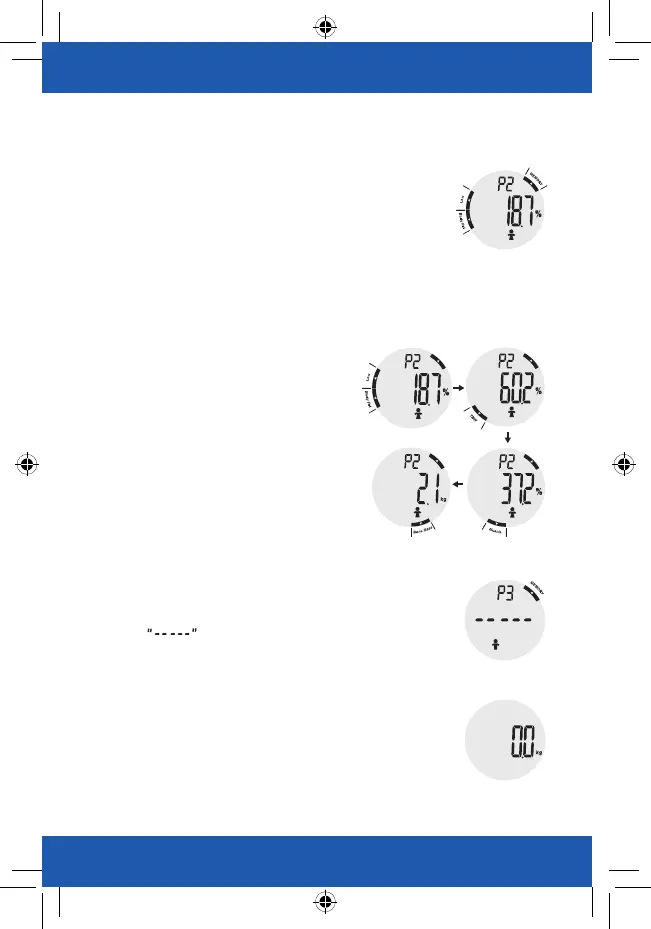
Your body fat level will also be displayed when the
measuring results are shown on the LCD.
As pictured to the right, the user’s body fat level is LOW.
(Please refer to Table of Body Fat Level for more details.)
Data Enquiry in Your Scale
When the Body Fat Analyzer is off, press the function
key
◀
or
▶
to check the latest analysis record stored in the device.
It will start from the User ID that completes the last
measurement (including Body Fat Analysis). You may
keep pressing the function key
◀
or
▶
to view other
users’ latest analysis records.
The analysis result will be displayed in the following
order: Body Fat, Total Body Water, Muscle Mass,
Bone Mass.
Manage Your Health
When there are no pieces of measuring result stored
under a specific User ID, for example, P3, the LCD will
display as pictured below.
After displaying the latest analysis result once, the device
will divert to the weighing interface (as pictured to the right).
You may start measuring and the measuring result will be
recorded under the referring User ID.


 To Next Page