33
Set Up Your Profile
The body fat analyzer BF-1255-B supports multiple users (Up to Eight). You may follow
below instructions to assign User ID and set up your own profile, including Gender,
Stature, and Age.
1. Assigning User ID
•With batteries correctly installed, press “SET” key to
enter setting. Or when the LCD displays 0.0, press and
hold “SET” button for about 5s to enter setting mode.
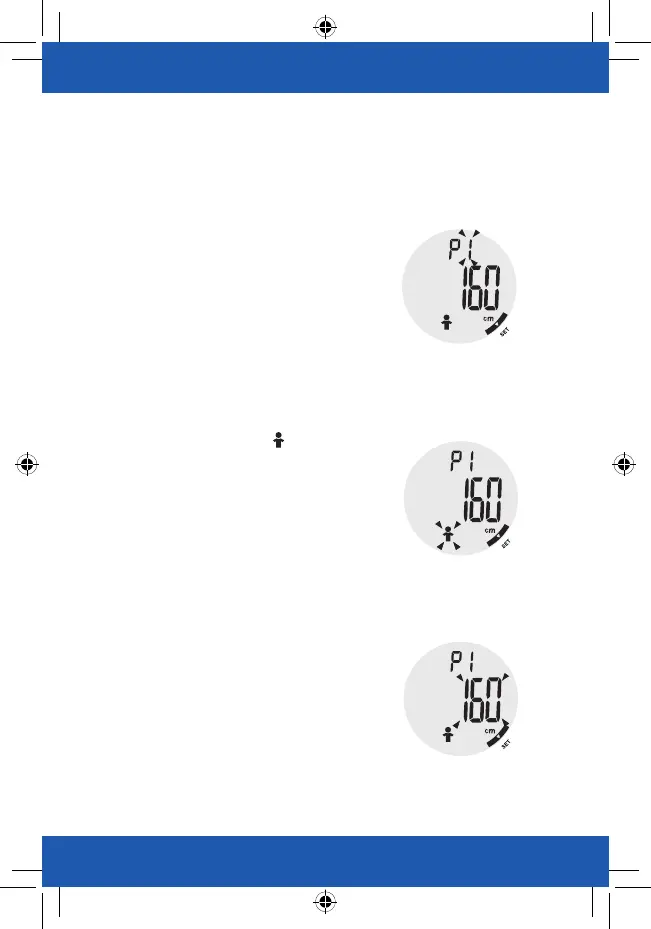
•The system will request User ID selection first.
As pictured to the right, “1” blinks. The operator may
press the function key or to select User ID among P1 to P8.
•Press “SET” key to confirm User ID.
3. Setting Stature
•After confirming Gender, the system will divert to Stature setting.
•As pictured to the right, the digits “160” blinks. The operator may
press the function key
◀
or
▶
to increase or decrease the
numeral. (Range: 100 cm to 220 cm)
•You may press and hold the function key or for fast changing
the numeral.
•Press “SET” key to confirm Stature.
2. Setting Gender
•After confirming User ID, the system will divert to Gender setting.
•As pictured to the right, the portrait blinks. The operator
may press the function key
◀
or
▶
to select Gender.
(Male/Female/Male Athlete/ Female Athlete).
•Press “SET” key to confirm Gender.
Athlete Mode:
An athlete is defined as an adult who is involved in intense
physial activity of approximate 12 hours per week and who has a
resting heart rate of approximately 60 beats per minute or less.


 To Next Page