40
Troubleshooting
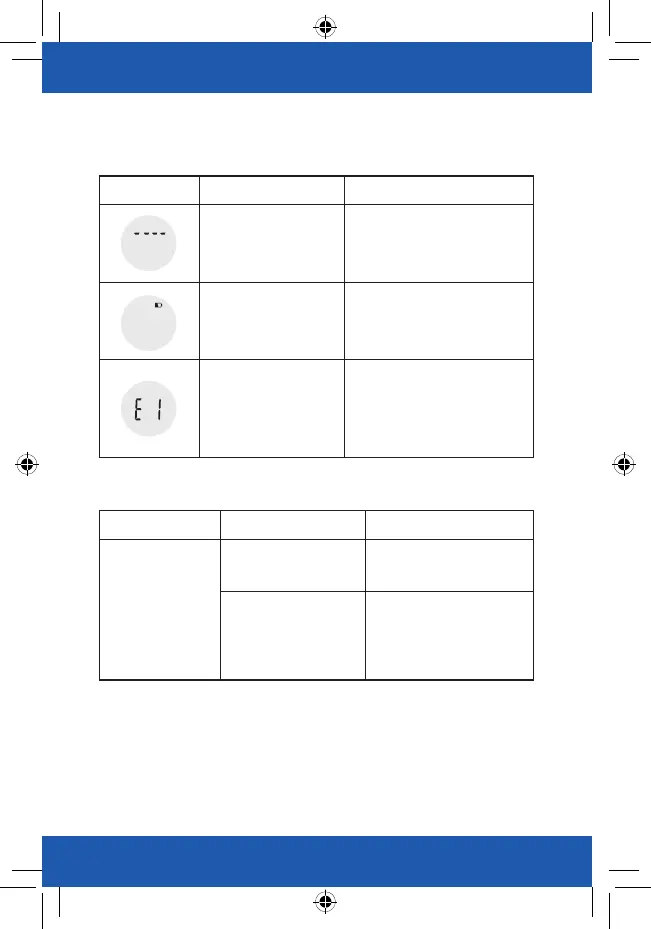
Error Description Solution
Overload. The device will
power off.
Stop using this scale for
measurement.
Low Battery. The device
will power off.
Replace all four batteries at the
same time. Please purchase the
authorized batteries for
replacement.
Failure of pairing up your
scale with your
smartphone.
Please check below items:
-Bluetooth is ON.
-App Collector is ON.
-Both devices are within the
transmission distance of Bluetooth.
Problem Root Cause Solution
Abnormal
measuring results:
- Too high; OR
- Too low; OR
- Huge difference
between two recent
measurement.
Incorrect posture
Please step on the platform
barefooted and stand still.
The device is located on
the soft ground such as a
carpet OR on a rugged
surface.
Please place the device on a
flat, hard surface.
Error Prompt
When Measuring


 To Next Page