EasyManua.ls Logo

CAS SC Series - Counting by Stored Unit Weight

CAS SC Series
16 pages
Print Icon
To Next Page IconTo Next Page
To Previous Page IconTo Previous Page
Loading...
11
1 2 3 4 5
STORE
2
0
0
STORE
STORE
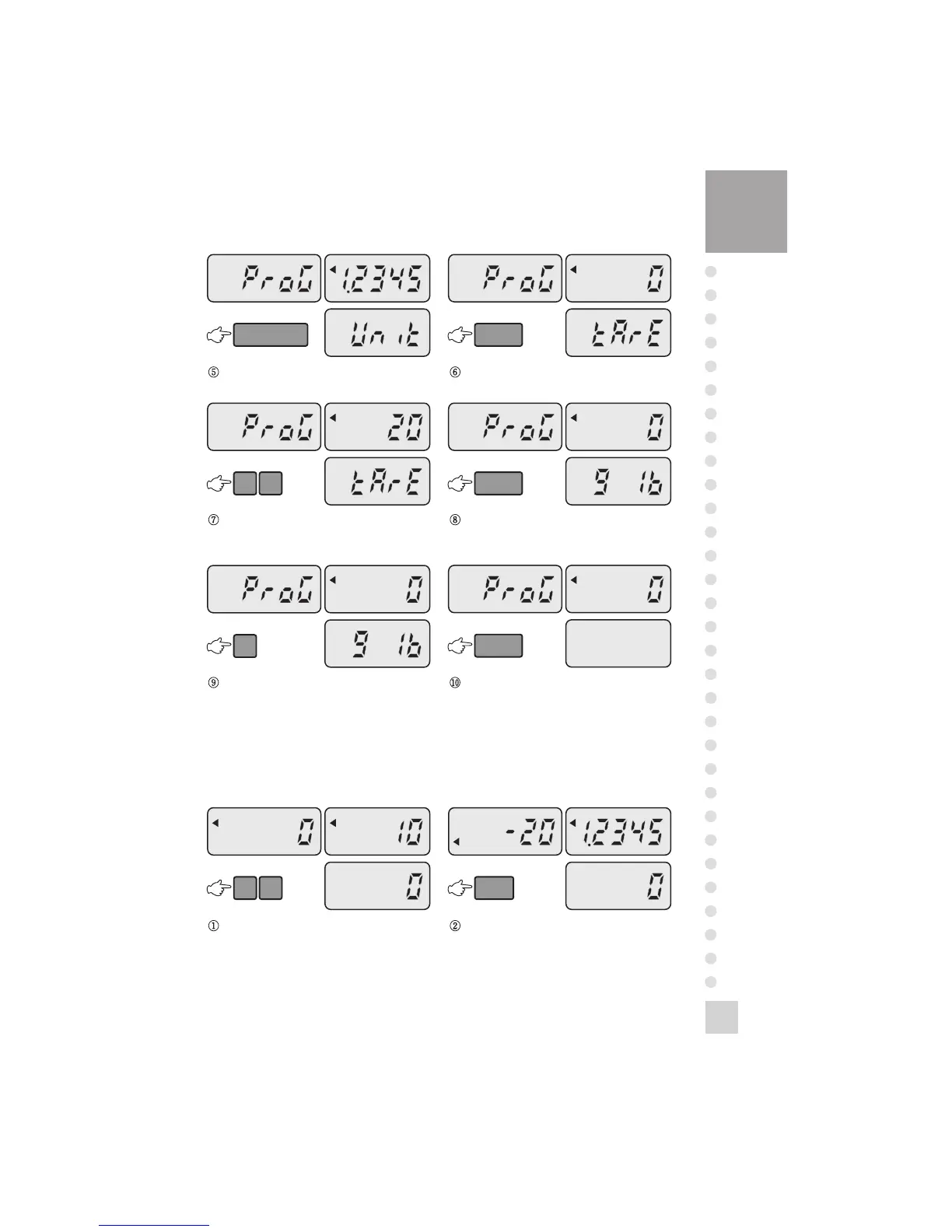
Enter a unit weight. (1.2345g) Press the STORE key.
2 0
STORE
Enter tare weight. (20g)
(If you don’t use tare, go to step 8.)
0
STORE
Press the STORE key.
Enter “0” or “1”.
“0” indicates g and “1” indicates lb.
Press the STORE key. To finish storing unit
weight, press the MODE key then the display
shows “End” and go to normal mode.
(To continue storing another unit weight, press
the SET key. Then you will go to step 2.)
4. Counting by Stored Unit Weight

1 0
CALL
Enter the address to call up a unit weight.
(Address : 10)
Press the CALL key.

Related product manuals