35 | Page
OPERATION
EVACUATING AND BACKFILLING THE OVEN CHAMBER
Put the oven chamber under vacuum and hold for at least 10 minutes when first putting the oven into
operation in a new location to verify the integrity of the vacuum supply system. The oven chamber must
be drawn down to at least -3inHg (-76mmHg or -10kPa) in order to seal.
End of procedure
Evacuate the Oven Chamber
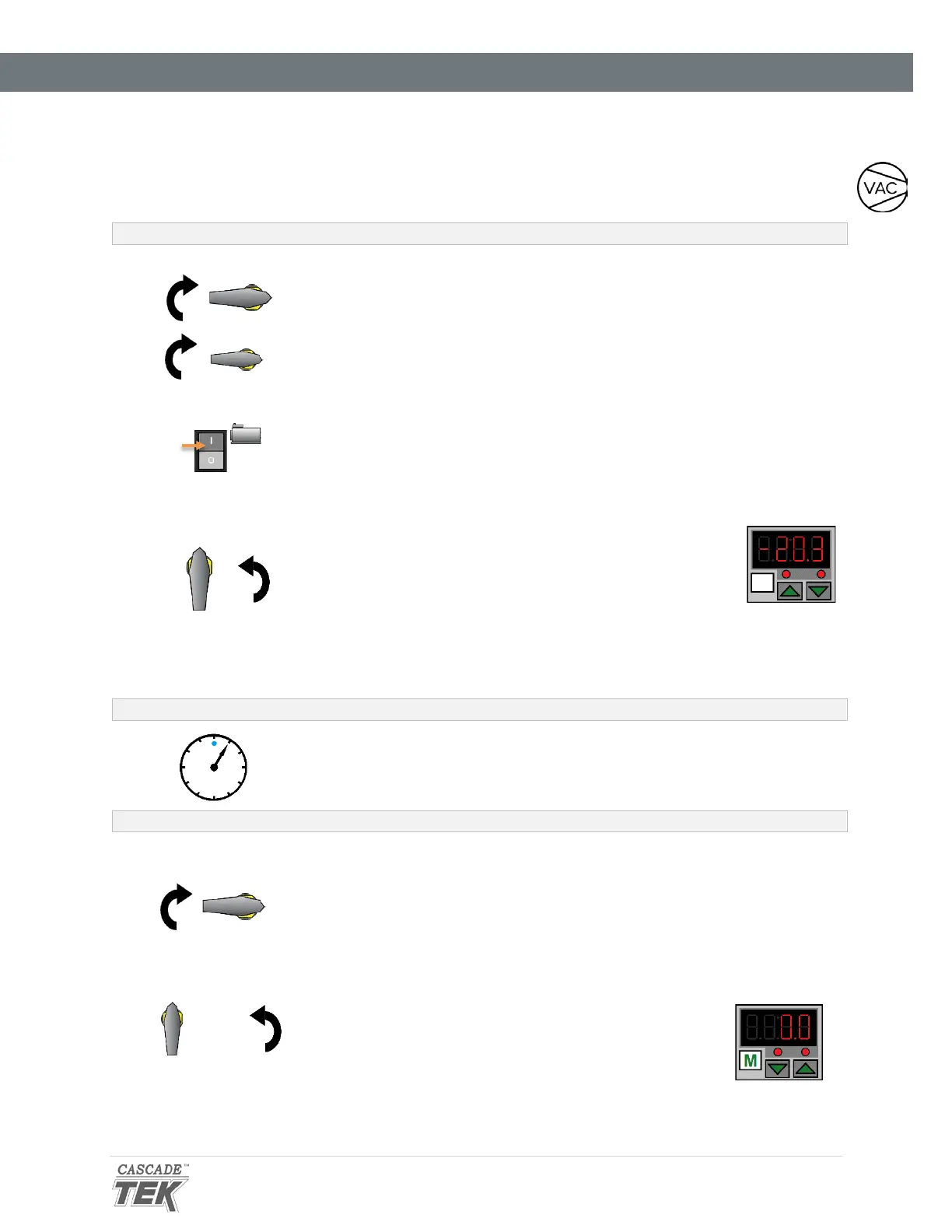
1. Verify the Vacuum and Vent Valve controls are in the closed position
• This protects your vacuum pump from exposure to streaming
atmosphere.
2. Turn on your vacuum pump
3. Open the oven Vacuum Valve
Turn the control all the way counter clockwise
• The Vacuum Gauge on the front panel should show
the chamber pressure decreasing.
• The achievable vacuum level is dependent on
altitude above sea level as well as the vacuum
supply efficiency and the volume of outgassed
byproducts. See page 40.
Continue evacuating the chamber throughout the baking application
to vent outgassed byproducts.
Backfilling the Oven Chamber
4. Close the Vacuum Valve
Turn the Vacuum Valve control back to the closed position (clockwise) to
protect the vacuum pump from extended exposure to streaming
atmosphere.
• The pump may remain on.
5. Slowly open the Vent Valve
The chamber pressure gauge will count upward to zero.


 To Next Page