39 | Page
OPERATION
VACUUM GAUGE OPERATIONS
Change the Unit of Measurement
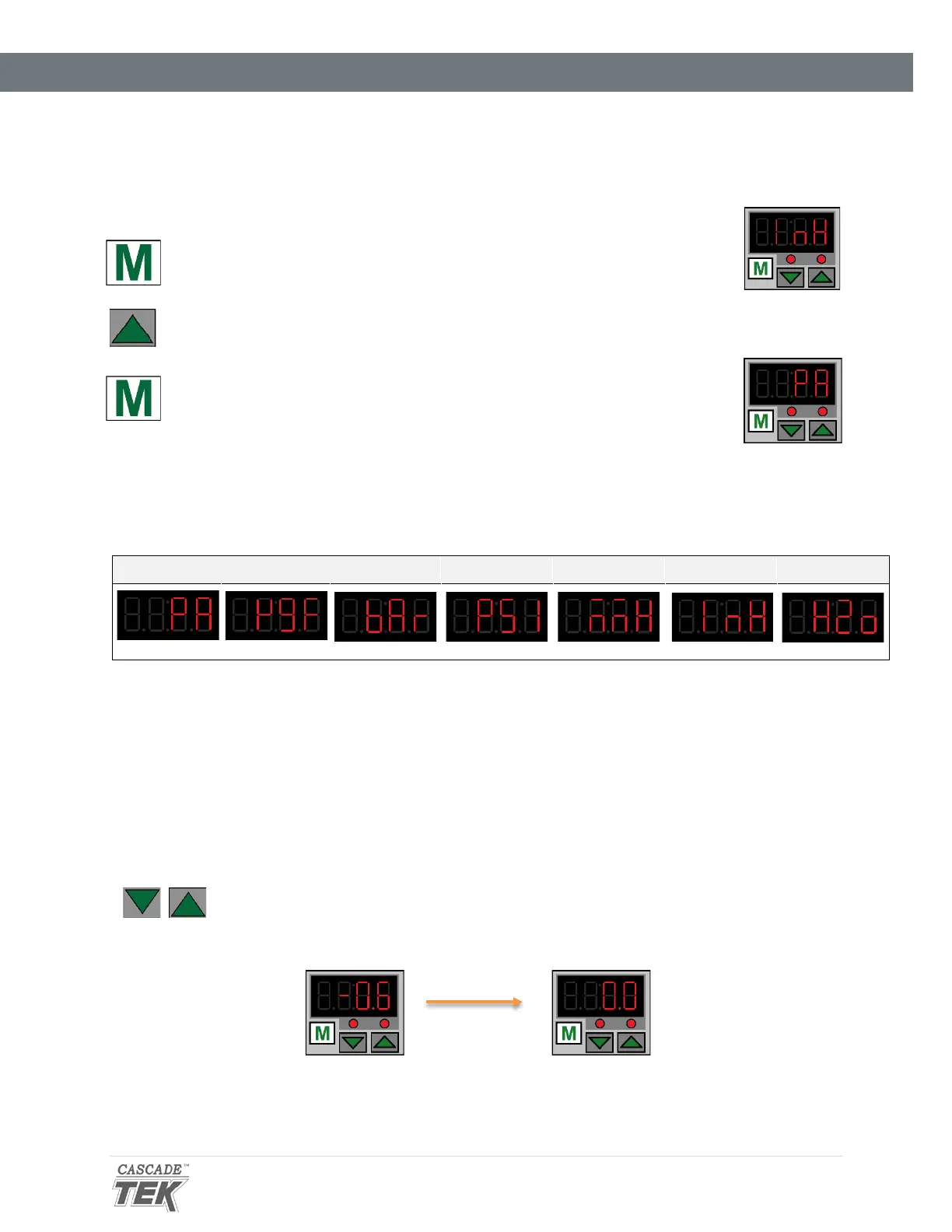
1. Place the vacuum gauge in its adjustment mode.
a. Press and hold the “M” button for approximately 3 seconds
• The display will begin to blink and show a unit of measurement
2. Use the arrow keys to scroll between units.
3. Exit the adjustment mode.
a. Press and hold the “M” button for approximately 3 seconds
• The display will cease blinking and show the current chamber
pressure.
Units of Measurement – Display Characters
kPa Kgf/cm
2
bar psi mmHg inHg mmH
2
O
Zeroing the Gauge
As set at the factory, the vacuum gauge shows a reading of 0 inches of mercury (inHg) when the
chamber is at ambient (room) pressure. The display was set at near sea level.
If the gauge does not show 0 inHg when the chamber is at room atmospheric pressure, perform the
following steps.
1. With the chamber door open, press and hold both the Up and Down
arrow buttons.
2. Release the buttons when the display shows 0.0.
See page 58 for the zero equivalent for units of measurement other than inHg.


 To Next Page