●
C
Pair the watch with a phone.
Before you can use the watch in combination
with a phone, you first need to pair them.
1. Move the phone to be paired with close to
(within one meter of) the watch.
2.
Y
Tap the “CASIO WATCHES” icon.
3.
Y
Tap the of the “My Watch” tab.
4.
Y
Perform the operation shown on the
phone screen to register the watch to the
CASIO WATCHES phone app.
5.
X
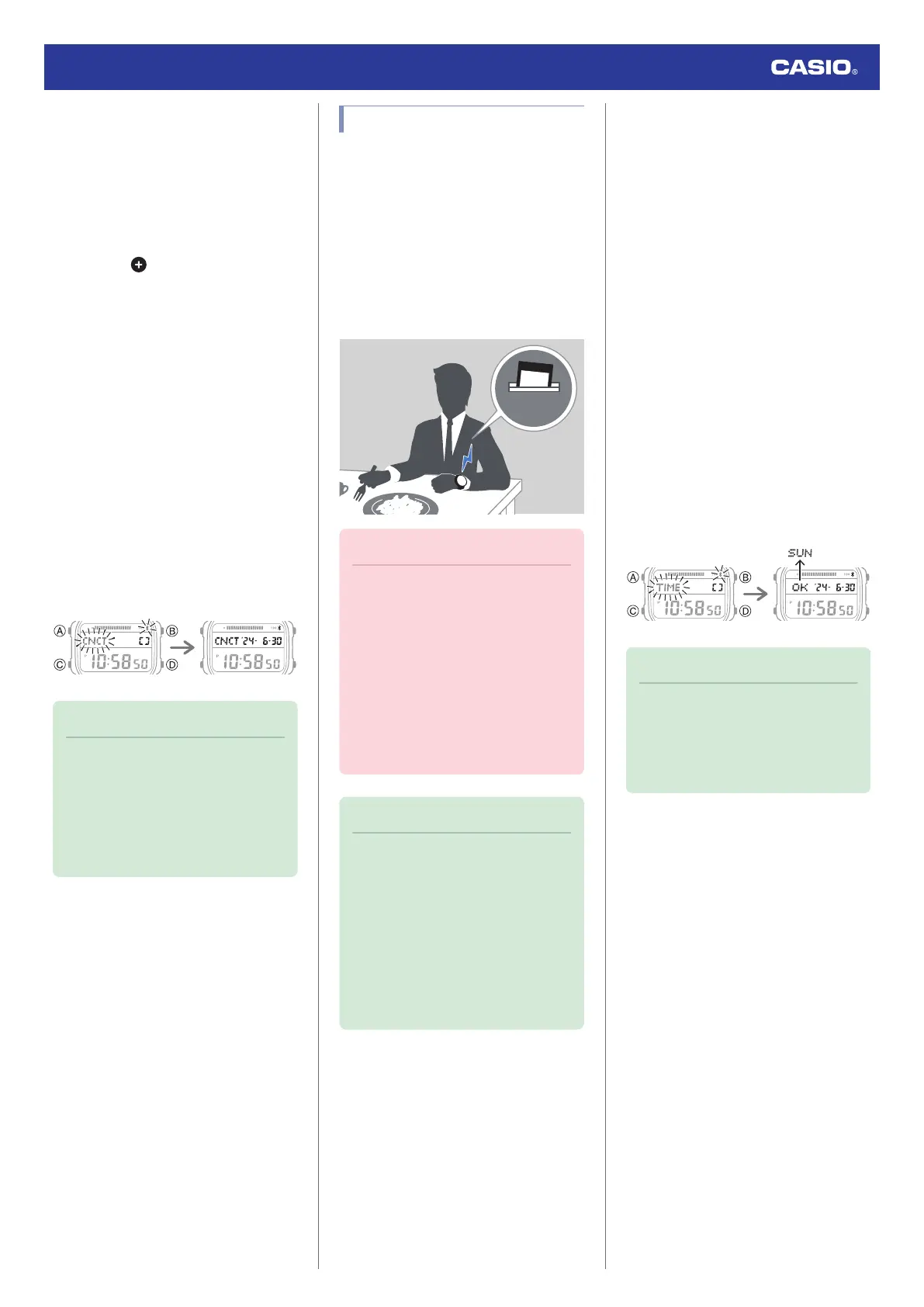
Hold down (C) for at least three
seconds. Release the button when
e
and
[CNCT] start to flash.
When a connection is established
between the watch and phone,
e
and
[CNCT] will stop flashing and remain on
the display.
●
If pairing fails for some reason, [ERR]
will appear on the display momentarily
and then the watch will return to the
Timekeeping Mode. Perform the pairing
procedure again from the beginning.
Pairing started Pairing complete
Note
●
The first time you start up the CASIO
WATCHES phone app, a message will
appear on your phone asking if you
want to enable location information
acquisition. Configure settings to allow
background use of location
information.
Auto Time Correction
Your watch will connect with a phone at preset
times each day and correct its time settings
automatically.
●
Using This Function
Your watch corrects its time setting four times
a day according to a preset schedule. If you
leave your watch in the Timekeeping Mode, it
will perform the correction operation
automatically as you go about your daily life,
without any operation required by you.
Important!
●
The watch may not be able to perform
auto time correction under the
conditions described below.
ー
While the watch is too far away from
its paired phone
ー
While communication is not possible
due to radio interference, etc.
ー
While the phone is updating its
system
ー
While the CASIO WATCHES phone
app is not running on the phone
Note
●
If there is a World Time City specified
with the CASIO WATCHES phone
app, its time will also be corrected
automatically.
●
The watch will connect with the phone
and perform auto time correction at
around 12:30 a.m., 6:30 a.m., 12:30
p.m. and 6:30 p.m. The connection is
automatically terminated after auto
time correction is complete.
●
Triggering Immediate Time Correction
The watch’s time setting will be corrected
automatically whenever you establish a
connection between the watch and a phone.
Whenever you want to trigger immediate time
correction, perform the procedure below to
connect with a phone.
1.
X
Enter the Timekeeping Mode.
l
Navigating Between Modes
2. Move the phone close to (within one meter
of) the watch.
3.
X
Press (D).
[TIME] flashes to indicate that the watch
has started the connection operation.
Once the watch and phone are
connected, [OK] will appear, and then the
watch will correct its time setting based on
information from the phone.
●
At this time your current location is
recorded by your phone.
Trying to connect After time correction
Note
●
The connection is terminated
automatically after time correction is
complete.
●
If time correction fails for some reason,
[ERR] will appear.
Watch Operation Guide 3565
10



 To Next Page