Measuring a Split Time or Lap
Time
1. Enter the Stopwatch Mode.
l
Navigating Between Modes
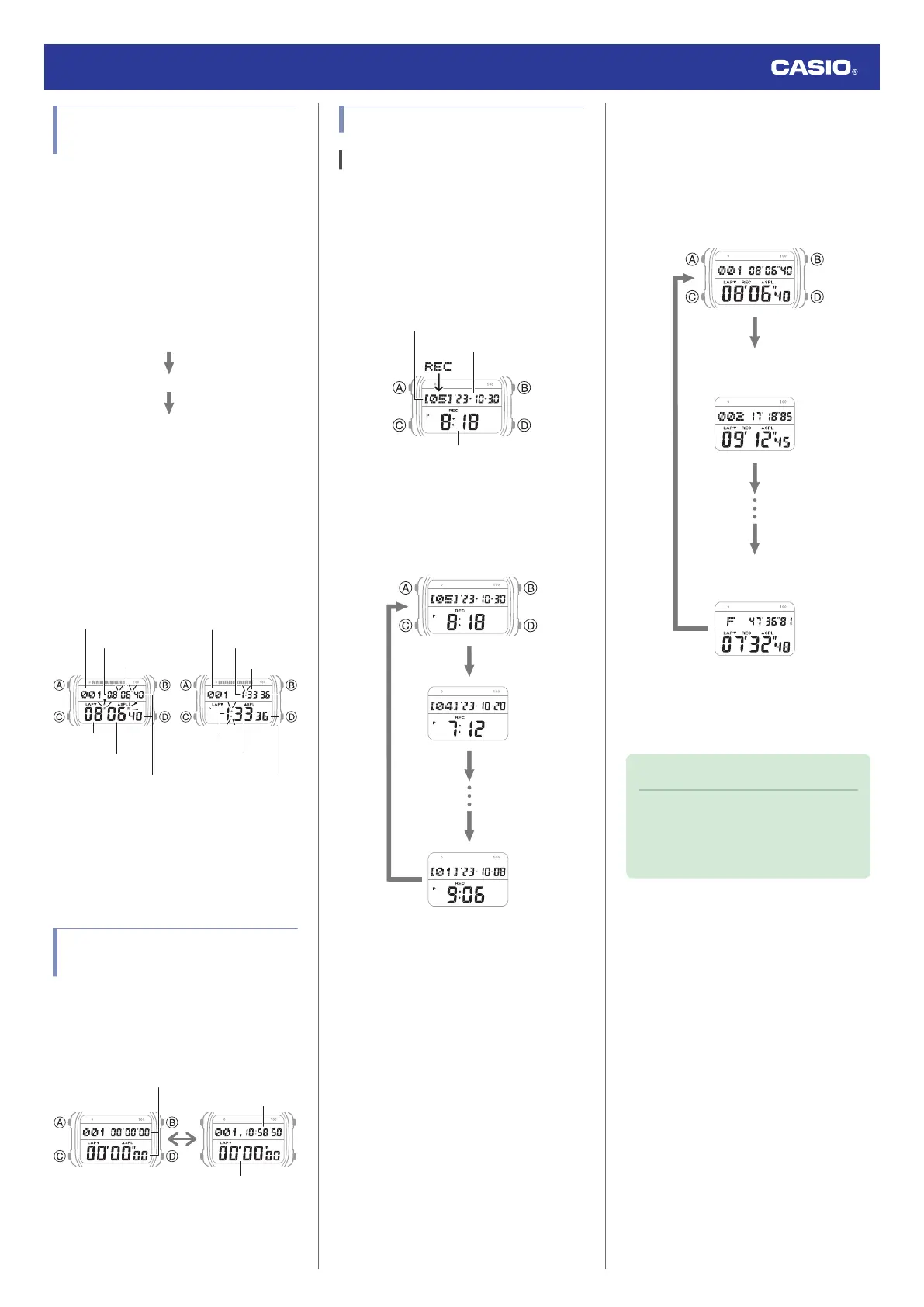
2. Use the operations below to measure
elapsed time.
●
Each press of (A) displays the time
elapsed from the start of the stopwatch
operation up to that point (split time) and
the elapsed time for a specific segment
(lap time).
●
Split times and lap times are both
displayed at the same time. Lap and
split times up to the one hour are shown
in 1/100-second units. Subsequent
measurements after one hour are
shown in 1-second units.
[SPL]: Split time
[LAP]: Lap time
Minutes
Seconds
1/100 seconds
Time Number*
First hour After first hour
Time Number*
Seconds
Minutes
Minutes
Minutes
Seconds
Hours
Hours
* [F] is displayed for the final time
number when an elapsed time
measurement operation is stopped.
3. Press (A) to reset the measurement time
to all zeros.
Viewing the Current Time
While in the Stopwatch Mode
Pressing (A) while the stopwatch is reset to all
zeros causes the current time to appear in the
upper section of the screen. Press (A) again
to return to the normal stopwatch display.
Current time
Measurement
Measurement
Viewing Measured Time Data
Viewing Saved Data
You can use the operation below to view split
times and lap times.
1. Enter the Recall Mode.
l
Navigating Between Modes
●
This causes the latest measurement
number and date to appear.
Measured time
Measurement date
Measurement number
2. Press (A) to cycle through measurement
numbers.
●
Each time you press (A), the previous
measurement number appears.
3. Use (D) to display the measurement
values you want to view.
[LAP]: Lap time
[SPL]: Split time
D
D
D
D
Oldest data
Newest data
Second oldest
data
●
Split and lap times up to the one hour
are shown in 1/100-second units.
Subsequent measurements after one
hour are shown in 1-second units.
Note
●
A record of the measured data is
created and assigned a number for
each measurement operation (from
start to stop).
Watch Operation Guide 3565
20



 To Next Page