●
Checking Your Progress to Your Daily
Step Target
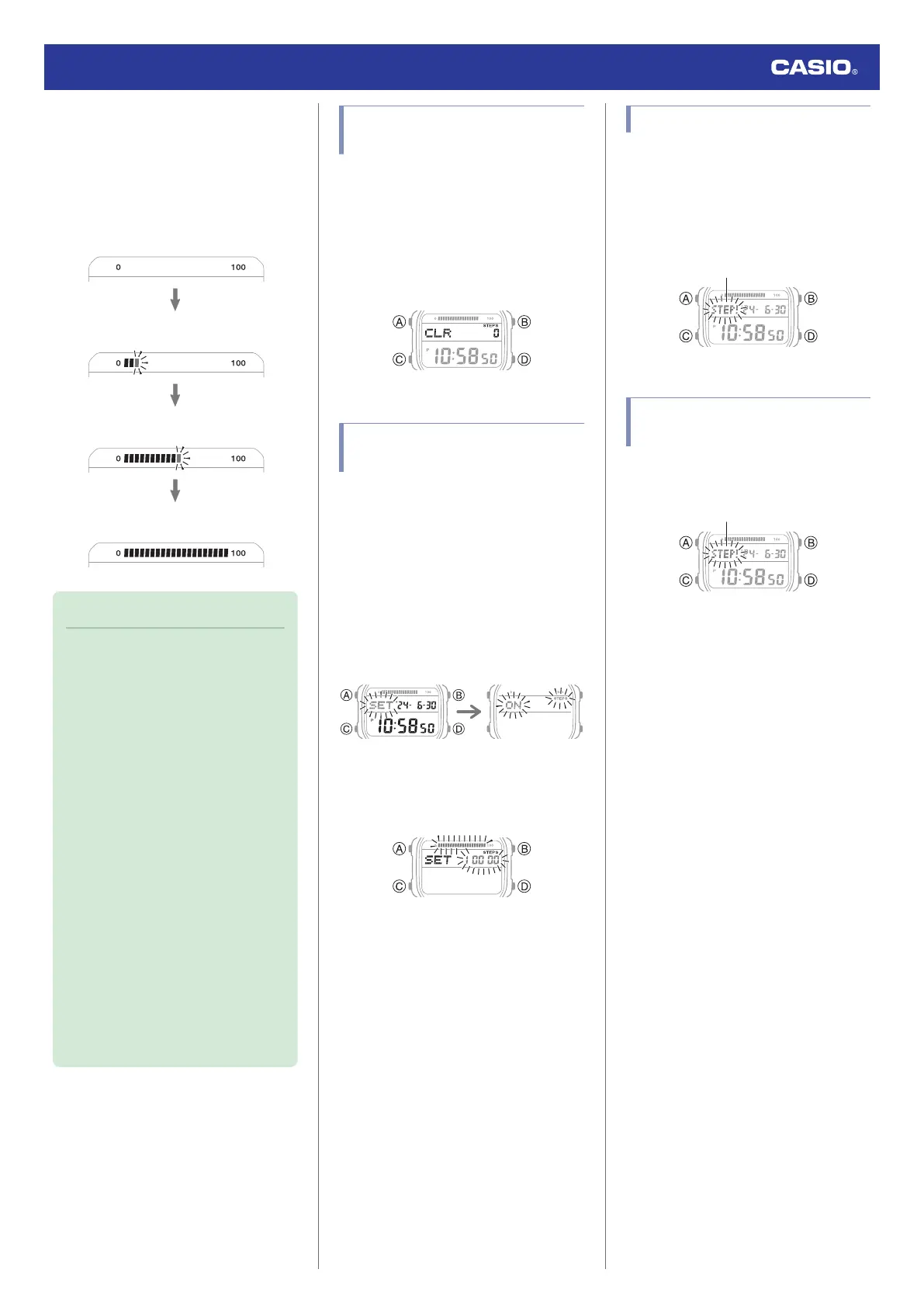
The graphic display area shows your current
progress toward achieving the daily step
target specified by you.
Example: Daily target of 10,000 steps
0 steps
1,000 steps
5,000 steps
10,000 steps (goal attained)
Note
●
The step count can show a value up to
999,999 steps. If the step count
exceeds 999,999, the maximum value
(999,999) remains on the display.
●
To prevent miscounts, the displayed
count does not increase for about 18
seconds after you start walking. After
you have been walking for about 18
seconds, the correct count appears,
including the steps you took during the
previous 18 seconds.
●
The step count is reset to zero at
midnight each day.
●
To save power, step counting stops
automatically if the watch is removed
from the wrist and no movement is
detected for about two to three
minutes.
●
Graph contents are also updated when
any one of the events below occurs.
ー
When the step counting is disabled
to save power
ー
When counting is not possible due
to accelerometer error or insufficient
power
Resetting Today’s Step
Count
1. Enter the Timekeeping Mode.
l
Navigating Between Modes
2. Hold down (B) and (D) for at least two
seconds. Release when [CLR] and the
step count stop flashing.
This resets the step count.
Specifying a Daily Step
Target
You can specify a daily step goal within the
range of 1,000 to 50,000, in units of 1,000
steps.
1. Enter the Timekeeping Mode.
l
Navigating Between Modes
2. Hold down (A) for at least two seconds.
This causes the current step reminder
setting ([ON] or [OFF]) to flash on the
display.
3. Press (C).
This causes the current daily step target
to flash.
4. Use (B) and (D) to specify a step count
target value.
5. Press (A) to complete the setting
operation.
Step Reminder
If the watch determines that you have not
walked for a preset amount of time, it will
sound a tone and display a flashing Step
Reminder indicator. If the watch performs this
Step Reminder alert operation, get up and
walk for five minutes to clear it.
Clearing a Step Reminder
Alert Indicator
To clear the step reminder alert indicator
([STEP!]), press any button besides (B).
Watch Operation Guide 3565
23



 To Next Page