10
Getting Started
Loading receipt paper
Follow steps
11
11
1 through
33
33
3 under “Loading journal paper” on the
previous page.
Important!
Never operate the cash register without paper. It can damage the printer.
44
44
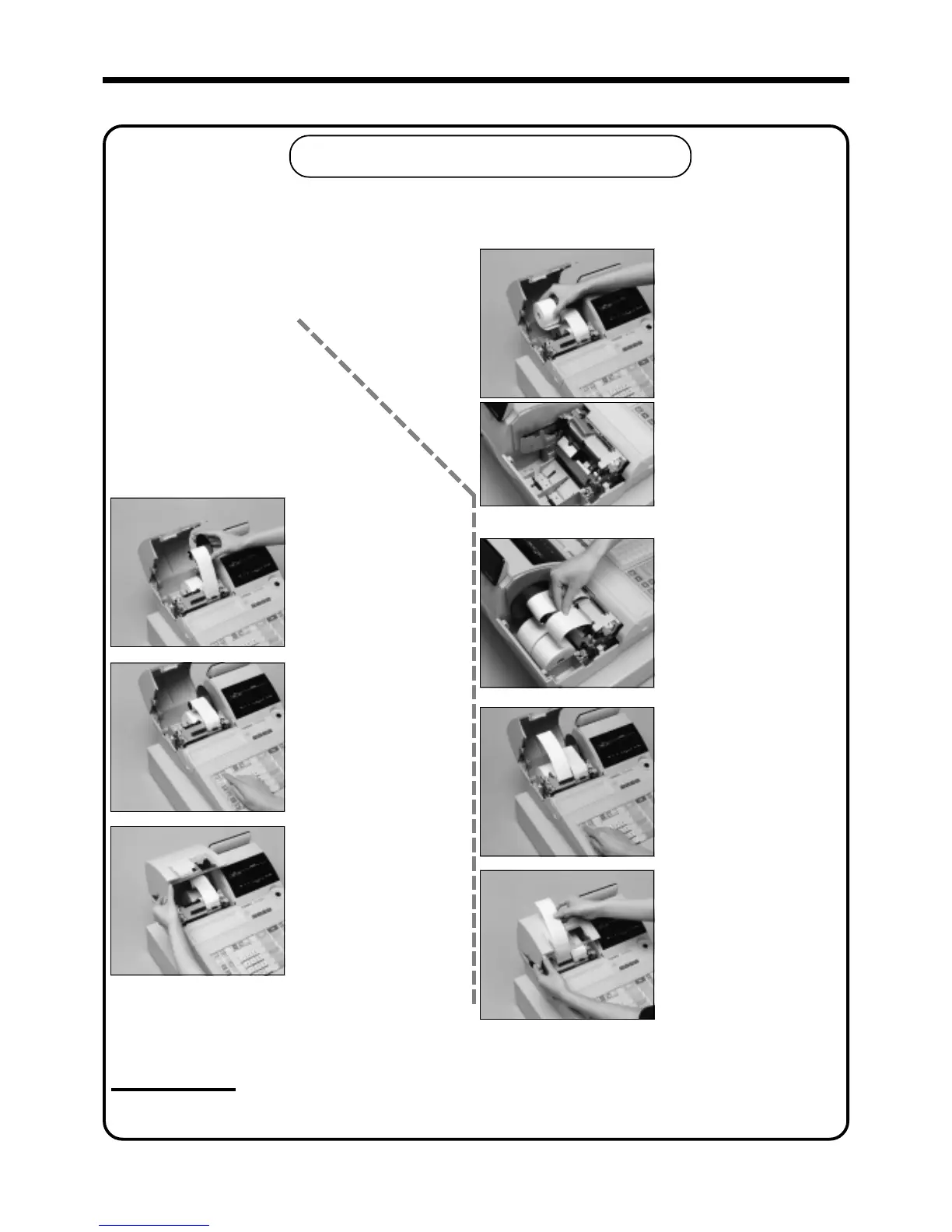
4
Ensuring the paper is being
fed from the bottom of the
roll, lower the roll into the
space behind the printer.
55
55
5
Drop the paper roll gently
and insert paper to the
paper inlet.
66
66
6
Press the f key until
about 20 cm to 30 cm of
paper is fed from the
printer.
77
77
7
Set the printer cover,
passing the leading end of
the paper through the paper
outlet. Close the printer
cover and tear off the
excess paper.
88
88
8
Place the take-up reel into
place behind the printer,
above the roll paper.
99
99
9
Press the j key to take
up any slack in the paper.
00
00
0
Close the printer cover.
www.cashregisters.net



 To Next Page