71
Advanced Operations and Setups
CE-6000 User’s Manual
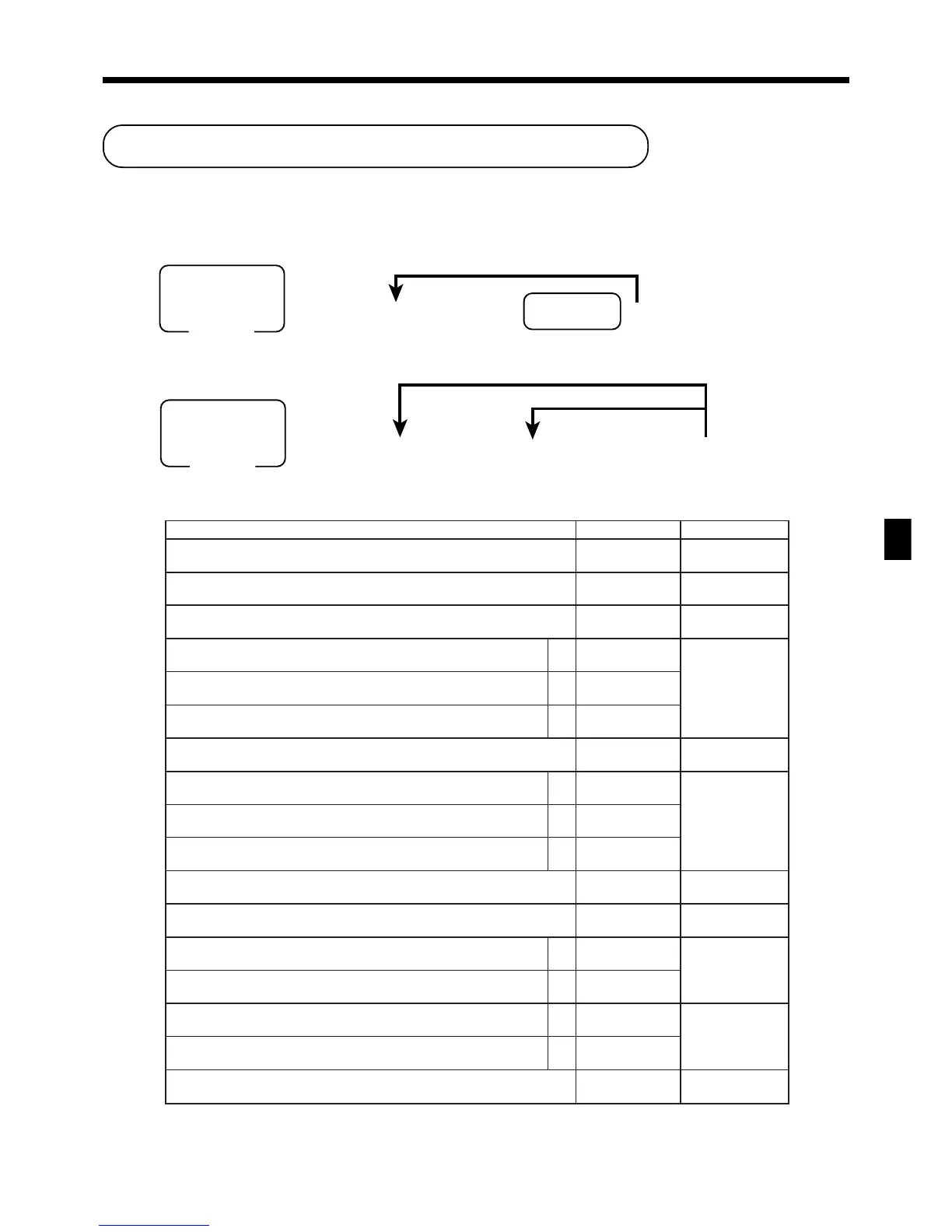
noitpircseDeciohCedocmargorP
:lortnocmetielgniS
3=tpiecermetielgniS,0=tpiecerlamroN
tnacifingiS
rebmun
:
D
21
”0“syawlA
;
D
11
noitaraperp/tnemidnoc/lamroN
2=noitaraperP,1=tnemidnoC,0=metilamroN
tnacifingiS
rebmun
:
D
01
.edom–GER/FRninoitarepoelbanE a
0=seY
1=oN
:
)c+b+a(
D
9
.edom2GERninoitarepoelbanE b
0=seY
2=oN
.edom1GERninoitarepoelbanE c
0=seY
4=oN
:sutatselbaxaT
.wolebeeS
::
D
8
D
7
.ecirptinu0elbanE a
0=oN
1=seY
:
)c+b+a(
D
6
.ecirpevitagenelbanE b
0=oN
2=seY
hsaH c
0=oN
4=seY
”0“syawlA
;
D
5
.ecirptinuderetneyllaunamrof)LDL(noitatimiltigidwoL
tnacifingiS
rebmun
:
D
4
).elbissopsinoitadilavenoylno,”oN“fI(:noitadilavelpitluM a
0=seY
1=oN
:
)b+a(
D
3
)ULProfevitceffeylnO(ULPnepO b
0=oN
4=seY
1noissimmoC a
0=oN
1=seY
:
)b+a(
D
2
2noissimmoC b
0=oN
2=seY
.tupniULPnoitaraperp/tnemidnocforebmunyroslupmoC
tnacifingiS
)8~0(rebmun
:
D
1
Programming department/PLU
There are two ways to program to department/PLU, batch feature programming and individual feature programming.
Batch feature programming to department/PLU
• Department
6 3s 6 : ~ : 6
Department
6 s
To another department key
Program data
Mode switch
PGM
6 3s 6
PLU No.
+ 6
:
~
:
6 a 6 s
Program data
Mode switch
PGM
To new (not sequencial) PLU
Different program to the next PLU
• PLU
• Program data
www.cashregisters.net



 To Next Page