E-60
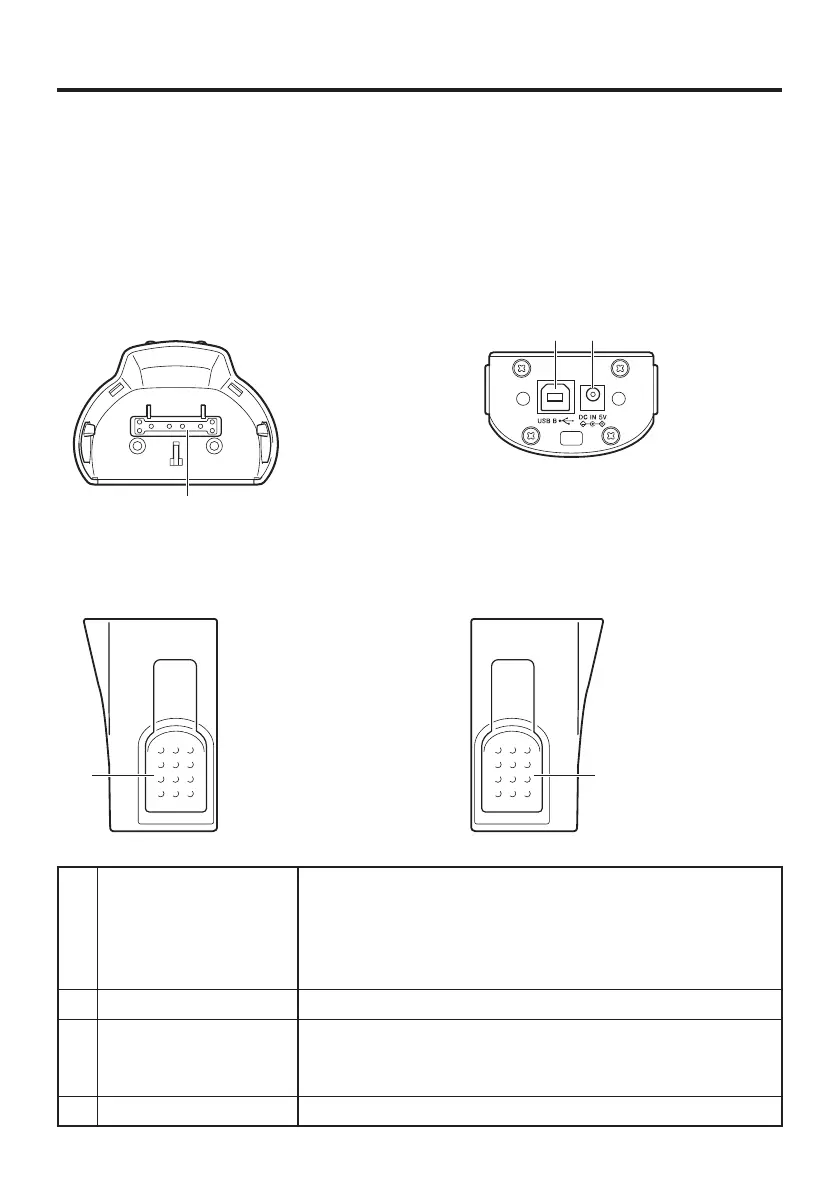
Using the USB and Charging Unit (HA-K65US)
The optional USB and Charging Unit (HA-K65US) makes it possible to transmit system
data and fi le data between the Handheld Terminal and a PC via a USB connection
(download or upload). You can also use the USB and Charging Unit to charge the
battery pack installed in the Handheld Terminal.
General Guide
2 1
Bottom
3
Top
4
Left
4
Right
1 AC Adaptor Jack This port is used to transmit system data and fi le data
(download, upload) by connecting the USB and Charging
Unit to a PC using a USB cable (DT-380USB-A). A
dedicated driver must be installed in the PC before
connecting the USB and Charging Unit to the PC.
2 USB Client Port Connect the AC adaptor (sold separately) here.
3 Power Supply/Data
Communication
Terminal
Power is supplied to the DT-X200 via these contacts. Also
used for data communication.
4 Stoppers Secures the DT-X200.



 To Next Page
 Loading...










