129
Viewing Snapshots and Movies
Playback Controls
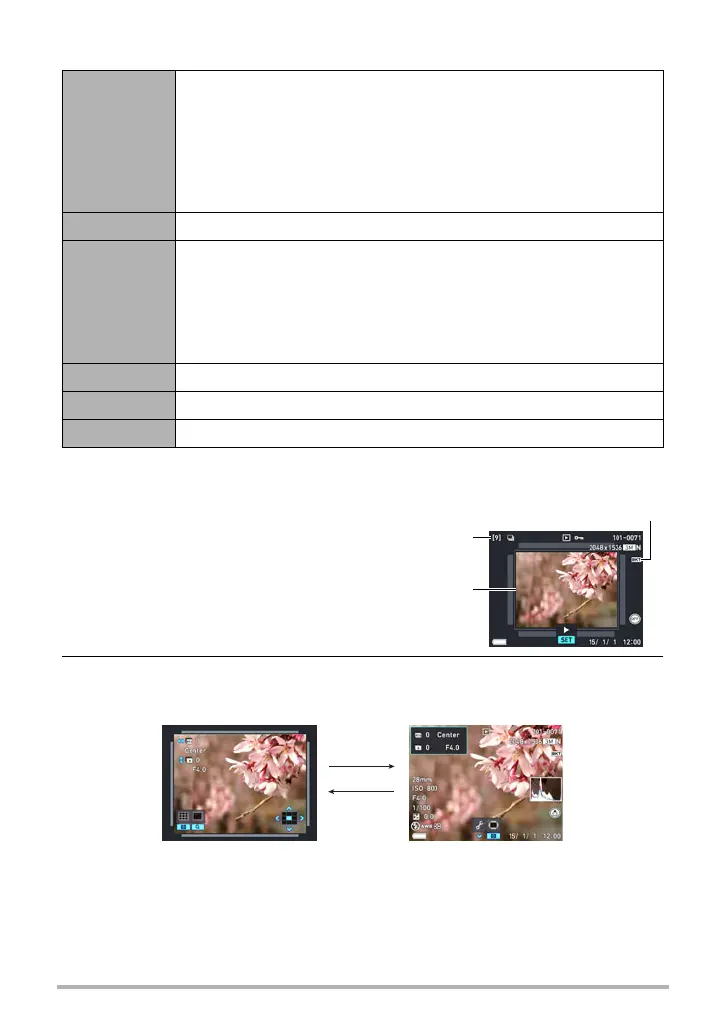
. To view an image shot with Intelligent Bracketing
1. Press [p] (PLAY) and then
use [4] and [6] to display the
Intelligent Bracketing group
you want to play.
2. Press [SET].
[4] [6]
During playback, changes the playback direction and playback
speed.
While playback is paused, scrolls forward or back.
• Forward and back scrolling can also be performed using the
function ring.
• Playback speed cannot be adjusted while the displayed image is
zoomed.
[SET] Toggles between pause and play.
Zoom
controller
Zooms the image.
• You can use [8], [2], [4], and [6] to scroll the zoomed image
on the monitor screen.
• Rotating the zoom controller towards w (]) while an image is
not zoomed will display a menu of images in the current CS
group.
[MENU] Exits CS group playback.
[8] (DISP) Cycles through information display formats.
[2] Displays the “Edit Group” menu.
Bracketing icon
Base image in
group
Total number of
images in group
[MENU]
[SET]
Bracketing group playback Full-screen view


 To Next Page