23
Quick Start Basics
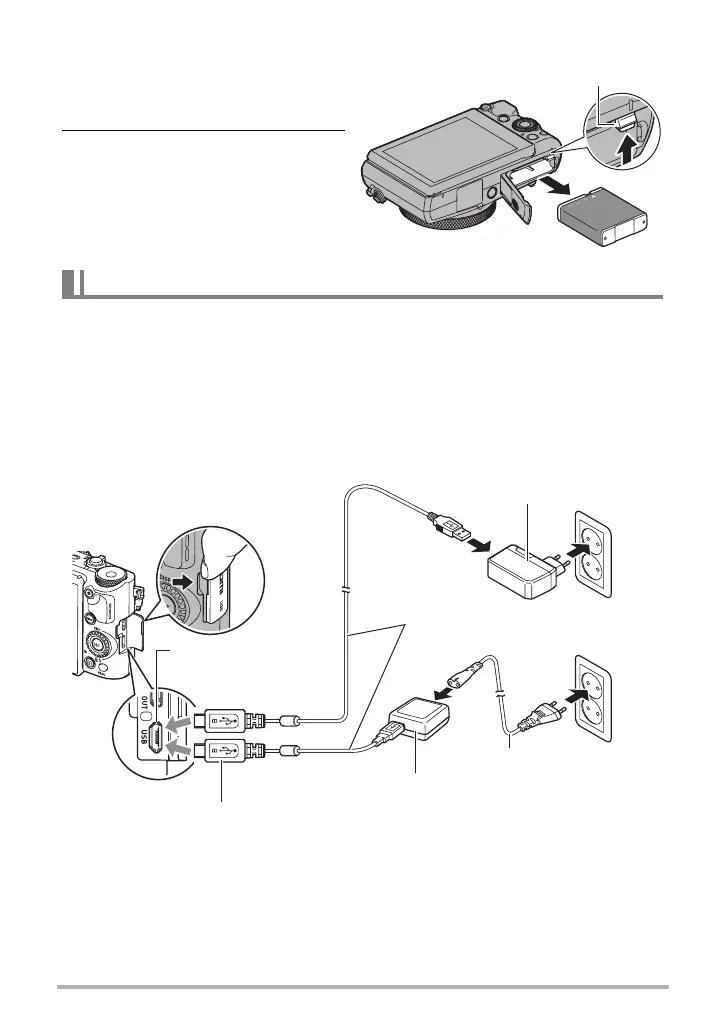
To replace the battery
1. Open the battery cover and
remove the current battery.
2. Load a new battery.
You can use either of the two following methods to charge the camera’s battery.
• USB-AC adaptor
• USB connection to a computer (Using the included micro USB cable.)
. To charge with the USB-AC adaptor
The adaptor lets you charge the battery while it is loaded in the camera.
While the camera is turned off, connect in the sequence shown below.
Charging time: Approximately 240 minutes
• When disconnecting the USB-AC adaptor from the camera, be sure to disconnect
from the camera first.
Charge the Battery
Stopper
3
4
2
1
3
2
1
USB-AC adaptor (AD-C53U)
u mark of the small (micro USB) connector facing the
monitor screen side of the camera.
[USB] port
USB-AC adaptor
(AD-C54UG)
Micro USB cable
(included with camera)
Power cord


 To Next Page