E-19
Note: • Only the quotient value of a ÷R calculation is stored in Ans memory.
• Assigning the result of a remainder division calculation to a variable
will assign the quotient value only. Performing the operation 5 a
'(÷R) 2 !t(STO))(X) (which assigns the result of 5÷R2 to X)
will assign a value of 2 to X. • If a ÷R calculation is part of a multi-step
calculation, only the quotient is passed on to the next operation. (Example:
10 + 17 a'(÷R) 6 = → 10 + 2) • Operation of the f and e keys is
disabled while a remainder division result is on the display.
Cases when Remainder Division becomes
Non-remainder Division
If either of the following conditions exists when you perform a remainder
division operation, the calculation will be treated as normal (non-remainder)
division.
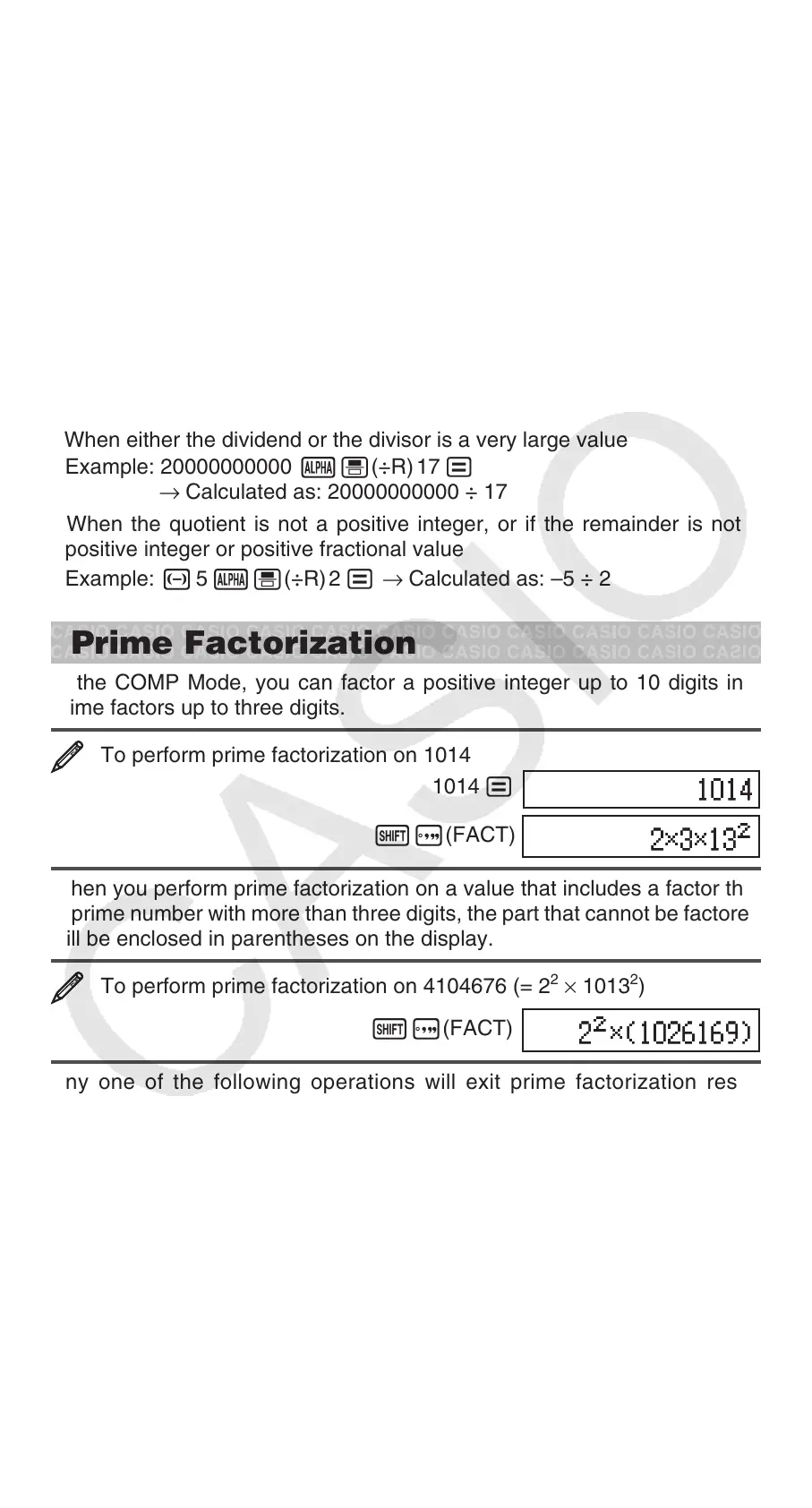
• When either the dividend or the divisor is a very large value
Example: 20000000000 a'(÷R) 17 =
→ Calculated as: 20000000000 ÷ 17
• When the quotient is not a positive integer, or if the remainder is not a
positive integer or positive fractional value
Example: - 5 a'(÷R) 2 = → Calculated as: –5 ÷ 2
Prime Factorization
In the COMP Mode, you can factor a positive integer up to 10 digits into
prime factors up to three digits.
To perform prime factorization on 1014
1014 =
!e(FACT)
When you perform prime factorization on a value that includes a factor that
is prime number with more than three digits, the part that cannot be factored
will be enclosed in parentheses on the display.
To perform prime factorization on 4104676 (= 2
2
× 1013
2
)
!e(FACT)
Any one of the following operations will exit prime factorization result
display.
• Pressing !e(FACT) or =.
• Pressing any of the following keys: . or e.
• Using the setup menu to change the angle unit setting (Deg, Rad, Gra) or
the display digits setting (Fix, Sci, Norm).
Note: • You will not be able to execute prime factorization while a decimal
value, fraction, or negative value calculation result is displayed. Trying to
do so will cause a math error (Math ERROR). • You will not be able to
execute prime factorization while the result of a calculation that uses Pol,
Rec, ÷R is displayed.


 To Next Page