E-37
x
3
– 2x
2
– x + 2 = 0
N5(EQN)4(aX
3
+ bX
2
+ cX + d = 0)
1 =- 2 =- 1 = 2 ==
(X
1
=) –1
c (X
2
=) 2
c (X
3
=) 1
Matrix Calculations (MATRIX)
Use the MATRIX Mode to perform calculations involving matrices of up to 3
rows by 3 columns. To perform a matrix calculation, you first assign data to
special matrix variables (MatA, MatB, MatC), and then use the variables in
the calculation as shown in the example below.
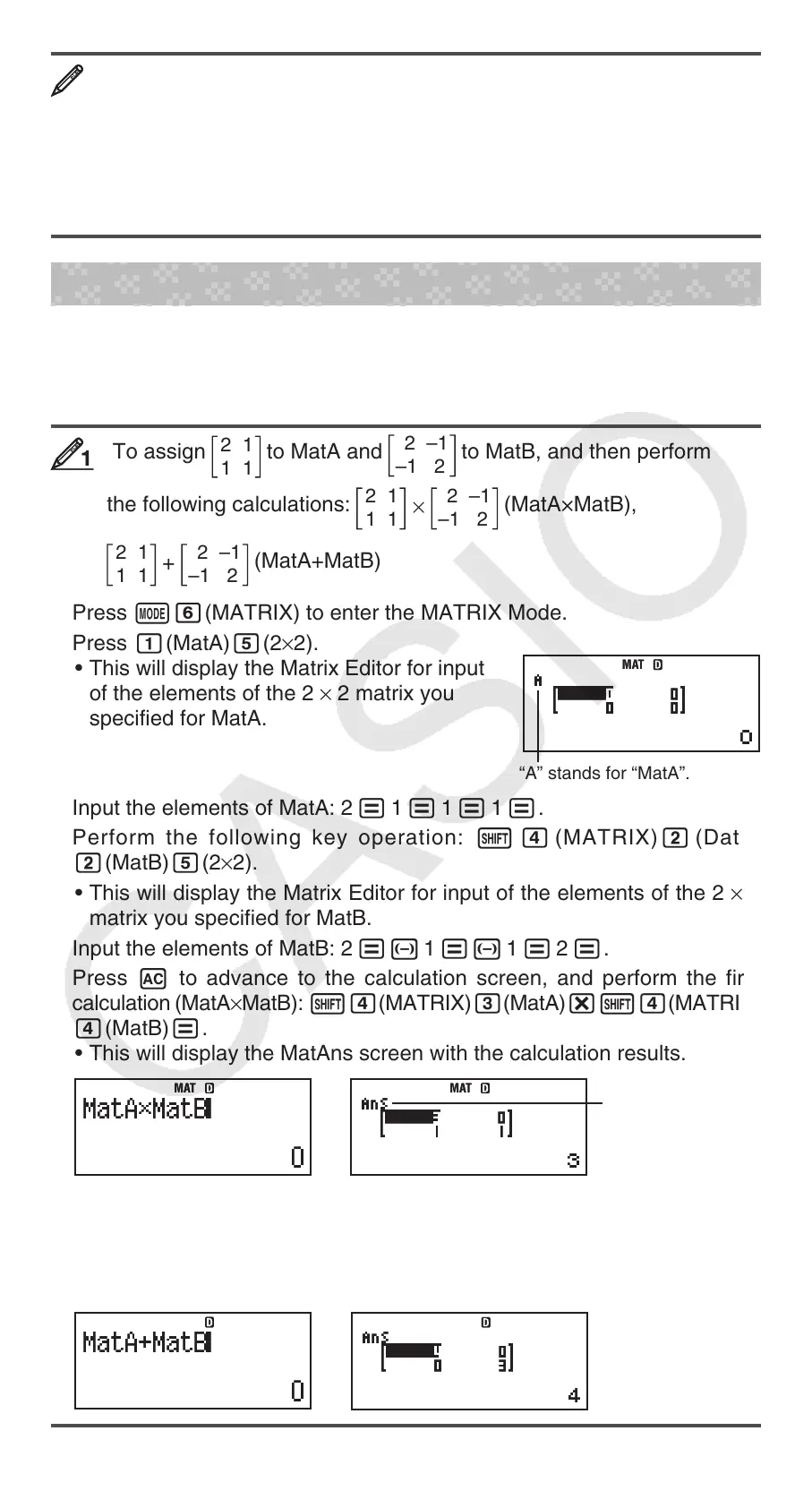
To assign
2 1
1 1
to MatA and
2 –1
–1 2
to MatB, and then perform
the following calculations:
×
2 1
1 1
2 –1
–1 2
(MatA×MatB),
+
2 1
1 1
2 –1
–1 2
(MatA+MatB)
1. Press N6(MATRIX) to enter the MATRIX Mode.
2. Press 1(MatA)5(2×2).
• This will display the Matrix Editor for input
of the elements of the 2 × 2 matrix you
specified for MatA.
“A” stands for “MatA”.
3. Input the elements of MatA: 2 = 1 = 1 = 1 =.
4. Perform the following key operation: 1 4 (MATRIX)2 (Data)
2(MatB)5(2×2).
• This will display the Matrix Editor for input of the elements of the 2 × 2
matrix you specified for MatB.
5. Input the elements of MatB: 2 =- 1 =- 1 = 2 =.
6. Press A to advance to the calculation screen, and perform the first
calculation (MatA×MatB): 14(MATRIX)3(MatA)*14(MATRIX)
4(MatB)=.
• This will display the MatAns screen with the calculation results.
“Ans” stands for
“MatAns”.
Note: “MatAns” stands for “Matrix Answer Memory”. See “Matrix Answer
Memory” for more information.
7. Perform the next calculation (MatA+MatB): A14 (MATRIX)
3(MatA)+14(MATRIX)4(MatB)=.
11
MATMAT
→
MAT
MAT
→
MAT
MAT
→
MAT
MAT
→
MAT
MAT


 To Next Page