E-33
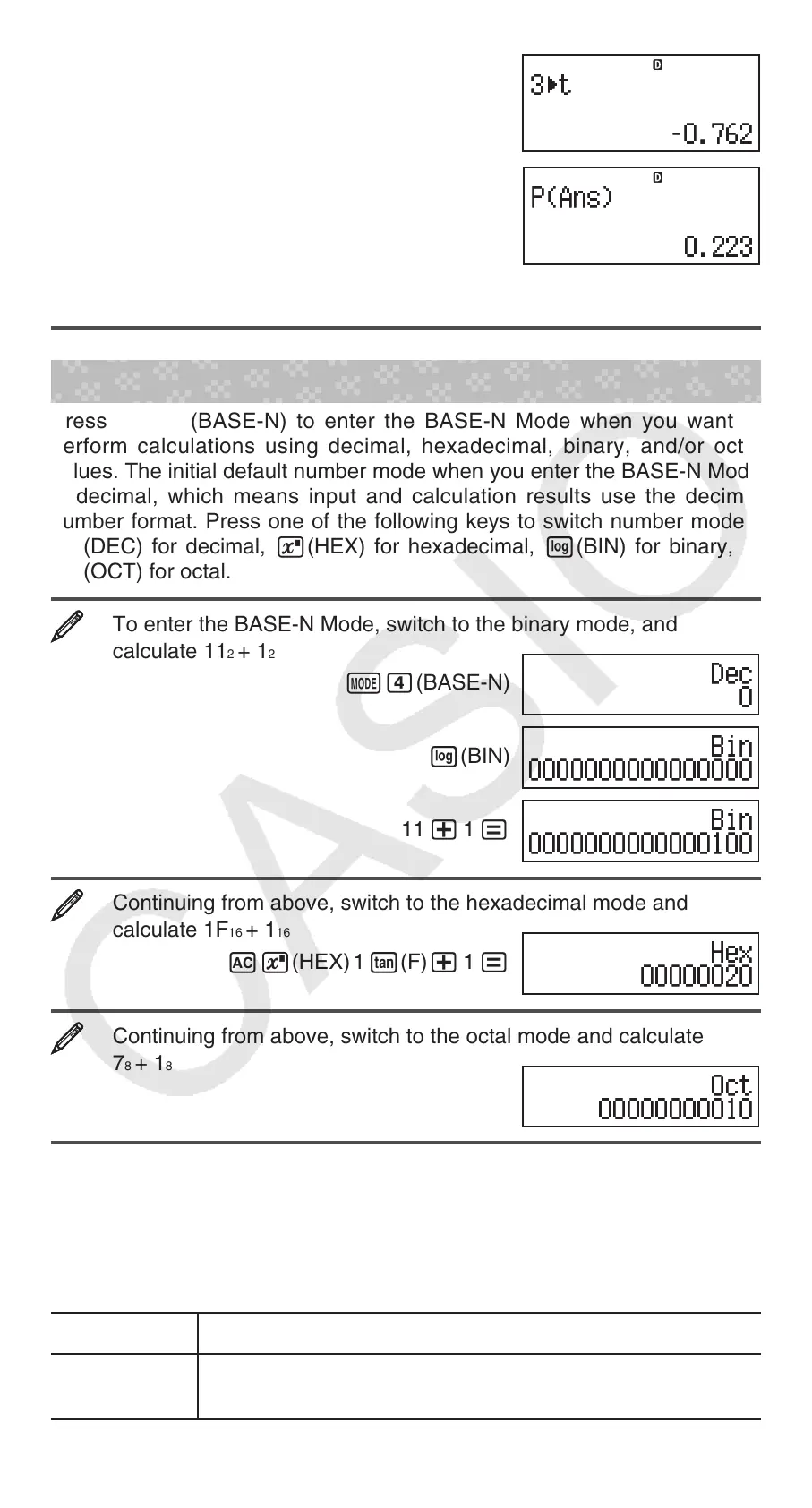
A 3 11(STAT/DIST)5(Distr)4('t)=
11(STAT/DIST)5(Distr)1(P()G)=
Results: Normalized variate ('
t): –0.762
P(
t): 0.223
Base-n Calculations (BASE-N)
Press N4(BASE-N) to enter the BASE-N Mode when you want to
perform calculations using decimal, hexadecimal, binary, and/or octal
values. The initial default number mode when you enter the BASE-N Mode
is decimal, which means input and calculation results use the decimal
number format. Press one of the following keys to switch number modes:
w(DEC) for decimal, 6(HEX) for hexadecimal, l(BIN) for binary, or
i(OCT) for octal.
To enter the BASE-N Mode, switch to the binary mode, and
calculate 11
2
+ 1
2
N4(BASE-N)
l(BIN)
11 + 1 =
Continuing from above, switch to the hexadecimal mode and
calculate 1F
16
+ 1
16
A6(HEX) 1 t(F)+ 1 =
Continuing from above, switch to the octal mode and calculate
7
8
+ 1
8
Ai(OCT) 7 + 1 =
Note: • Use the following keys to input the letters A through F for hexadecimal
values: -(A), $(B), w(C), s(D), c(E), t(F). • In the BASE-N
Mode, input of fractional (decimal) values and exponents is not supported. If
a calculation result has a fractional part, it is cut off. • The input and output
ranges is 16 bits for binary values, and 32 bits for other types of values. The
following shows details about input and output ranges.
Base-n Mode
Input/Output Ranges
Binary
Positive: 0000000000000000
x 0111111111111111
Negative: 1000000000000000 x 1111111111111111
STAT
FIX
STAT
FIX
STAT
FIX
STAT
FIX


 To Next Page