E-21
can be specified within the range of –1 × 10
10
a b 1 × 10
10
. See
10
.
Note: The following cannot be used in f(x): Pol, Rec, ÷R. The following cannot
be used in
f(x), a, or b: ∫, d/dx, Σ, Π.
9: Determines the product of
f(x) over a given range. The calculation
formula is:
(
f
(
x
))
=
a
b
= f(a) × f(a+1) × f(a+2) × ... × f(b). The Natural Display
input syntax is
(
f
(
x
))
=
a
b
, while the Linear Display input syntax is (f(x), a,
b). a and b are integers in the range of a
1 × 10
10
, b
1 × 10
10
, a
b.
See
11
.
Note: The following cannot be used in
f(x): Pol, Rec, ÷R. The following cannot
be used in
f(x), a, or b: ∫, d/dx, Σ, .
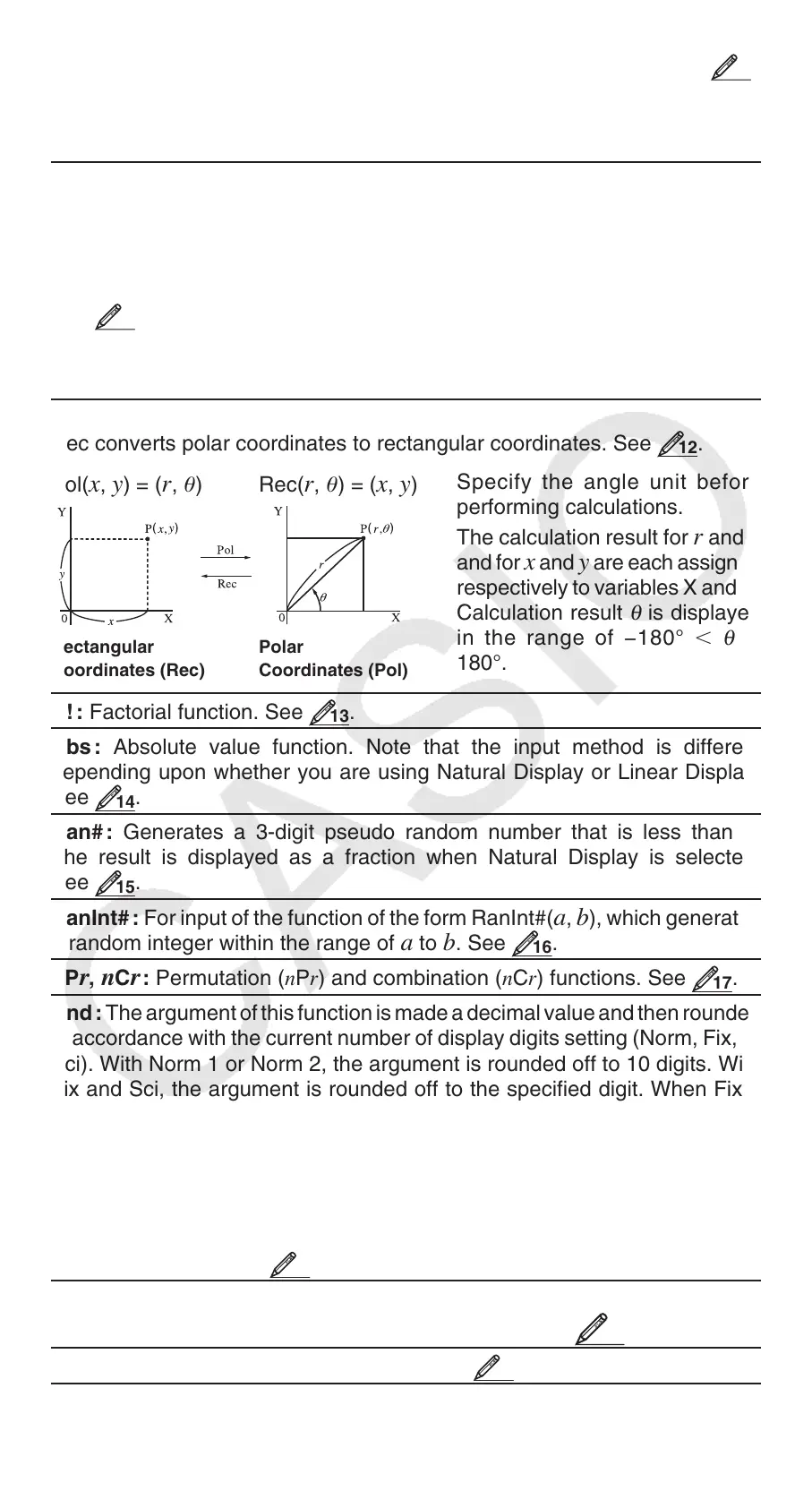
Pol, Rec : Pol converts rectangular coordinates to polar coordinates, while
Rec converts polar coordinates to rectangular coordinates. See
12
.
Pol(
x, y) = (r, ) Rec(r, ) = (x, y)
Specify the angle unit before
performing calculations.
The calculation result for
r and
and for
x and y are each assigned
respectively to variables X and Y.
Calculation result
θ
is displayed
in the range of −180°
θ
180°.
Rectangular
Coordinates (Rec)
Polar
Coordinates (Pol)
x ! : Factorial function. See
13
.
Abs : Absolute value function. Note that the input method is different
depending upon whether you are using Natural Display or Linear Display.
See
14
.
Ran# : Generates a 3-digit pseudo random number that is less than 1.
The result is displayed as a fraction when Natural Display is selected.
See
15
.
RanInt# : For input of the function of the form RanInt#(
a, b), which generates
a random integer within the range of
a to b. See
16
.
nPr, nCr : Permutation (nPr) and combination (nCr) functions. See
17
.
Rnd : The argument of this function is made a decimal value and then rounded
in accordance with the current number of display digits setting (Norm, Fix, or
Sci). With Norm 1 or Norm 2, the argument is rounded off to 10 digits. With
Fix and Sci, the argument is rounded off to the specified digit. When Fix 3
is the display digits setting, for example, the result of 10 ÷ 3 is displayed
as 3.333, while the calculator maintains a value of 3.33333333333333 (15
digits) internally for calculation. In the case of Rnd(10÷3) = 3.333 (with Fix
3), both the displayed value and the calculator’s internal value become
3.333. Because of this a series of calculations will produce different results
depending on whether Rnd is used (Rnd(10÷3) × 3 = 9.999) or not used (10
÷ 3 × 3 = 10.000). See
18
.
GCD, LCM: GCD determines the greatest common divisor of two values,
while LCM determines the least common multiple. See
19
.
Int: Extracts the integer part of a value. See
20
.


 To Next Page