E-19
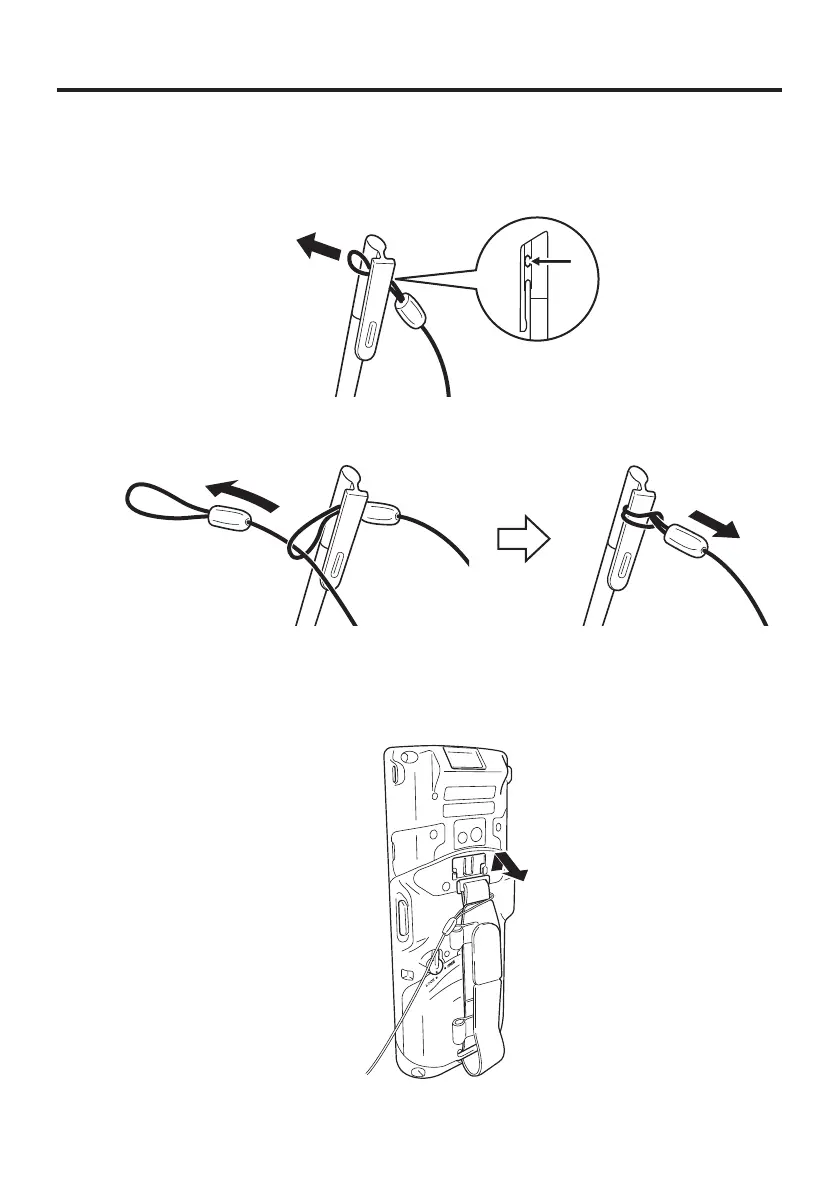
Connecting the Stylus String
The string can be connected to stylus and hand belt to prevent loss of stylus or
misplacing. Follow the instruction below to connect it to stylus and hand belt.
1. Thread one end of the string through the slit on stylus as shown in the illustration.
2. Thread the other end of the string through the loop as shown in the illustration, and
then pull the other end to tighten.
3. Unhook one end of the hand belt from IT-G-500 if it is attached, and then thread the
hand belt through the loop of the string as shown in the illustration.
For unhooking the hand belt from the terminal, refer to “To remove the hand belt” on
page 17.
4. Hook the end of the hand belt to the terminal. Refer to “To attach the hand belt” on
page 17.














 To Next Page