Handling microSIM Cards
The Handheld Terminal supports microSIM card.
The employment of microSIM card slot is dependent on model. See page 13 for the
models with microSIM card slot integrated.
The microSIM card slot is located in the side of the battery pack compartment, so you
must remove the battery pack when installing or removing a microSIM card.
Refer to pages 14 to 15 for information on “Loading and Removing the Battery Pack”.
Install (or remove) a microSIM card according to the procedure described below.
Installing
1. Make sure that the power on the terminal has been switched off. If the power is still
on, press the power key to switch off the power.
2. Remove the battery pack.
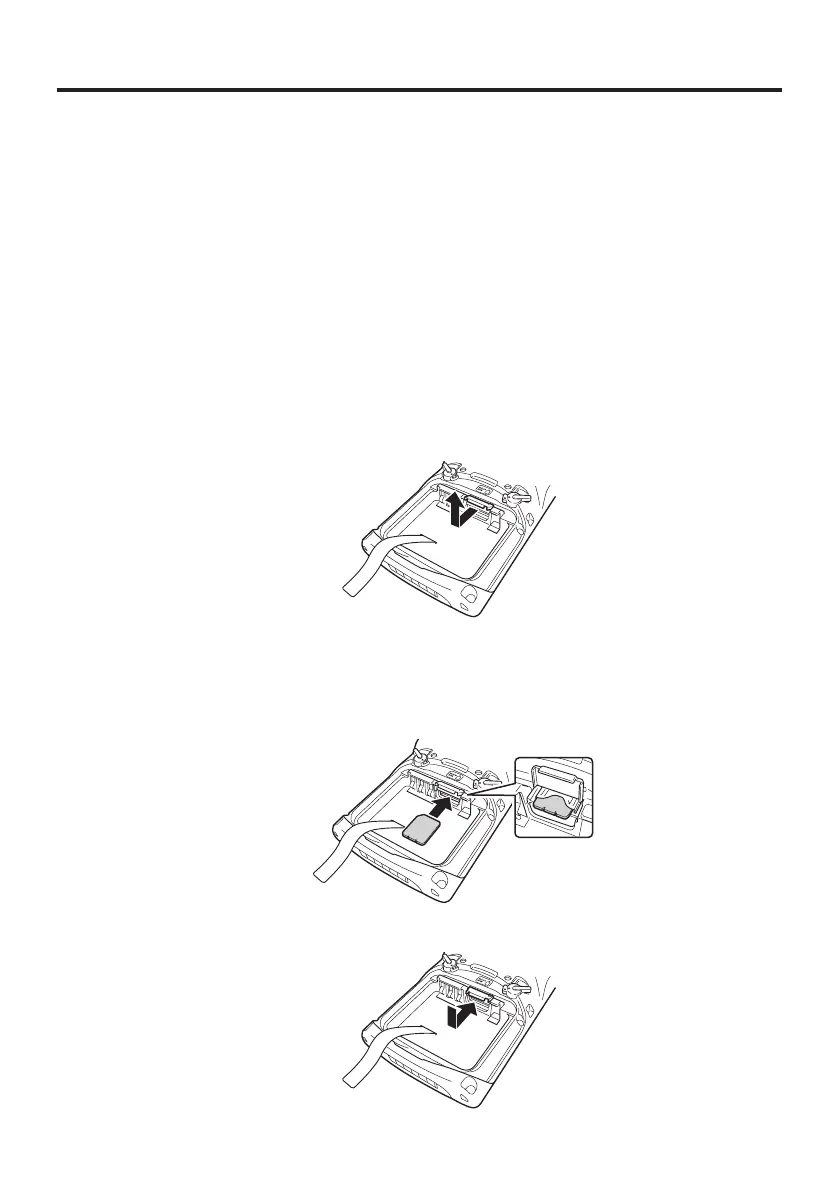
3. Pull the plastic holder outwards and then upwards to open it, as shown in the gure.
4. Push the microSIM card gently into the entrance to the card slot, as shown in the
gure.
When doing this, take care not to insert the microSIM card between the card slot and
the plastic holder by mistake.
5. Close the plastic holder and push it into place, as shown in the gure.
6. Load the battery pack.














 To Next Page