36
EN
Number
of Lines
Format
24mm (1"),
18mm (
3
/
4
")
wide
12mm (
1
/
2
")
wide
9mm (
3
/
8
")
wide
3
A
1×1
1×1
1×1
--
B
1×1
1×1
2×2*
--
C
1×1
2×2*
1×1
--
D
2×2*
1×1
1×1
--
* Smaller printing with a frame.
Important!
You cannot specify the character size for a line of text when any one of the
conditions below exists.
•
When 6mm (
1
/
4
") wide tape is loaded in the printer
•
When there are more than three lines of text
•
When a character size is specifi ed for specifi c characters (page 34)
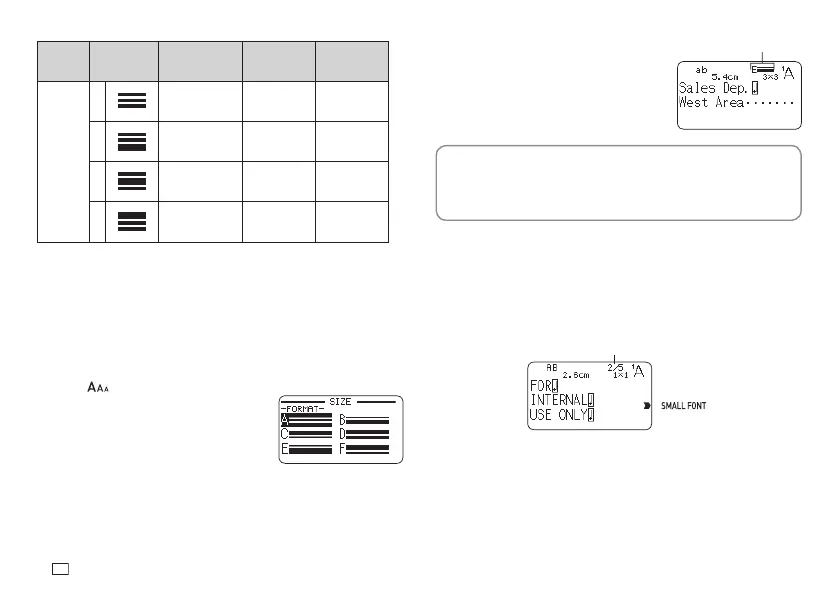
1.
Input text.
2.
Press .
3.
Select LINE and then press SET.
4.
Select the format you want to use
and then press SET.
Important!
Either of the events below will cause a line character size setting to be
cancelled automatically.
•
Changing the number of lines
•
Specifying the size of specifi c characters (page 34)
■
Small Font
Certain number of line (number of input lines or the number of lines in a
selected format) and tape width combinations may cause SMALL FONT to
become selected.
•
A pointer will appear next to SMALL FONT on the right side of the display
when this happens.
•
In the case of a free design label, the Imager will show a fractional value.
Imager
Important!
•
Font and proportional settings become invalid while SMALL FONT is
selected.
•
Text that has a character style or effect applied, as well as illustrations and
user characters may not print correctly while SMALL FONT is selected.
Selected format


 To Next Page