5.B.c First cut
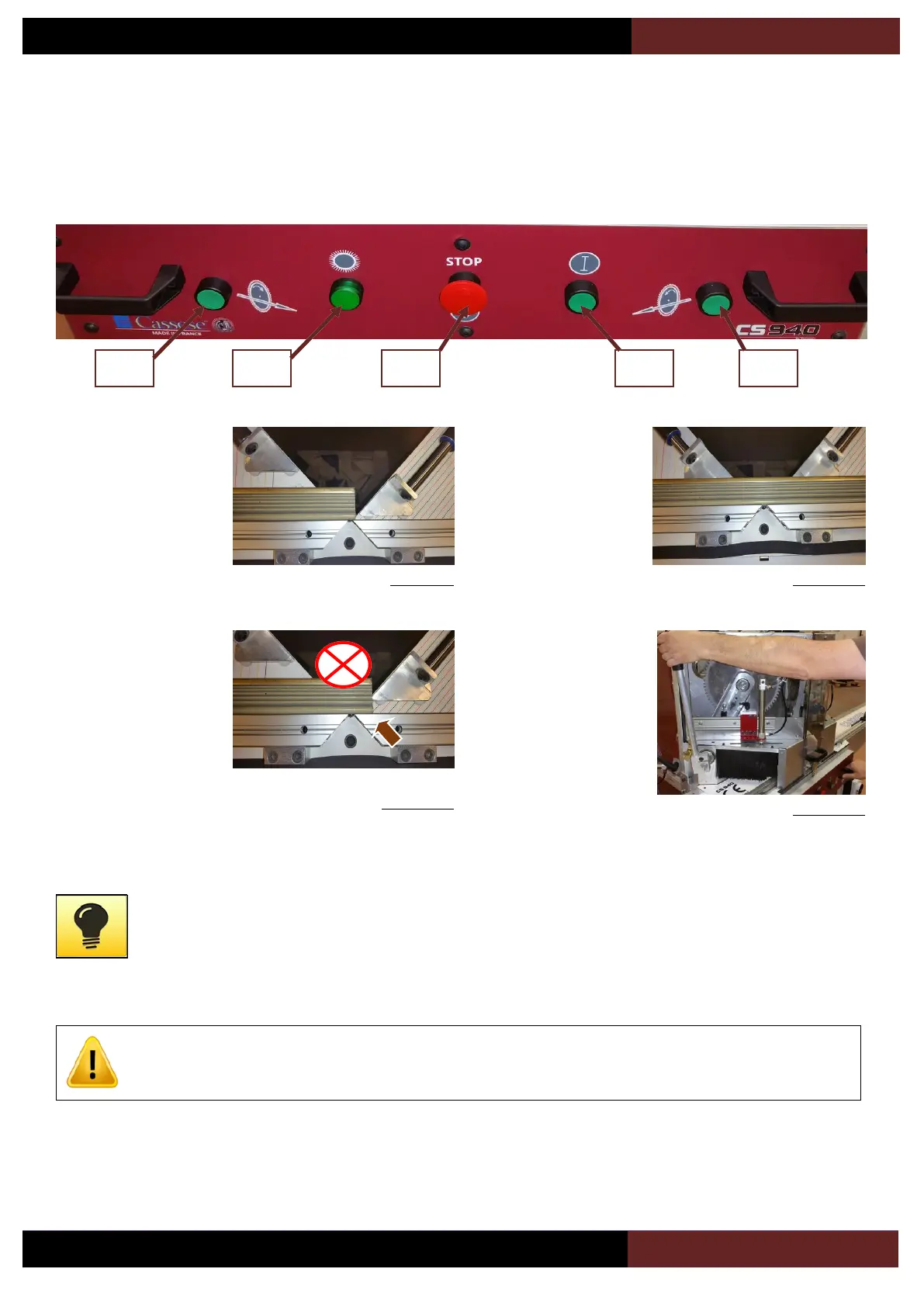
Switch on the blade
rotation using the button
(18) of the control panel.
Press the pedal and
introduce the moulding as
per image opposite.
Example of bad position of
the moulding, the right
clamp will push the
moulding against the
blades which will result in
blade damages.
It is also possible to
introduce the moulding as
per image opposite.
Release the pedal and
make sure the moulding is
well maintained.
First, press the button (19)
,and while you keep it
pressed, pull on the left
handle to move the blade
down.
Adapt the mouvement to the type of material to be cut. Plastic must be cut in a fast motion whereas hard wood and
thick mouldings will require a slower movement. It is also advised to help the blades back movement, do not release
suddenly the handle which would result in a shock and vibrations which are not good for the quality of the cut and
the durability of the system. Keep the button (19) pressed during the complete cycle of the machine.
For your safety, releasing the button (19) while the left blade is not back up will stop the blade rotation.Press the
button (18) to restart the blades if needed.
If after a cut a piece of wood needs to be pushed out of the machine and is not accessible, do never introduce your
hands bellow the brushes. Push that piece using another piece of wood.


 To Next Page