EasyManua.ls Logo

Cateye VELO WIRELESS+ - Tire size selection

Cateye VELO WIRELESS+
16 pages
Print Icon
To Next Page IconTo Next Page
To Previous Page IconTo Previous Page
Loading...
2
3
4
1
Appendix
SET
SET
4
11
Menu screen
Measurement
screen
Description
Changing settings
[Menu screen]
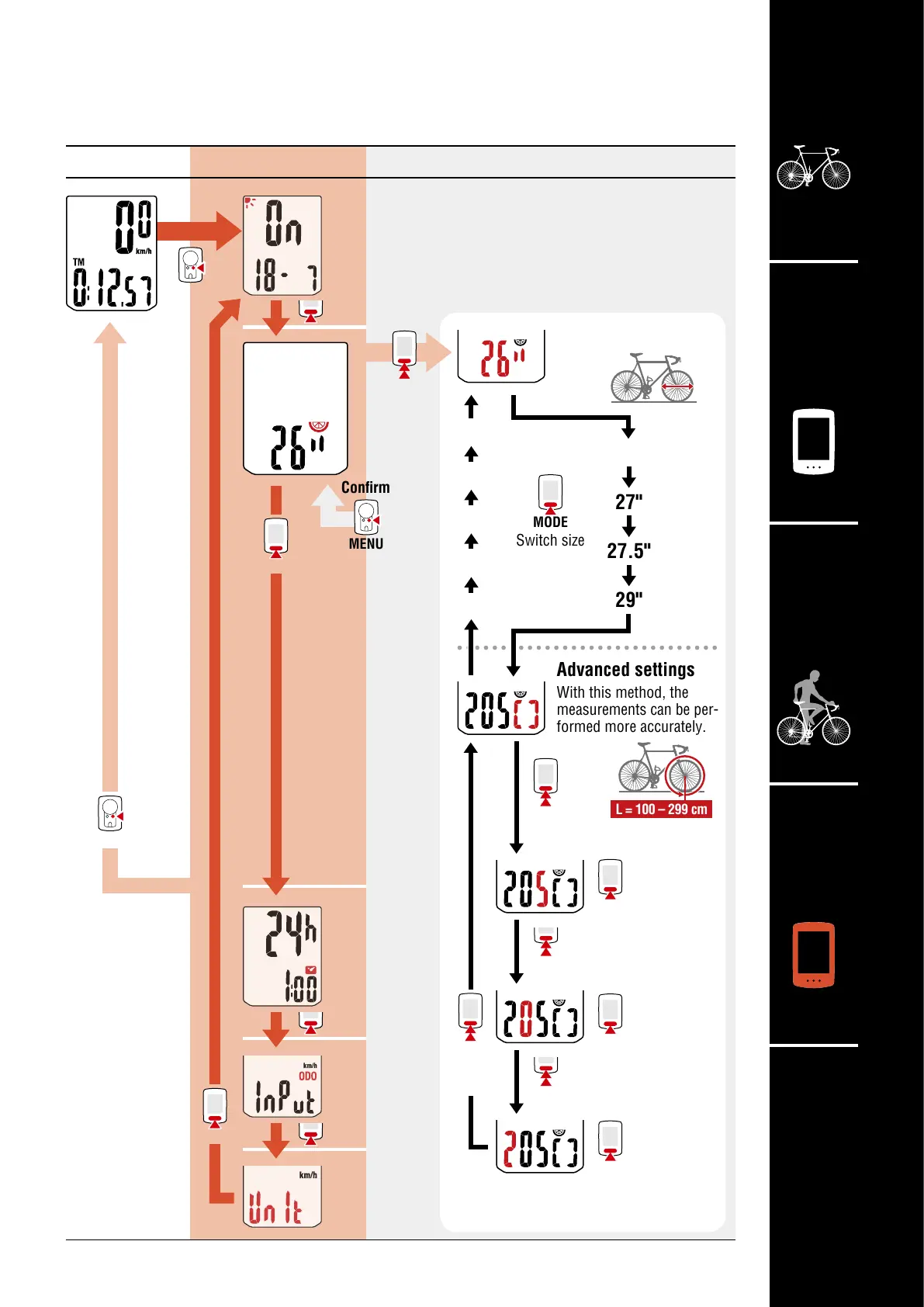
Tire size selection
You can use the simple setting method (select the
size in inches) or the advanced setting method
(enter the tire circumference) to set the tire size.
* For details on the tire circumference,
see “Tire circumference” (page 7).
MODE
Increase
numbers
MODE
Increase
numbers
MODE
Increase
numbers
MODE
Switch size
Advanced settings
With this method, the
measurements can be per-
formed more accurately.
Simple setting
Inch
L = 100 – 299 cm
MENU
MODE
(Press and hold)
Change setting
MENU
Confirm
MODE
MODE
MODE
MODE
MODE
MENU
700c
27"
27.5"
29"
24"
22"
20"
18"
16"
MODE
Move to next digit
(Press and hold)
MODE
Move to next digit
(Press and hold)
MODE
(Press and hold)
MODE
(Press
and hold)

Related product manuals