2
3
4
1
Appendix
SET
SET
4
12
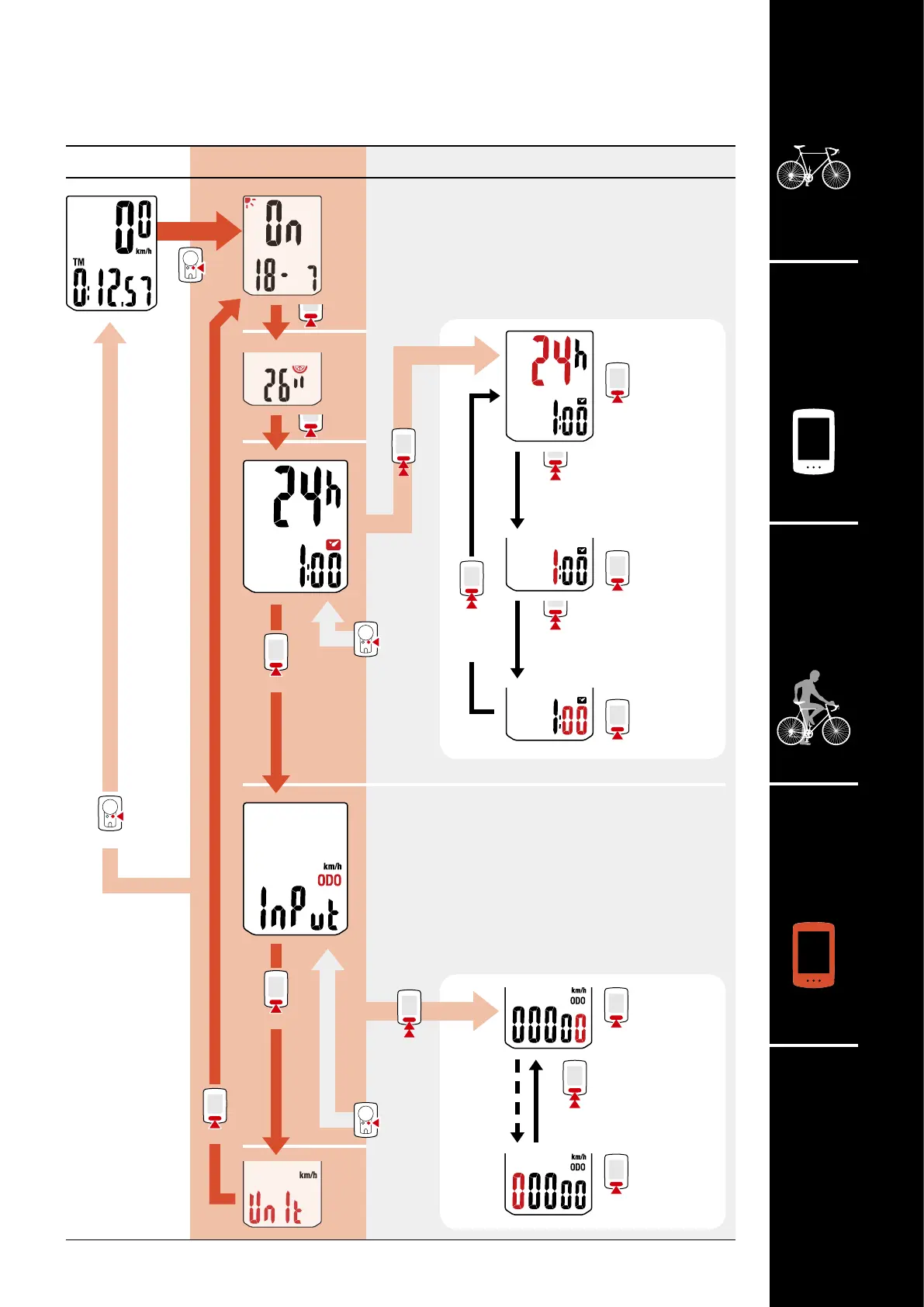
Menu screen
Measurement
screen
Description
Changing settings
[Menu screen]
Clock
Lets you set the clock.
* When 12h is selected, A (AM) or P (PM) is
displayed at the top of the screen.
Manual distance input
Lets you set total distance traveled manually.
(0 - 99999 km [miles])
* Setting an arbitrary value for total distance al-
lows you to start from the value you entered.
This is useful when you have just purchased a new
bicycle or when replacing the computer battery.
Increase
numbers
Increase
numbers
(Press and hold)
(Press and hold)
12h
↔
24h
Select display
Increase
numbers
Set “hours”
Increase
numbers
Set “minutes”
(Press and hold)
Change setting
(Press
and hold)
(Press and hold)
Change setting
Move to next digit
(Press and hold)
Confirm
Confirm













 To Next Page