3
4
1
Appendix
SET
2
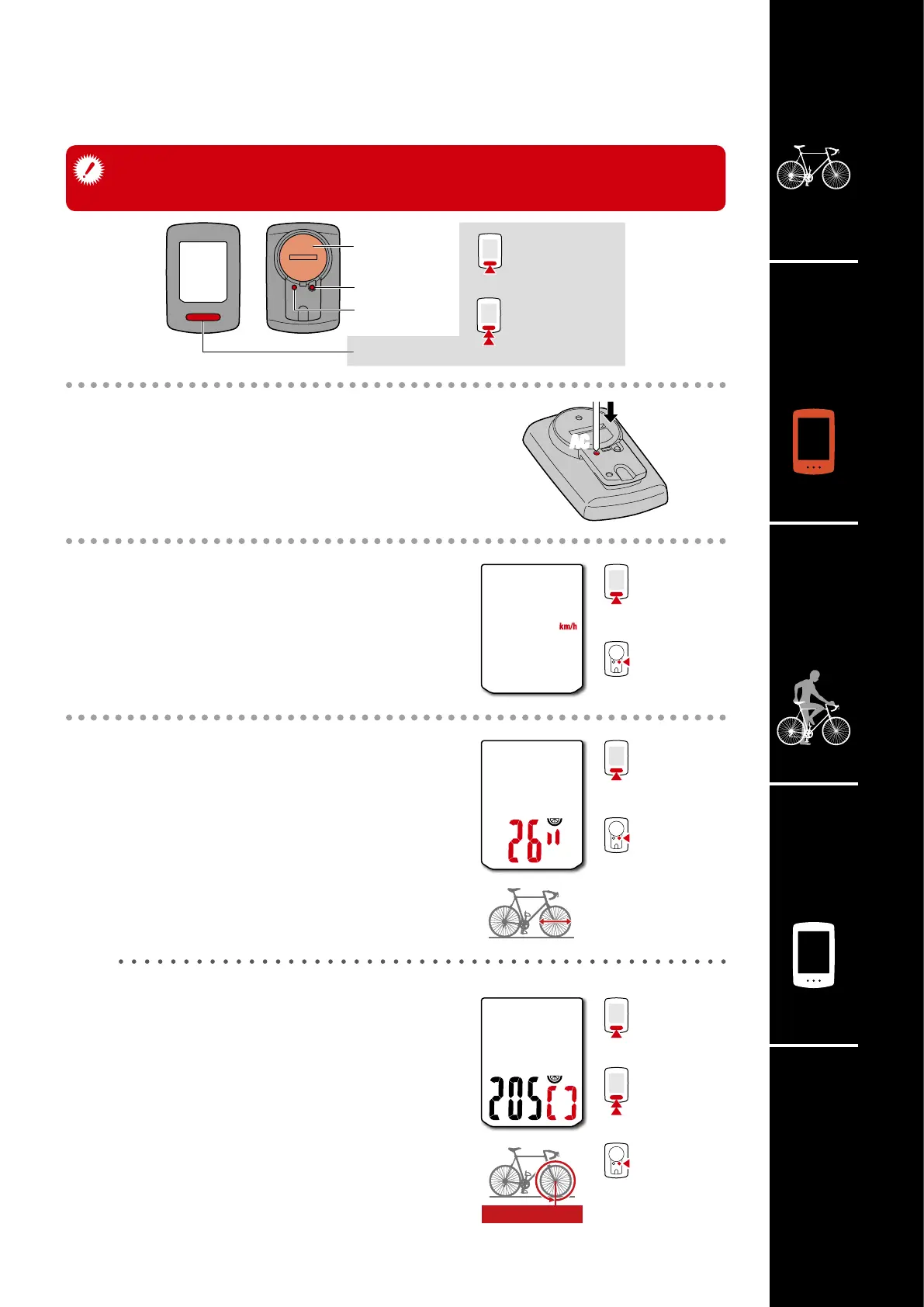
When using the computer for the first time or resetting it to its factory
default settings, clear all computer data following the procedure below.
5
AC
MODE
MENU
MODE
MODE
AC
Battery case
cover
Short press
Long press
(2 sec.)
1
Clear all data.
Press the AC button on the back of the computer.
* All data is deleted and the computer is reset
to its factory default settings.
2
Select the measurement unit.
Select “km/h” or “mph”.
3
Select the tire size.
Simple setting:
When MODE is pressed, 26”
→
700C
→
27”
→
27.5”
→
29”
→
205[]
→
16”
→
18”
→
20”
→
22”
→
24” and 26” will appear, in this
order.
Select the tire size (inch) of your bicycle.
Advanced settings
(For more accurate measurement):
Display 205[] on the screen, and press and
hold MODE to enter the tire size of your bicycle
in cm. Pressing MODE changes the value, and
pressing and holding MODE moves to the next
digit.
* For details on the tire circumference, see
“Tire circumference” (page 7).
Setting up the computer
km/h
↔
mph
Confirm
Switch size
Increase
numbers
Move to next
digit
(Press and hold)
Confirm
Confirm













 To Next Page