2
3
4
1
Appendix
SET
3
8
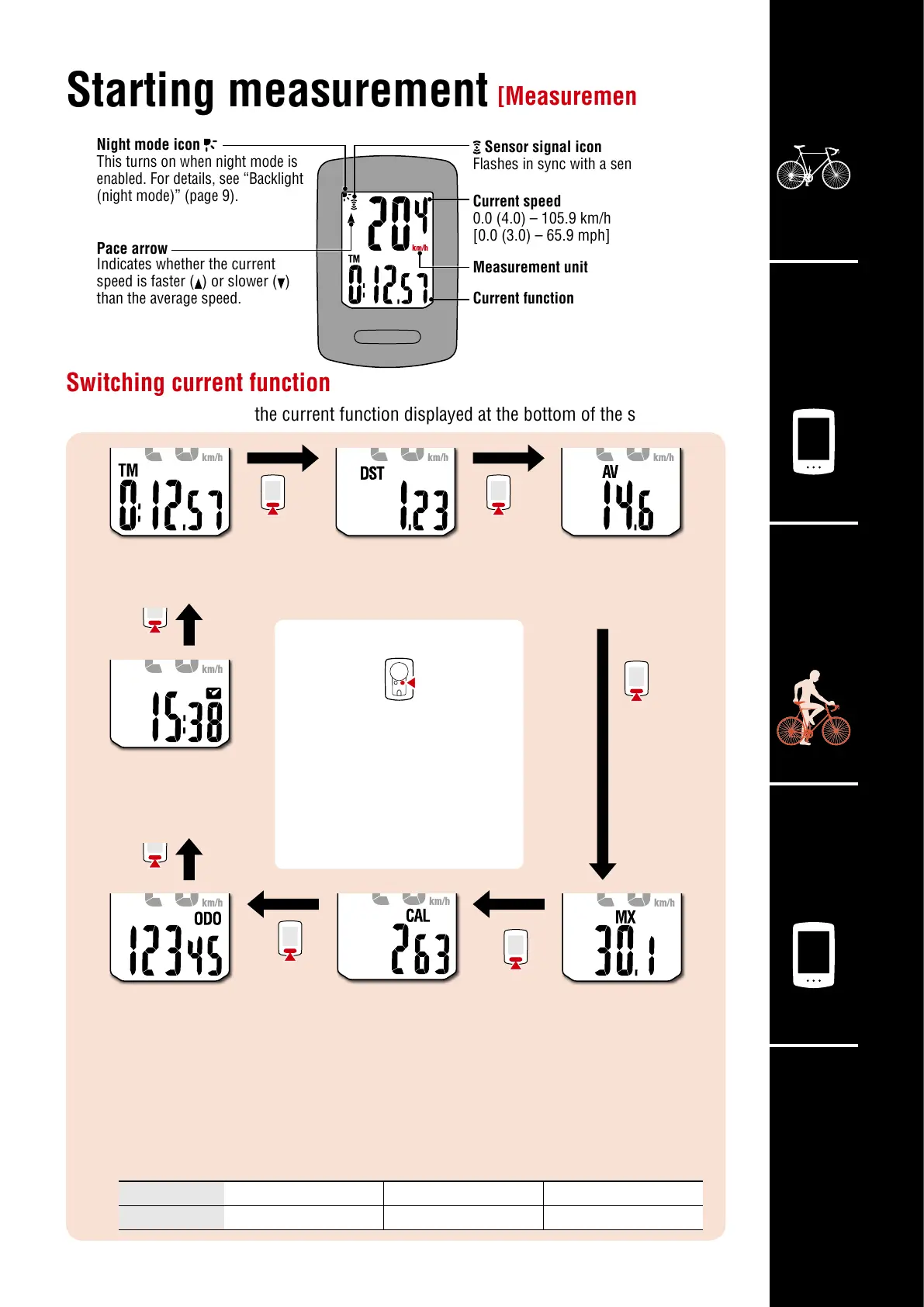
Sensor signal icon
Flashes in sync with a sensor signal.
Pace arrow
Indicates whether the current
speed is faster (
) or slower ( )
than the average speed.
Night mode icon
This turns on when night mode is
enabled. For details, see “Backlight
(night mode)” (page 9).
Switching current function
Pressing MODE switches the current function displayed at the bottom of the screen.
Starting measurement
On the measurement screen,
press MENU to go to the
menu screen. Various settings
can be changed on the menu
screen.
[Measurement screen]
*1:
Av (Average Speed) displays .E instead of the measurement value when Tm (Elapsed Time) exceeds
approximately 27 hours or Dst (Trip Distance) exceeds 999.99 km. Reset the measurement data.
*2: Calorie consumption is a cumulative value based on speed calculated at one second intervals.
Values for calorie consumption per hour are shown below.
Use the values in this chart as a reference.
Speed 10 km/h [mph] 20 km/h [mph] 30 km/h [mph]
Kcal per hour 67.3 kcal [155.2 kcal] 244.5 kcal [768.2 kcal] 641.6 kcal [2297.2 kcal]
Current speed
0.0 (4.0) – 105.9 km/h
[0.0 (3.0) – 65.9 mph]
Measurement unit
Current function
Average Speed (*1)
0.0 – 105.9 km/h
[0.0 – 65.9 mph]
Maximum Speed
0.0 (4.0) – 105.9 km/h
[0.0 (3.0) – 65.9 mph]
Elapsed Time
0:00’00” – 9:59’59”
Trip Distance
0.00 – 999.99 km [mile]
Total distance
0 – 99999 km [mile]
Calorie Consumption (*2)
0 – 99999 kcal
Clock
0:00 – 23:59 or
1:00 – 12:59













 To Next Page