1)
2)
3)
4)
5)
6)
7)
8)
9)
10)
11)
12)
13)
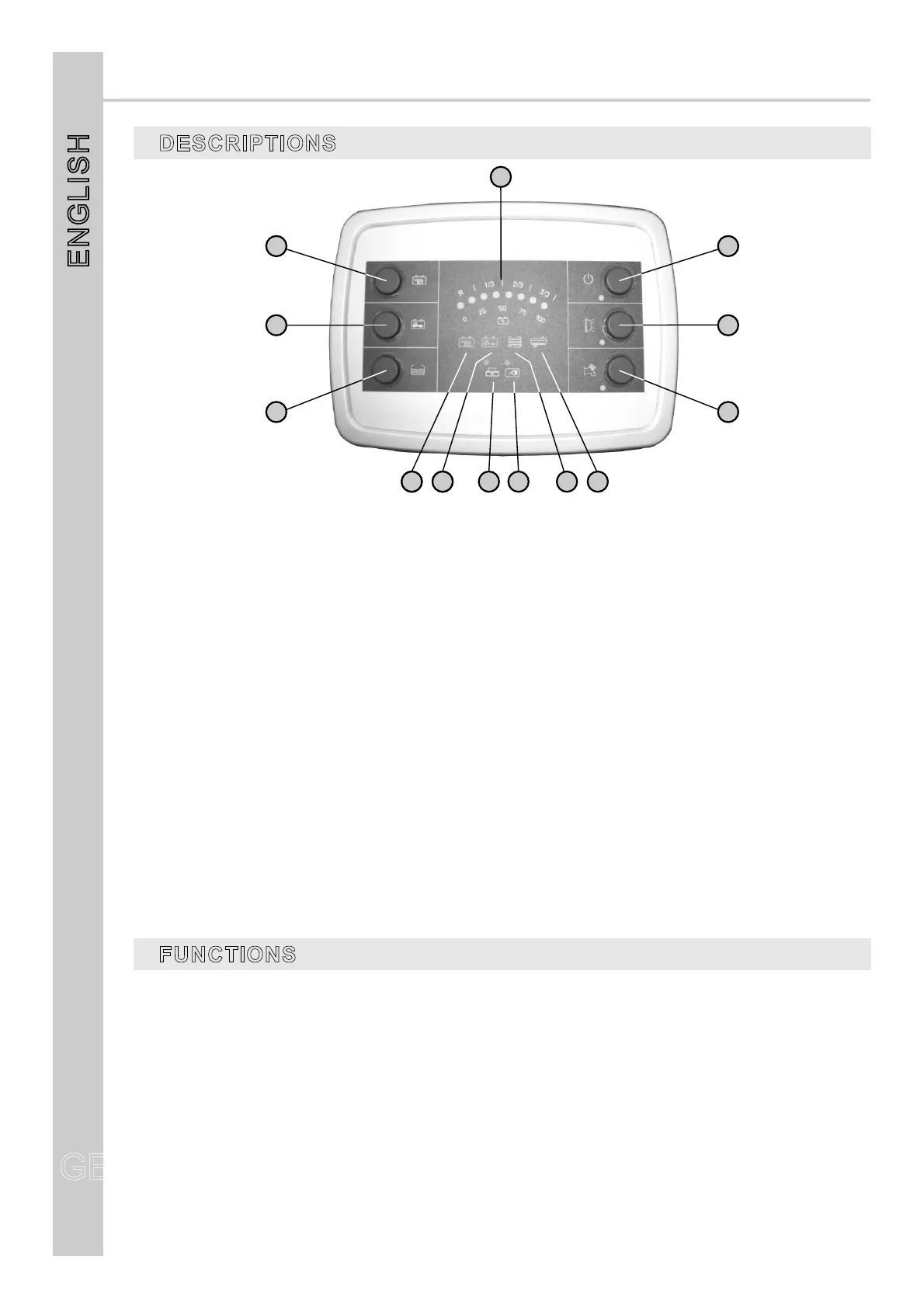
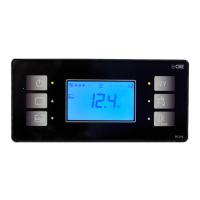
Buttontochecktheleisurebattery(B2).
Buttontocheckthecarbattery(B1).
Buttontocheckthedrinkwatertank.
LEDdisplay:
-Voltmeterforthecontrolofcarandleisurebatteryvoltage(scale0to100%).
-Drinkingwatertanklevel(Emergencylevel,1/3,2/3,3/3).
Mains’ general switch, the blinking of the led indicates that the battery is discharged and the next
intervention of the minimal voltage control.
NOTE: at start-up, the panel verifies the functioning of all LEDs, with the exclusion of ref. 10 and 11.
Awninglightswitch;thisawninglightswitchesautomaticallyoffwhenyoustartuptheengine.
Waterpumpswitch;itcontrolsthepumprelais.
Ifthissymbolblinkstheleisurebattery(B2)hasrundown.
Ifthissymbolblinksthecarbattery(B1)hasrundown.
Itshowstheleisurebatterierechargingthroughenginealternator.
Ledtosignal230Vneton.
Ifthissymbolblinksthedrinkwatertankisempty.
Ifthissymbolblinksthewastewatertankisfull.
CONTROL PANEL“PC150-EL”
DESCRIPTIONS
GB
ENGLISH
GB
16
FUNCTIONS
CARBATTERY ALARM(B1)
LEISUREBATTERY ALARM(B2)
MINIMUMVOLTAGECONTROL (BATTERY PROTECTION)
Whencarbatteryvoltageislowerthan12V,carbatteryalarmisautomaticallyactivatedtogetherwith
symbolref.9blinking.
Whenleisurebatteryvoltageislowerthan11V,leisurebatteryalarmisautomaticallyactivatedtogether
withsymbolref.8blinking.
Anelectronicdeviceswitchesallthe12Vmainsoff,whentheleisurebatteryreachestheminimal
voltagelevelof10V.Itispossibletoswitchonagainallthemainsfor1minutebyswitchingoffandthen
onagainthemainswitch.
Thefridge,theelectricalstepandthemainspowereddirectlyfromB2areexcludedfromthisdevice.
4
1
2
3
6
7
5
8 98 9 1 2 1 31 0 1 1



 To Next Page